Maintenance of the system
______________________________________________________________________________________
NewTom VGi evo – Service Manual rev 6 9-8
Uncorrected pixel management
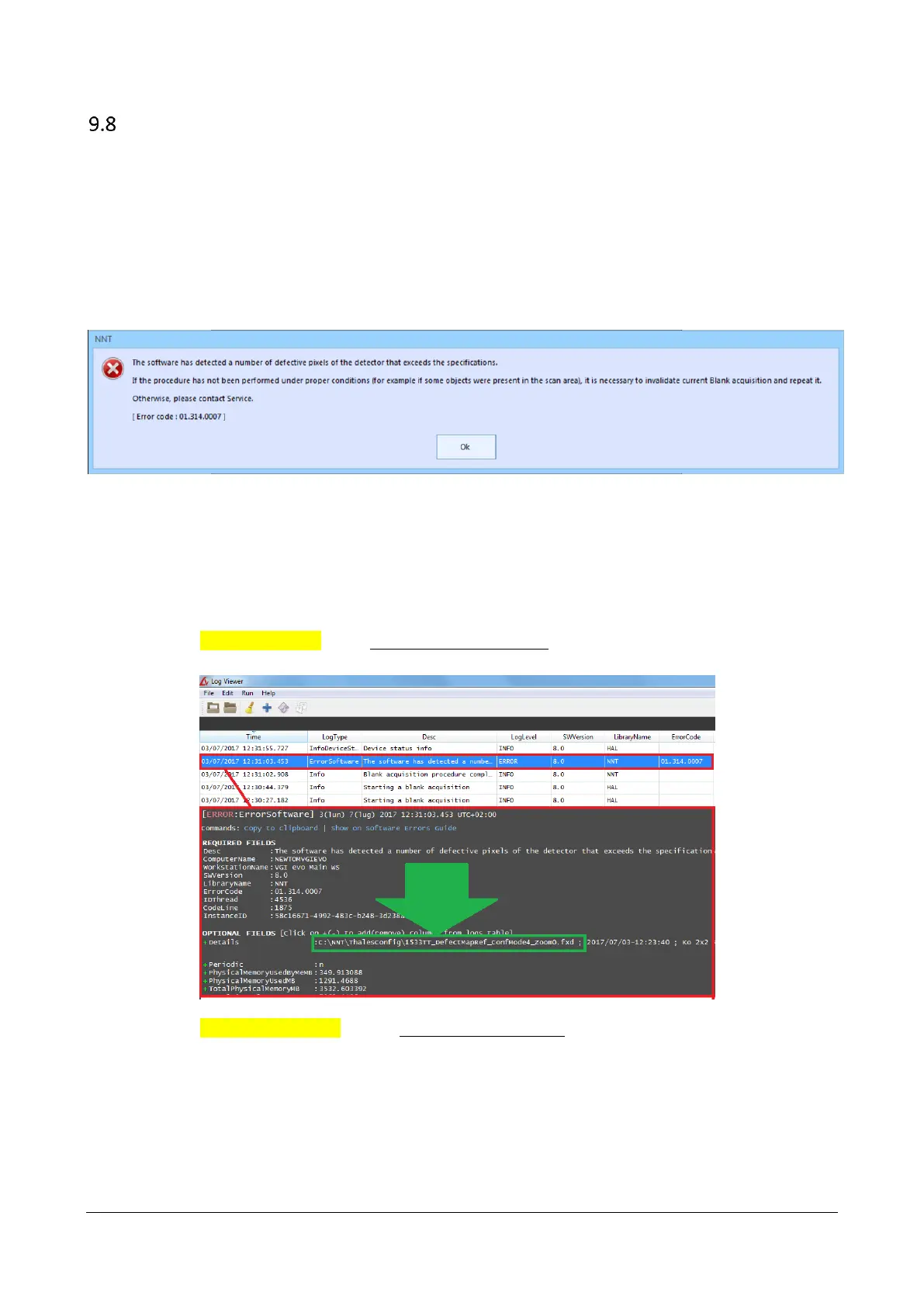
In case the software during the blank procedure, detects a high number of pixels that cannot be corrected, the following
error message will appear at the end of the process.
Typically, this could happen after the replacement of the x-ray source and could be caused by some shadows inside the
acquired image due to an incorrect x-ray source or collimator adjustment (typically, shadows will be located on the edges
of the image).
NOTE: Even if the message appears the system can still be operated, but it could be possible to get some artifact inside
the reconstructed images.
HOW TO IDENTIFY WHERE THE DEFECTIVE PIXELS ARE LOCATED
Proceed as following to define what portion of the image caused the blank process to failed
1. Open the NNT Log file and search for the error message that appeared at the end of the blank. In the error
message look for the defect map file to which the error refers as explained below and write it down.
NNT 8.0 and higher: Select Tools ->Start error log viewer. Click on the error message, look on the error
details (green arrow) and write down the complete file name.
NNT previous than 8.0: Select Tools -> Open log error file and save as PDF. In the PDF file search for
message just above the error and write down the complete file name.



 To Next Page