Maintenance of the system
______________________________________________________________________________________
NewTom VGi evo – Service Manual rev 6 9-24
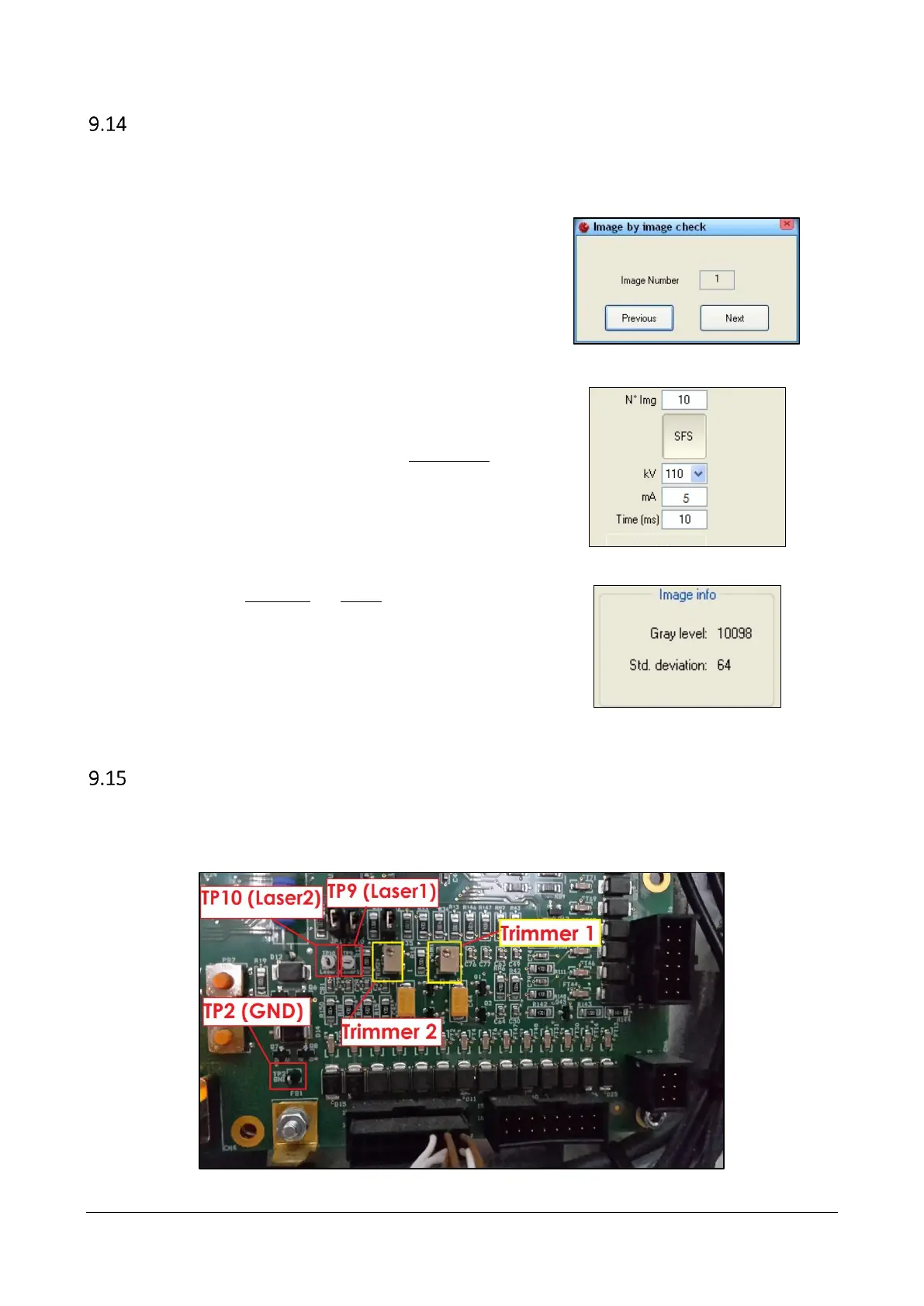
Image by image check
The software integrate the possibility to acquire a stack of images images and later check the images one by one.
This can be particularly useful in case of investigation related to possible unstability of the x-ray source emission and/or
detector acquisition.
1. Enable the service level (CRTL+SHIFT+ALT+END).
2. From the scanner test window select Tools → Image by
Image Check.
3. The dialog on the side will appear.
4. Set the number of images you wish to acquire and the
radiological paremeters in terms of mA and Time (ms).
5. Acquire the images by selecting the “Acquisition”
button.
6. Press the “Previous” and “Next” buttons on the dialog
to move toward the sequence of acquired images.
For each image the “Gray level" and “Standard
deviation” referred to the Region Of Interest will be
displayed.
Laser voltage
Laser voltages can be measured on NIM040-A board located on RP1 plate, between TP2 (GND) and TP9 (V Laser1) for
LASER1, and between TP2 (GND) and TP10 (V Laser2) for LASER2. Laser voltage must be 3.3 Vdc.
In case the voltage needs to be adjusted it can be done acting respectively on TRIM1 and TRIM2 on the same board.



 To Next Page