DIGITAL IMAGING
You can take snapshots or a short video with your microscope using the built-in digital camera. With the SD card
memory, you do not need to use a PC or any other devices to do imaging. Transferring images to your PC for saving or
printing is easy and will be discussed later in this manual.
NOTE: If you are going to take images, do not connect the USB cable to your PC or damage could occur to the
equipment. The USB cable is not used for taking images.
You can take snapshots or a short video with your microscope using the built-in digital camera. With the SD card
memory, you do not need to use a PC or any other devices to do imaging. Transferring images to your PC for saving or
printing is easy and will be discussed later in this manual.
NOTE: If you are going to take images, do not connect the USB cable to your PC or damage could occur to the
equipment. The USB cable is not used for taking images.
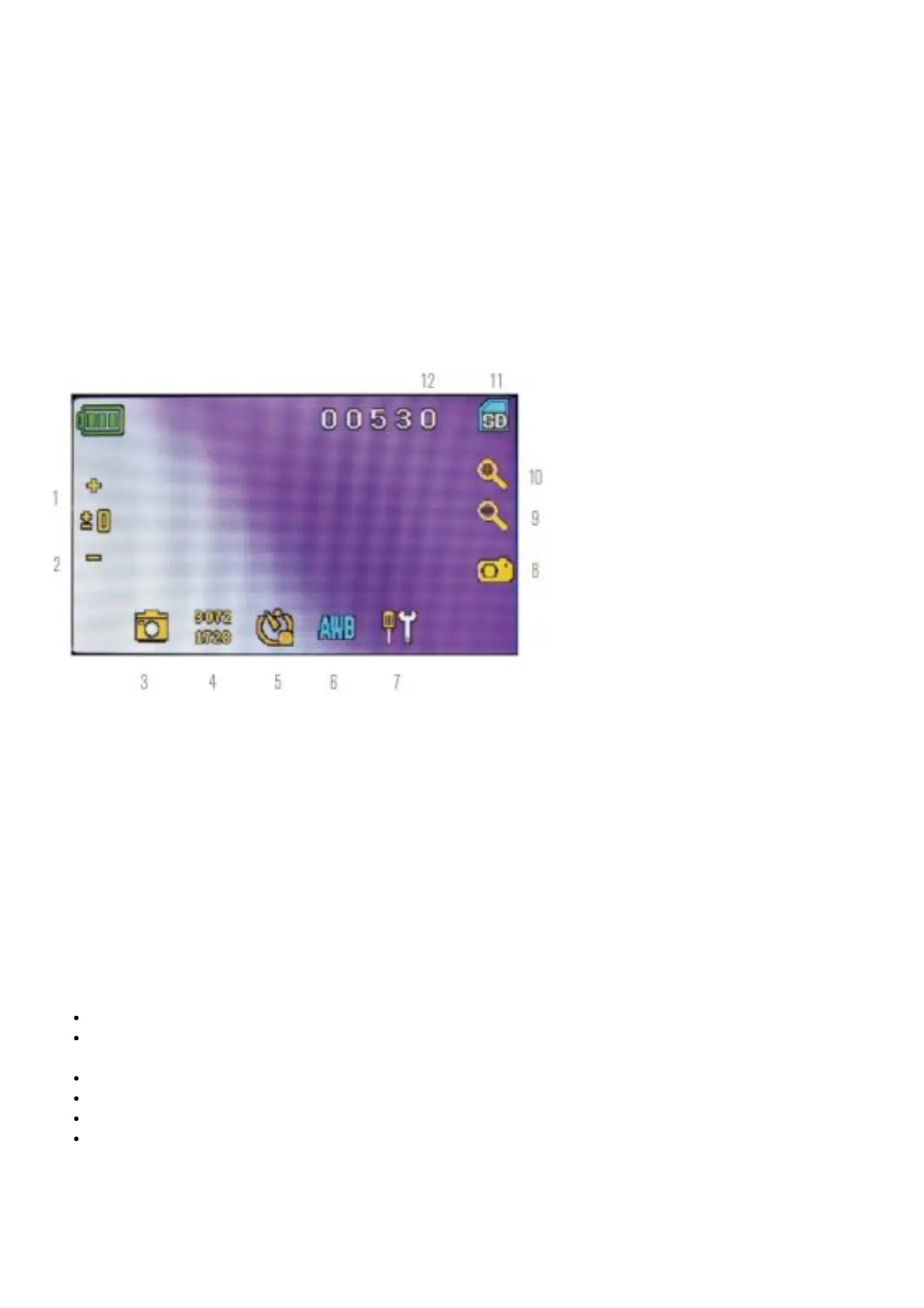
VIEWING/SNAPSHOT MODE
1. Increase EV function
2. Decrease EV function
3. Selection mode
4. Pixel setting
5. Snapshot selection
6. Color special effect
7. Settings
8. Shutter trigger/take snapshot
9. Digital zoom indicator +
10. Digital zoom indicator +
11. SD card storage
12. Snapshots remaining
Settings Icon (7)
Time & Date — Year, month, date, and time
Language — Choose from Chinese (simple or traditional), English, French, German, Italian, Japanese, Korean,
Portuguese, Russian, and Spanish
Beep — Beeps with each touch of the screen (can be disabled)
Default Factory Settings — Revert to factory settings
Format- Format the SD card
TV OUT – Sends a signal to an external monitor
Pixel setting icon (4)
Lightly tap the icon to change the pixel setting from 640×360, 1920×1080, 2048×1152, 2560×1440, 3072×1728, and
3648×2048. 3072×1728 is the sensor resolution and 3648×2048 gives you higher resolution through interpolation.
Snapshot selection (5)














 To Next Page