Objective Lens 4x 10x 20x 40x
Digital Image 40x 100x 200x 400x
Maximum with 4x digital zoom feature 160x 400x 800x 1600x
WORKING DISTANCE
Objective Lens 4x 10x 20x 40x
Working Distance (mm) – est. 35.3 7.8 1.9 0.7
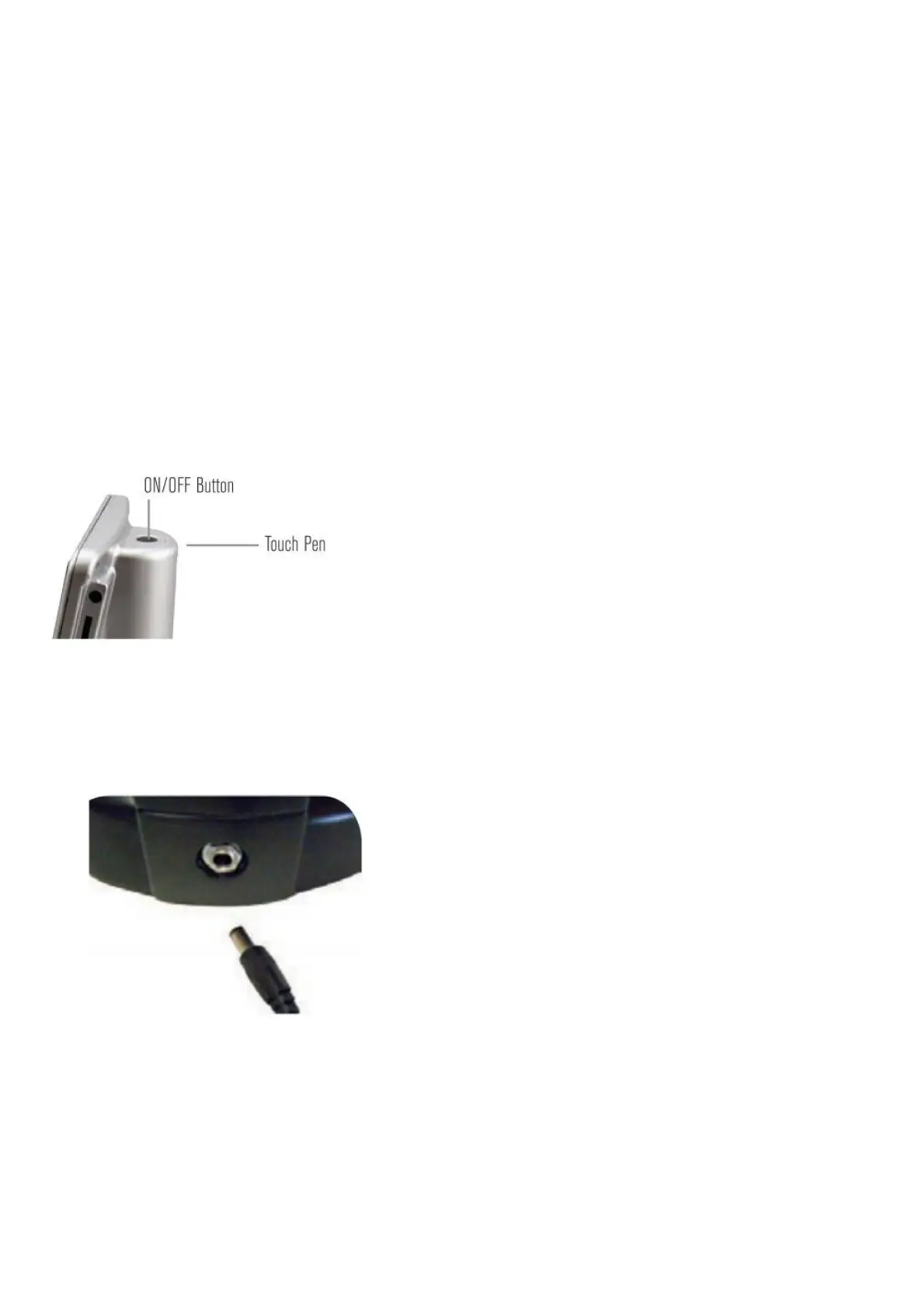
TOUCH PEN
You can keep the touch pen handy in the receptable behind the Power ON/OFF button.
SETTING UP YOUR MICROSCOPE
1. Carefully remove the microscope and other parts from the carton and set them on a table, desk, or other fl at
surface.
2. Remove the plastic cover from the microscope.
3. Plug the small cable from the AC adapter into the socket on the back of the base (see Figure 2).
Figure: 2
4. Plug the adapter into the proper power source.
Battery Operation — You can use your microscope without AC power if you choose. This gives you the freedom to
operate the microscope outdoors or indoors, anywhere you please. You’ll need 4 AA batteries (user supplied). Open
the battery door on the bottom of the microscope and insert the batteries according to the battery polarity shown in the
battery compartment (Figure 3). After the batteries are installed, close the battery door. Battery life will typically be
three hours.














 To Next Page