31
1 2
3
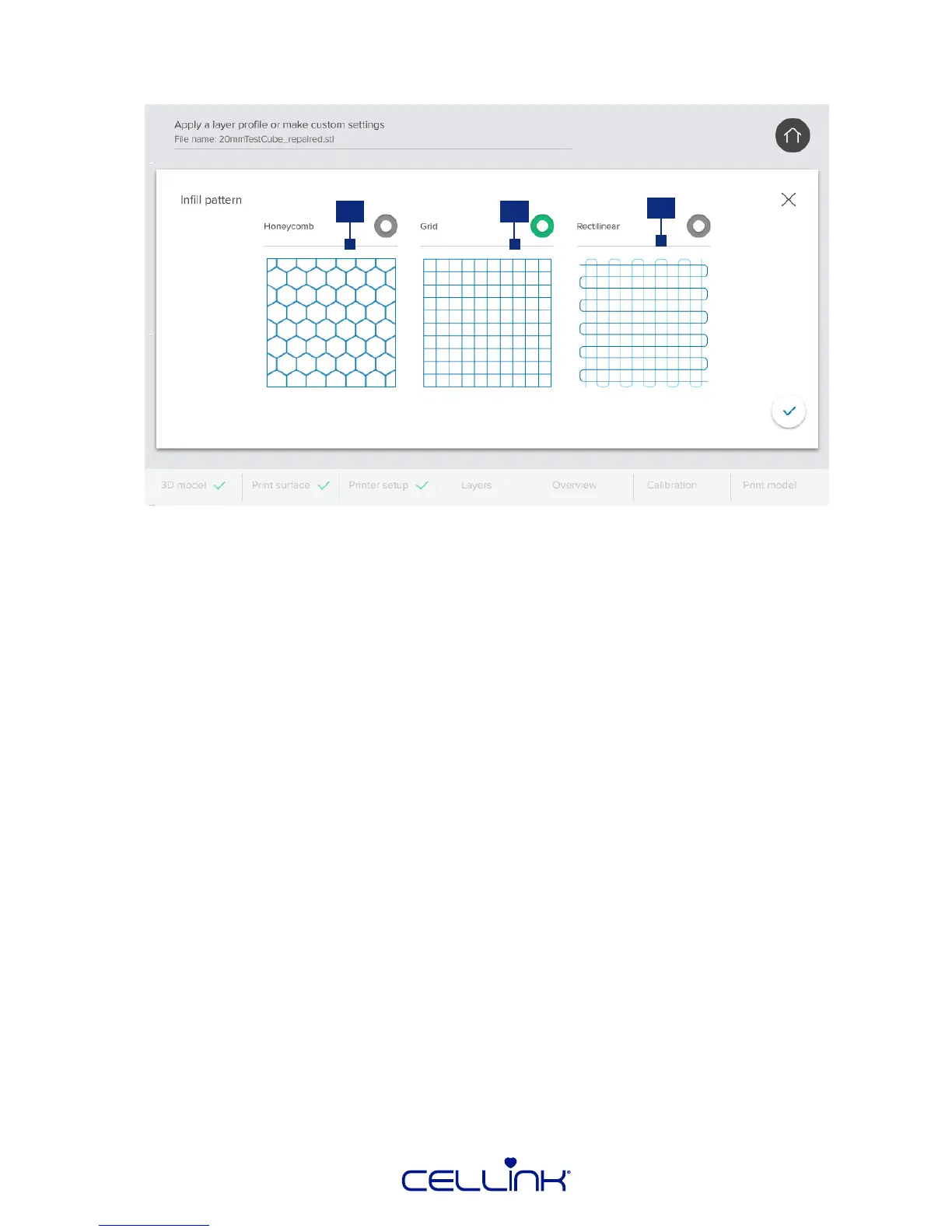
4.2.5 Layer sengs - Inll paern
1. Honeycomb paern – The honeycomb paern is suitable as an inll for ssue constructs
that must be mechanically rigid, such as bone. The paern is most relevant for constructs
to withstand compression.
2. Grid paern – The grid paern is a suitable inll for ssue constructs with isotropic mechanical
characteriscs. This paern prints solid at every layer, resulng in solid walls between the
pores and good compressive strength. This paern is most applicable for ssues like bone
and carlage.
3. Reclinear paern – The reclinear paern is a suitable inll for ssue constructs with
isotropic mechanical characteriscs. This paern is most applicable for ssues like skin, fascia
and carlage.
1. Inll – If enabled, BIO X will use the selected printhead to bioprint the inll paern
of your 3D model.
2. Perimeter – If enabled, BIO X will use the selected printhead to bioprint the perimeter
of your 3D model.
3. Support – If enabled, BIO X will use the selected printhead to print a support
structure for your 3D model. Use this opon if you are planning to bioprint a
structure which cannot support itself.
4.2.6 Layer sengs - Printhead use
Indicate which printhead should bioprint each part of your structure in the “Printhead use” sengs.
These sengs enable you to use support structures while bioprinng and use mulple inll materials
to create comlex structures. Three dierent modes are available:



 To Next Page