42
4.3.5 Print model
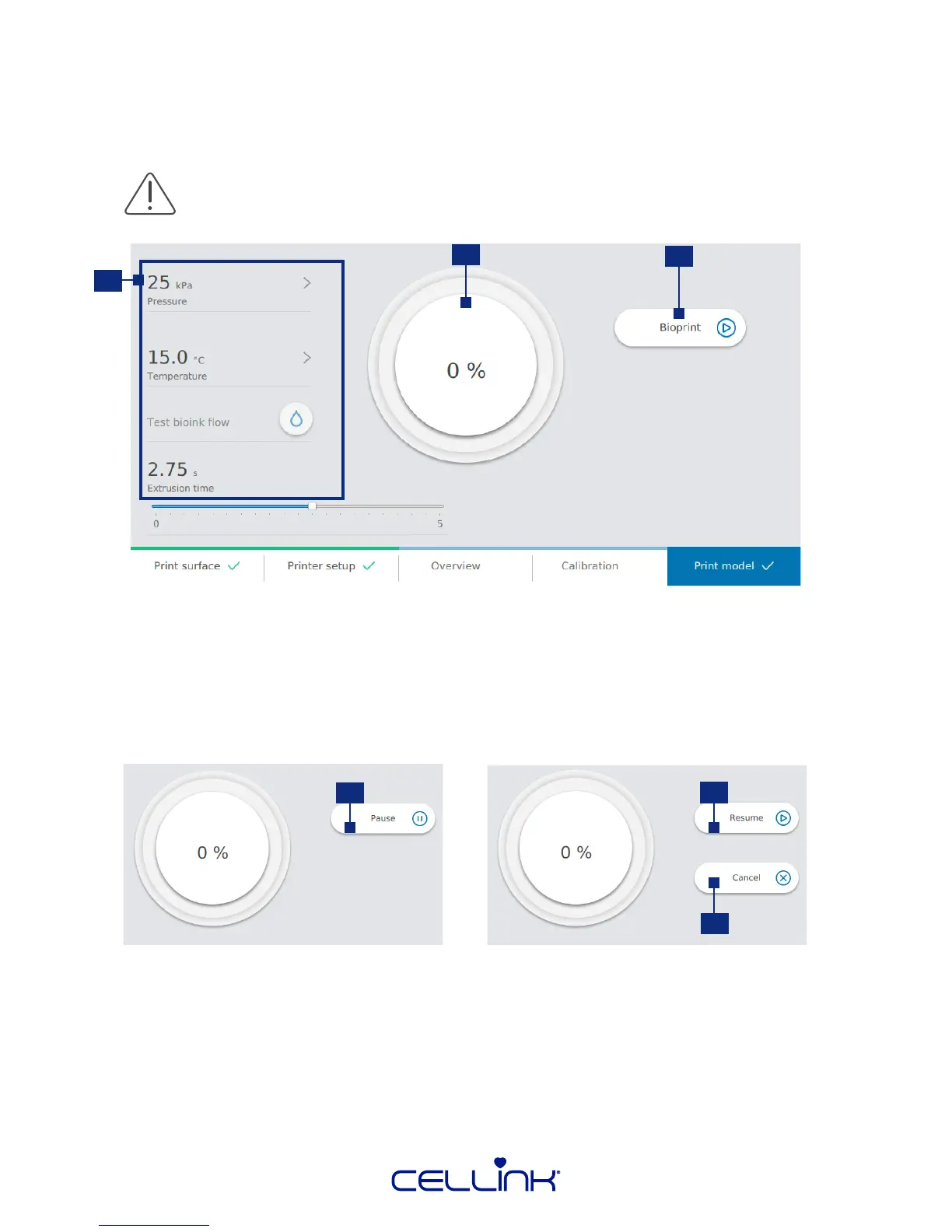
This screen summarizes the bioprinng process. You can monitor the acvity of each printhead and
curing module while prinng.
1. Prinng setups - You can control the setup of your prinng during the
whole process.
2. Progress indicator – Allows for an overview of how far the bioprinng
process has come and how long it will take unl it is completed.
3. Bioprint - Tap to start the bioprinng process.
Always pause bioprinng before opening the door. Do not remove printheads before
bioprinng has stopped. Doing so risks aborng the process and compromising your
cells.
2
1
3
4. Pause – Tap to pause the bioprinng process.
5. Resume - Tap to resume the bioprinng process.
6. Cancel – Tap to cancel the bioprinng process.
These opons are available when the bioprinng process is paused.
4
6
5



 To Next Page