Note: SPRINTPAK setup is required upon instrument start-
up and after each set of fi fty (50) tests.
CAUTION
SPRINTPAK fi lters and cups are designed for one-
time use only. Reuse of the fi lters and/or cups can
cause clogging which can do extensive damage to
the instrument and void the instrument warranty.
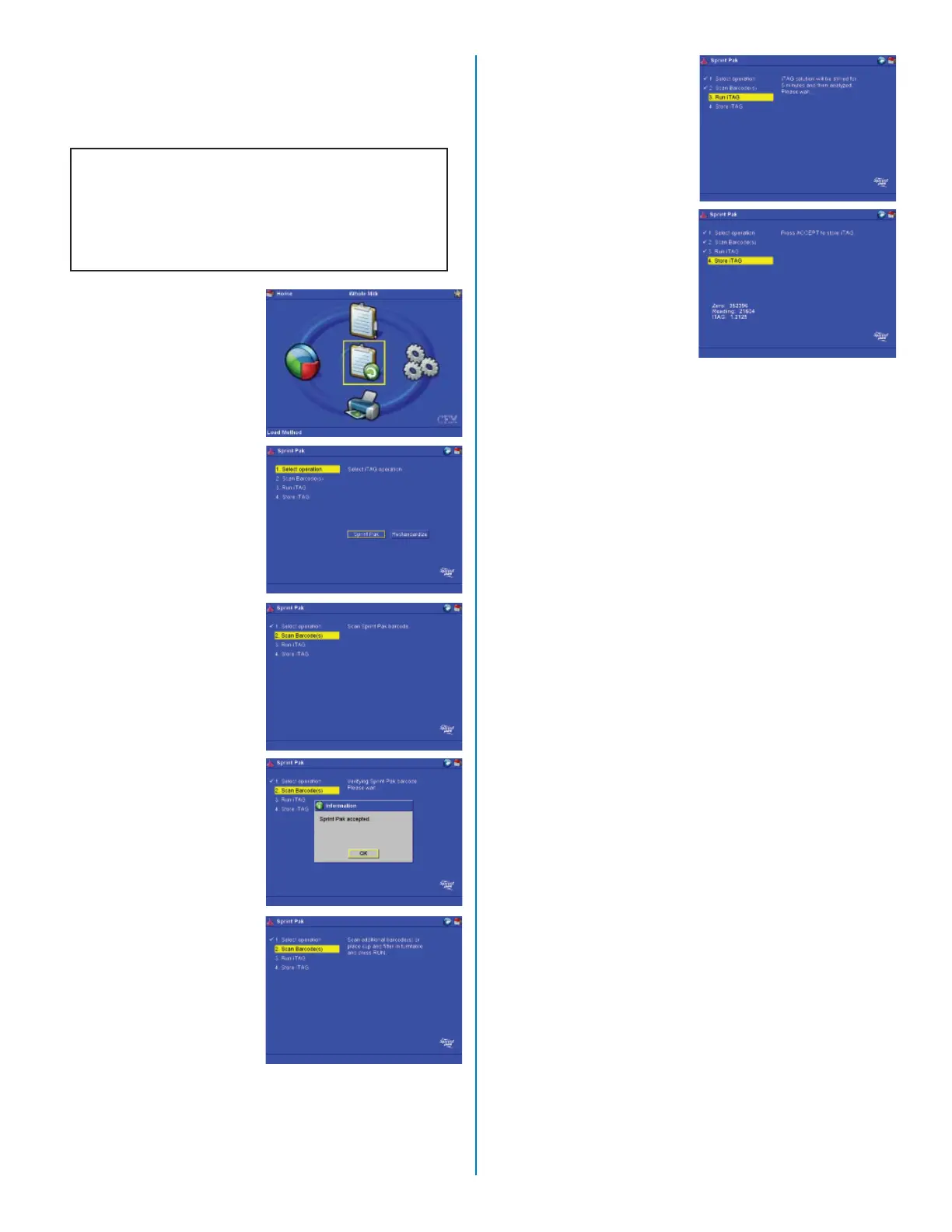
SPRINTPAK® Setup
1. From the main screen,
press the “SPRINTPAK”
key.
2. Press the “Enter” key.
3. Position the bar code on
a new SprintPak under
the bar code reader.
4. The instrument reads
and accepts the
SPRINTPAK bar code.
Press the “Enter” key.
5. Place a cup and a fi lter
in the turntable. Place
the “Run” key.
6. Wait fi ve (5) minutes
for the instrument to
stir the iTAG® Solution
1. Once the solution is
stirred suffi ciently, the
instrument analyzes the
solution.
7. Press the “Accept” key
to store the iTAG® So-
lution 1 data.
20


 To Next Page