EasyManua.ls Logo

Cembre MG4 - System Settings and Network Configuration

Cembre MG4
24 pages
Print Icon
To Next Page IconTo Next Page
To Previous Page IconTo Previous Page
Loading...
13
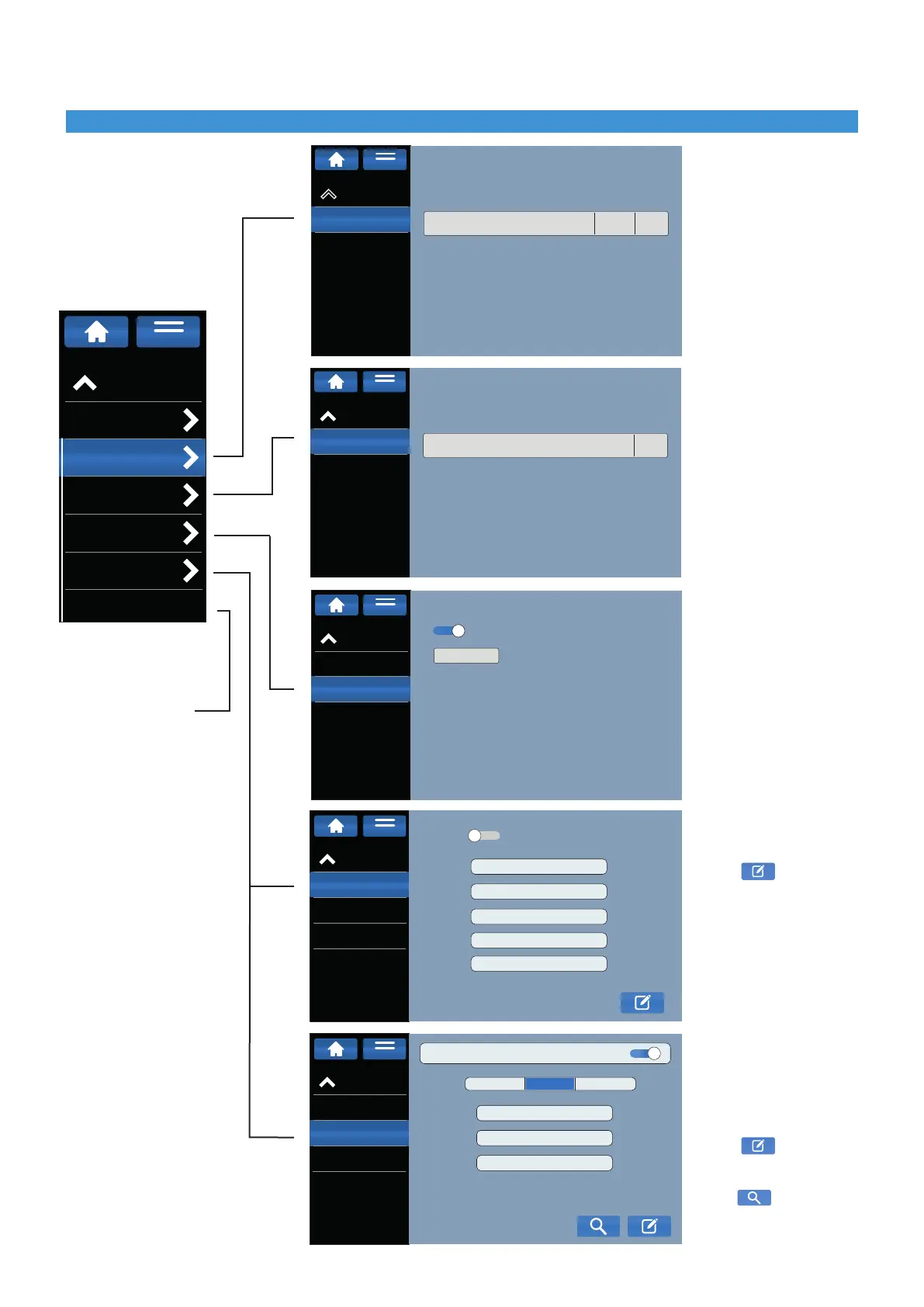
Touch screen display3
refer to page 14
UsingaUSBashdrive,
load the updated library
of printable CEMBRE
products into the printer
(GENIUSPRO Media
Libraryledownloadable
from the ASSISTANCE
section of www.cembre.
com)
UsingaUSBashdrive,
loadarmwareupdate
(downloadable from the
ASSISTANCE section of
www.cembre.com)
Setting a password to
manage the print queue.
Enter a password to
manage the menu settings.
Default PIN: 0000
Settings for connecting to
the LAN network.
Press
to input the
requested data or enable
the DHCP mode.
Settings for connecting
to the Wi-Fi network or
Access point.
Enable the function at the
top right
Press
to choose the
setting and enter required
data
Press
to search and
select nearby wireless.
settings menu
Product Library
From USB
LIBRARY
AVAILABLE UPDATES
VerFile
Version: 2.1.36
MENU
FW Update
From USB
FIRMWARE
AVAILABLE UPDATES
File
Version: 2.0.24
MENU
Network
LAN Settings
WiFi Settings
Hostname
DHCP:
IP:
SUBNET
MASK:
GATEWAY:
DNS:
DOMAIN:
MENU
Network information
Network
LAN Setting
WiFi Settings
Hostname
WiFi......
ACCESS POINTSTATIC iP
DHCP
IP:
SUBNET
MASK:
GATEWAY:
MENU
Network information
Security
Printer Spool PIN
ENABLE PIN
MODIFY PIN
Settings PIN
MENU
Settings
Diagnostics
Product Library
FW Update
Security
Network
System
MENU