Page 44
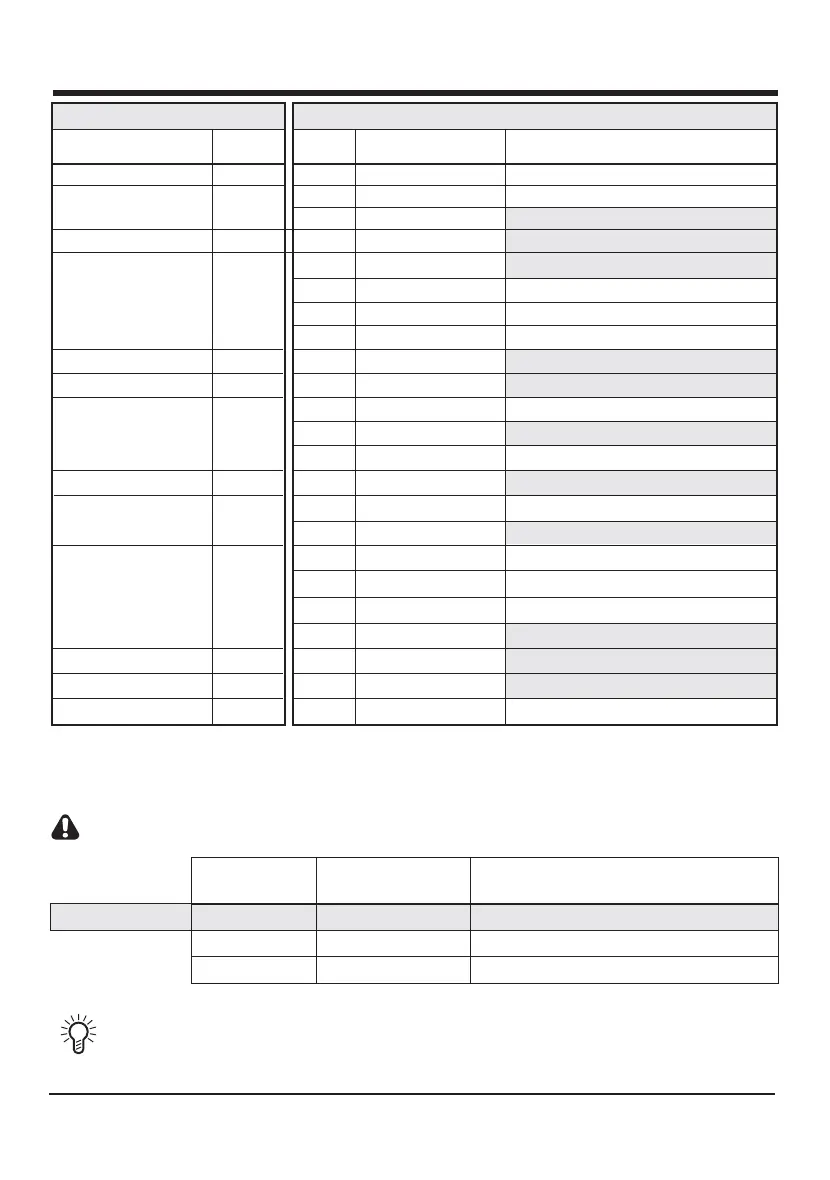
FEATURE
DESCRIPTION
Auto-close
Auto-close Time
Gate Limit Settings
-
See detailed instructions on page 25
1
2
3
STATUS or COUNT
DESCRIPTION
-
ON
15 seconds (Default)
1 Flash = 1 second
-
OFF (Default)
FEATURE
NUMBER
COUNT
VALUE
CP80 Controller FeaturesCP80 Controller Features
-
-
Mode of Operation
Pedestrian Auto-close
4
5
-
STANDARD (Default)
1 Flash = 1 second
5 seconds (Default)
-
CONDOMINIUM
PIRAC
REVERSING
Collision Counter
1 Flash = 1 count
4 counts (Default)
12
Preflashing
Preflash Time
Collision Sensitivity*
Auto-close Override
Positive Close Mode
MODE 1
HIGH*
ON
1 Flash = 1 second
1 Flash = 1 second
3 second (Default)
5 seconds (Default)
MEDIUM (Default)*
OFF (Default)
LOW
MODE 2
MODE 3
OFF (Default)
-
1
-
2
STATUS
VALUE
3
4
1
2
-
1
1
1
2
3
2
2
3
4
-
-
-
-
-
-
-
-
-
-
-
-
-
Courtesy Light
10
11
7
8
9
6
1 Flash = 10 seconds
120 seconds (Default)
Crawl distance † 1 Count = 350mm
13
-
1 Flash = 350mm
DISTANCE BETWEEN
MARKER AND PINION
750mm
STATUS FLASH
COUNT
CRAWL
DISTANCE
†
700mm
2
1100mm1050mm 3
500mm
1
350mm
DEFAULT
† The crawl distance is a length of travel which allows the gate to slow down before reaching the end stop. For heavier
gates with less friction, the crawl distance may have to be increased. When increasing the crawl distance, the origin
marker (Figure 19) must be moved and the gate limits reset as in step 6, page 24.
Where operators have been fitted with a CE chip, the crawl distance value is fixed to a count of 2.
* For CE compliance use a collision sensitivity value of 1 or 2 only
To speed up the counting while selecting main menu items, temporarily connect the PED
terminal to the COM terminal.













 To Next Page