63 – Monitoring – User manual – v1.2
Monitoring - CanDis
8.5 TCP/IP Interface and Configuration
8.5.1 Introduction
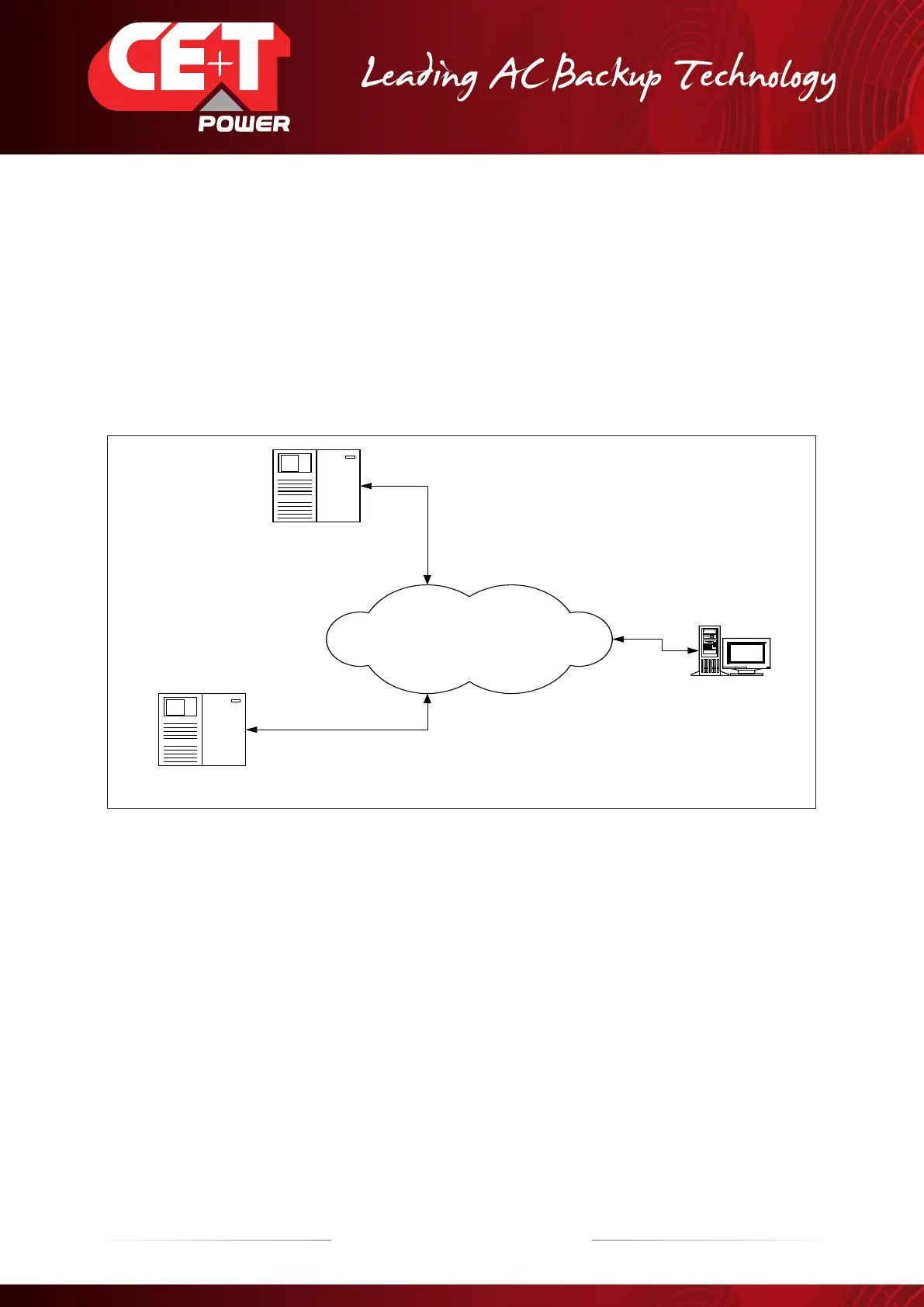
TCPIP-SNMP is a protocol allowing the user to have access to the system from a remote site using a web browser (configure
and information display), or through SNMP (Simple Network Management Protocol) to only monitor the equipment. The available
information will be the following: current, voltage, alarms, status ….
In our MODBUS network the TCPIP interface is the master and T2S is the slave. No other master should be installed on the
MODBUS network when the TCPIP interface is foreseen.
The settings must be adapted with your LAN to give access through the firewall. Make sure to have it done by someone
knowledgeable in the configuration of IT networks!
TCP-IP
NETWORK
CE+T POWER SYSTEM
SNMP Agent
CE+T POWER SYSTEM
SNMP Agent
Management station
When equipped with the Web-SNMP interface, one can have access to:
1. A web browser (Internet explorer) through http protocol;
2. The SNMP protocol, which works like a client-server where there is only one client for the NMS (Network Management
Station) and many servers (the equipments). The NMS can poll the TCPIP and TCP-IP can send traps to inform the NMS
that one alarm has been activated.
The TCPIP interface CS121 and CS141 has multiple functionalities that are not used nor are validated with
our TSI inverters.
IF ANY OTHER CONFIGURATION or PARAMETERS which are not in relation with the TSI inverter IS USED BY
THE USER, IT IS UNDER THE CUSTOMER’S RESPONSIBILITY.
To be able to install WEB-SNMP interface you need the following equipment and capabilities:
Operating manual for configuration.
Your system must be equipped with TCPIP_IP interface.
ETHERNET 10 /100 connection to your LAN with RJ45 crossover cable.
Laptop or computer to set the parameters.
IT network management know-how.


 To Next Page