Condensing Pool Heater 16 14/11/06
Setup Mode
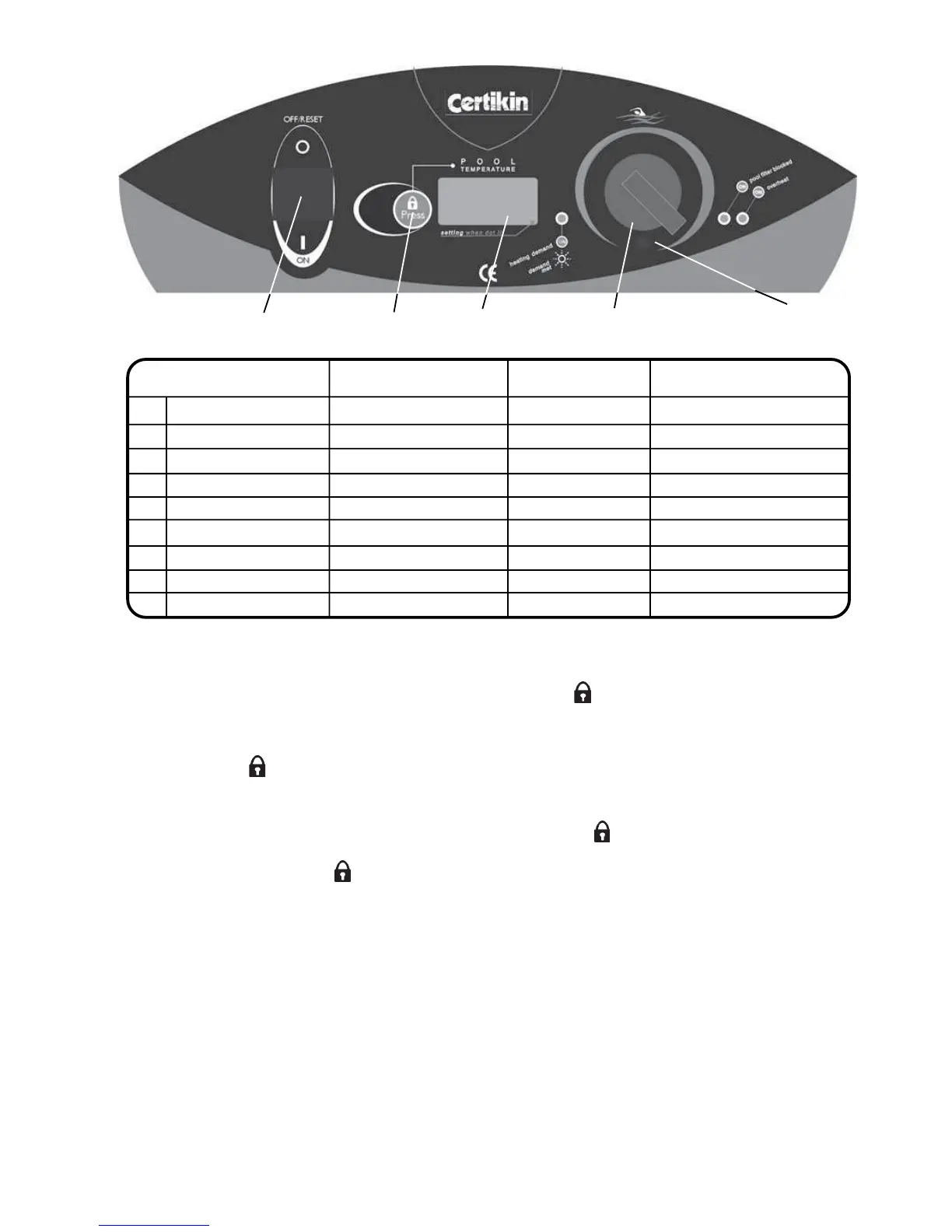
Switch on with the panel switch whilst pressing the Lock/Reset button. then release. The control is now in
Setup Mode.
The control can now be altered by rotating the Pool Thermostat Knob to a certain position and then pressing the
Lock/Reset button, then swiching off. (See Fig. 9.0)
Example:
To change from Fahrenheit to Centigrade:
Turn Panel Switch OFF then back ON whilst pressing the Lock/Reset button.
Turn the Pool Thermostat Knob until the display shows ‘F’.
Press the Lock/Reset button once and the display will show ‘C’.
Switch the Panel Switch OFF then back ON again.
The Control will now display in Centigrade.
3
4
5
6
2
1
7
Lock/Reset
Button
On / Off
Switch
Temperature
Display
Pool Temperature
Setting Knob
Setup Mode Setting Factory Setting Alternative Display Indicator
1 Display units ° F = Fahrenheit ° C = Centigrade ° F or ° C
2 Maximum temperature 32 °C (90 °F) 41 °C ( 106 °F) PL or SPA
3 Pressure Log Number of Operations Resets to zero Yellow LED ON
4 Overheat Log Number of Operations Resets to zero Red LED ON
5 Combustion Gas Log Number of Operations Resets to zero Red LED flashing
6 Gas Lockout Log Number of Operations Resets to zero Red & Yellow LED ON
7 Hi-Limit Log Number of Operations Resets to zero Red PCB LED ON
8 Unused Number of Operations Resets to zero Red PCB LED ON
9 Version number - - e.g. 008
Setting
Position
Fig. 9.0
Genie


 To Next Page