16-6
PROGRAMMER FUNCTION
The programmer function allows the updating of the software present in the logic units and cards on the
truck. It is possible to update the cards in two different ways:
• AUTO the programmer automatically recognizes the truck and the latest software version to be
installed.
• MANUAL for selecting the truck family and the software version you intend to install;
in MANUAL mode it is also possible to install previous versions of the software.
AUTO MODE
Procedure
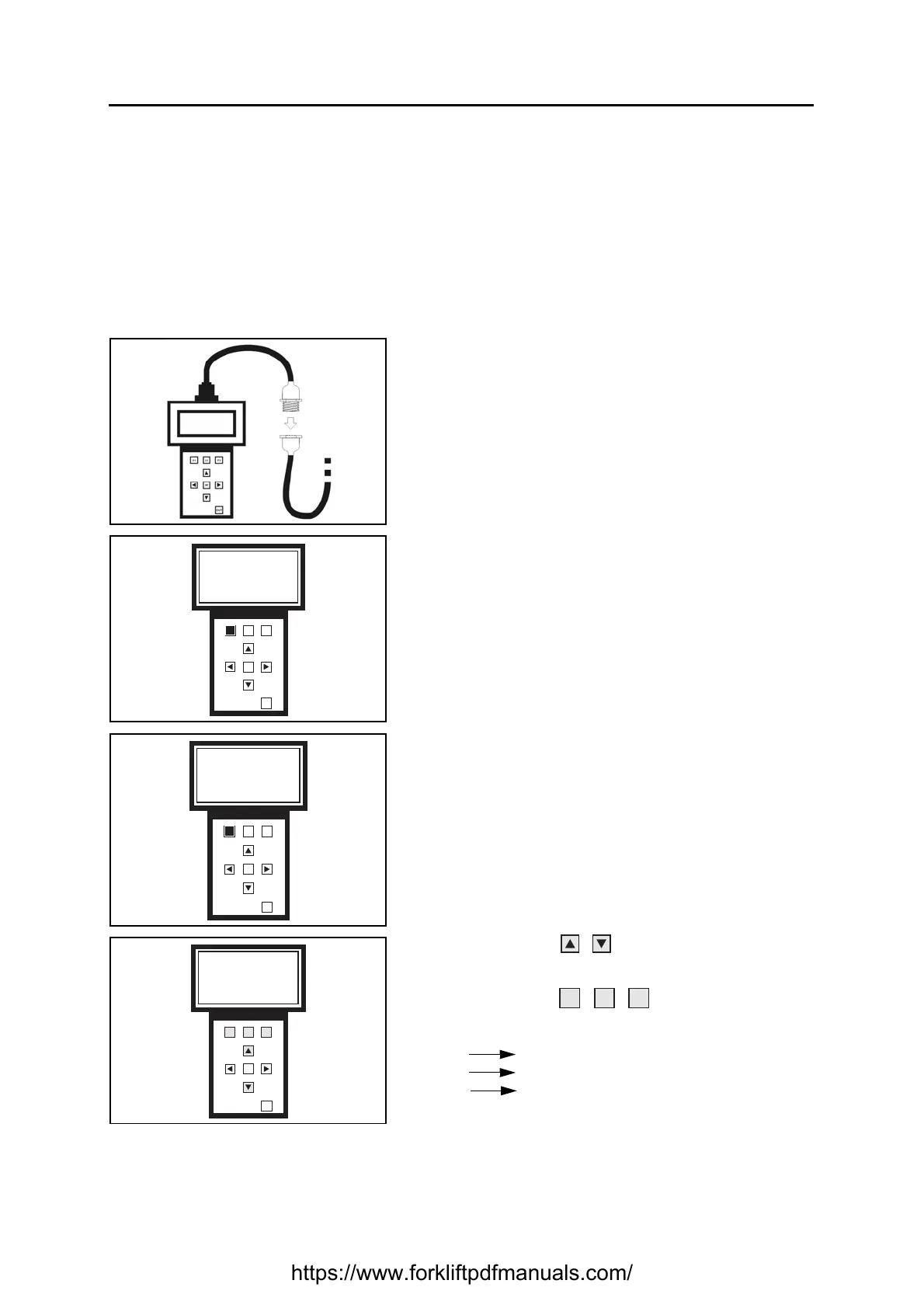
1. Connect the programmer and turn on the truck (see
specific paragraph)
Wait a few seconds for the data to load
2. Press F1 to select the Programmer function
3. Press F1 to select Auto mode
Wait a few seconds for the data to load
4. Use the buttons to change screen and view
the cards present on the truck
Use the buttons to select the card to be
updated
F1 selects line 1
F2 selects line 2
F3 selects line 3
F1 F2
F3
OK
OUT
Please select funct
Programmer
Save/Restore
PROG S/R
F1 F2
F3
OK
OUT
Programmer selected
Please select
Program mode
AUTO MANUAL
F1 F2
F3
OK
OUT
EVCB X.XX Old
TRCB X.XX Updated
PUMP X.XX Old
https://www.forkliftpdfmanuals.com/


 To Next Page