109
OPERATING YOUR VEHICLE
Passenger Helmet Connection/Rider Helmet Connection
After connecting helmet and instrument through bluetooth, voice
control function can only be used�
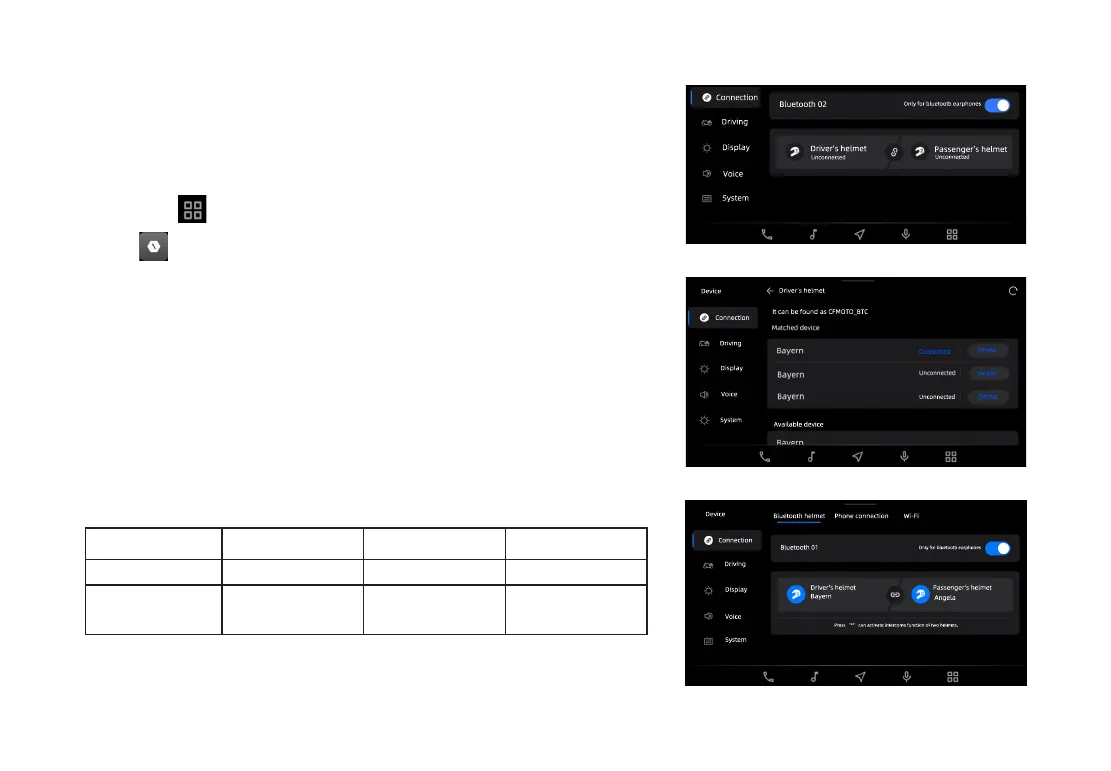
Follow these steps to connect helmets:
Click APP to split screens;
Click to enter Settings;
Click helmet connection through bluetooth and select your
helmet type;
Click bluetooth switch to enable bluetooth and "helmet
connection selection interface" will pop up;
Select rider/passenger helmet;
After connection, a notice "Connected" will appear�
Intercome function is enabled after two helmets are connected�
Dierences between two helmets:
Call Music
Voice assistant
Rider helmet
Yes Yes Yes
Passenger
helmet
No Yes No
Connection
Driving
Display
Voice
System
Bluetooth 02
Driver’s helmet
Passenger’s helmet
Unconnected
Unconnected
Only for bluetooth earphones
Connected
Delete
Delete
Delete
Available device
Driver’s helmet
It can be found as CFMOTO_BTC
Connection
Driving
Display
Voice
System
Unconnected
Device
Wi-Fi
Bluetooth 01
Only for bluetooth earphones
Connection
Device
Driving
Display
Voice
Press “*” can activate intercome function of two helmets.
Driver’s helmet
Bayern
Passenger’s helmet
Angela
Bluetooth helmet
Phone connection
System


 To Next Page