110
OPERATING YOUR VEHICLE
Phone
Phone and music can be used after phones and helmets are
connected through bluetooth;
Follow these steps to connect phones:
Click APP to split screens;
Click to enter Settings;
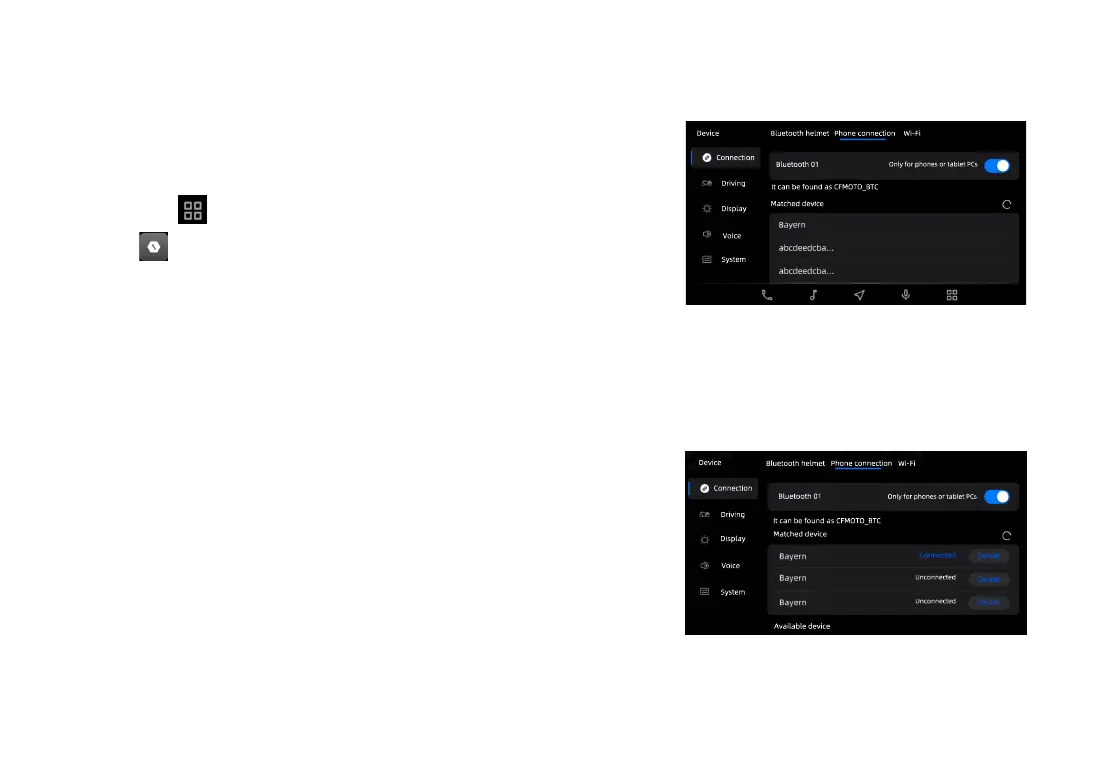
Click phone connection and the instrument will automatically
search for available bluetooth devices;
Select your device;
At this time, a notice will pop up on the phone's screen, click
"Yes";
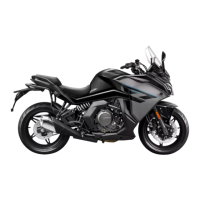
Wait for this connection to be done;
After connection, a notice "Connected" will appear�
Device
Connection
Driving
Display
Voice
System
Bluetooth helmet Phone connection Wi-Fi
Bluetooth 01
Only for phones or tablet PCs
It can be found as CFMOTO_BTC
Matched device
Bluetooth 01
It can be found as CFMOTO_BTC
Matched device
Available device
Connected
Unconnected
Unconnected
Only for phones or tablet PCs
Delete
Delete
Delete
Device
Connection
Driving
Display
Voice
Bluetooth helmet
Phone connection
Wi-Fi
System


 To Next Page