-25-
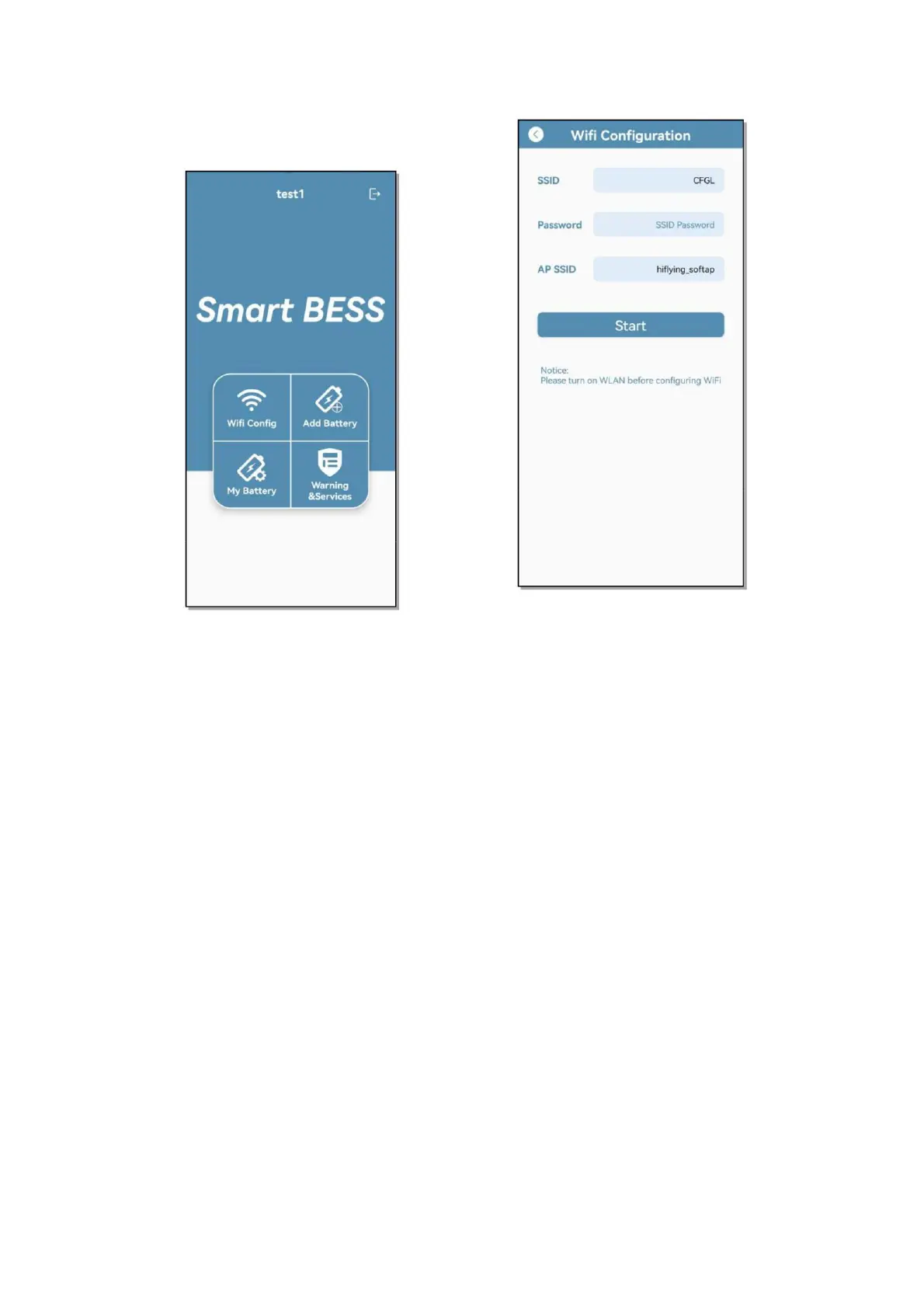
Add Battery、My Battery、
Warning & Services
6.2.2.4 Wi-Fi Distribution Network
➢ Select Wi-Fi Config to configure
the
battery network. Before the
operation, please pay attention to
connecting to the Wi-Fi with
network communication, and turn
on the battery at the same time;
SSID is the name of the current
mobile phone connected to the Wi-
Fi, this item is obtained
automatically; Password is the
current Wi-Fi password, This item
needs to be entered manually; AP
SSID is the hot spot name generated
by the battery device, and this item
is obtained automatically; after
clicking Start, the APP will
automatically connect to the battery
for battery distribution network
operation, and return to the main
page after completion to add the
battery
6.2.2.5 Add Battery
➢ After the battery is connected to the
network, select Add Battery to add
the battery, click it to enter the
automatic code scanning page, scan
the bar code of the battery shell at
this time, and a battery information
dialog box will pop up after success.
You can customize the battery name
and connect the PCS name. Click
Confirm to save the battery
information, and you need to add as
many batteries as there are here


 To Next Page