Need help?
Do you have a question about the Chainway C3000 and is the answer not in the manual?
Detailed specifications including physical, performance, and environmental attributes of the C3000 terminal.
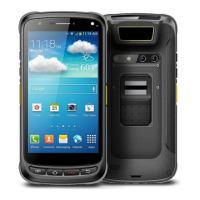
Overview of the C3000 handheld terminal's physical features, components, and design elements.
Description of the available keyboard types (QWERT and numeric) for the C3000 device.
Lists and describes the standard accessories included with the C3000 handheld terminal.
Details optional accessories available for the C3000 terminal, such as carrying cases and cables.
Step-by-step instructions for safely removing and installing the battery in the C3000 terminal.
Procedure for installing a TF (TransFlash) card into the C3000 handheld terminal.
Guide on how to install a SIM card into the C3000 handheld terminal.
Outlines the different methods available for recharging the C3000 terminal's battery.
Information on accessing files on the TF card after installation.
Explains how to suspend, shut down, and restart the C3000 handheld terminal.
Describes the function and elements of the taskbar on the C3000 device.
Overview of the C3000's desktop interface, icons, and shortcuts.
Instructions on how to perform a device restart on the C3000 terminal.
Configuration settings for internet access, including homepage, security, and proxy options.
Settings for connecting the C3000 terminal to a PC for data synchronization.
Manages storage, including formatting and dismounting TF cards and internal storage.
Settings related to battery status, power schemes, and device idle states.
Configuration options for keyboard repeat rate, delay, and testing.
Customizes locale, language, number formats, and input languages for the device.
Adjusts the device's date, time, and time zone settings.
Instructions on how to uninstall applications from the C3000 terminal.
Configures the current input method and allows switching between methods.
Adjusts mouse properties like double-click sensitivity and physical distance.
Manages network and dial-up connections for WiFi and GPRS.
Displays system information, manages device name, memory, and copyrights.
Customizes display settings including background, appearance, and backlight.
Configures device volume levels and sound events for notifications.
Manages local licenses for terminal server client connections.
Adjusts stylus double-tap sensitivity and performs screen calibration.
Scans for and manages nearby Bluetooth devices.
Provides tools to repair abnormal synchronization failures with ActiveSync.
Describes the use of the on-screen soft keyboard for inputting characters and symbols.
Information on the availability and selection of multiple input methods for the device.
Step-by-step guide to connect the C3000 terminal to a wireless WiFi network.
Configuration and connection procedures for establishing a GPRS dial-up connection.
Details the specific settings required to configure GPRS dial-up on the terminal.
Important points and checks before initiating a GPRS dial-up connection.
Overview of ActiveSync software versions and supported operating systems.
Step-by-step guide for installing the Microsoft ActiveSync software on a PC.
Procedures for updating the C3000 terminal's operating system.
Instructions for copying system update files to an SD card.
Steps to update the operating system for Windows CE on the device.
Guide to restoring the C3000 terminal to its factory default settings.
Instructions for updating the device's startup logo image.
Information on operating the barcode scanner correctly for scanning various barcode types.
Details on using the RFID sensing zone for reading RFID tags.
Information on using the GPS module for location tracking, recommended for outdoor use.
Guide to using the 5-megapixel camera, including resolution settings and photo capture.
Information on Bluetooth 2.0 functionality for data sending and printing.
Troubleshooting common issues related to the device's hardware and system operation.
Solutions for problems encountered with the barcode scanning function.
Troubleshooting common issues related to the RFID module and tag identification.
Solutions for problems with USB connection, WiFi, and other communication errors.
Troubleshooting for other issues like ActiveSync, SDK, and system updating failures.
Technical specifications for the AC/DC power adapter used with the C3000 terminal.
Important safety precautions and guidelines for handling, using, and storing the device's battery.
Lists barcode symbologies that can be enabled or disabled via scanning function barcodes.
Explains the function for recognizing and transmitting barcode type information.
Provides function barcodes to enable or disable specific 1D barcode types on the scanner.
 General
| Brand | Chainway |
|---|---|
| Model | C3000 |
| Category | Touch terminals |
| Language | English |


 To Next Page