CHAPTER 5 Network Connection
5.1 WIFI Connection
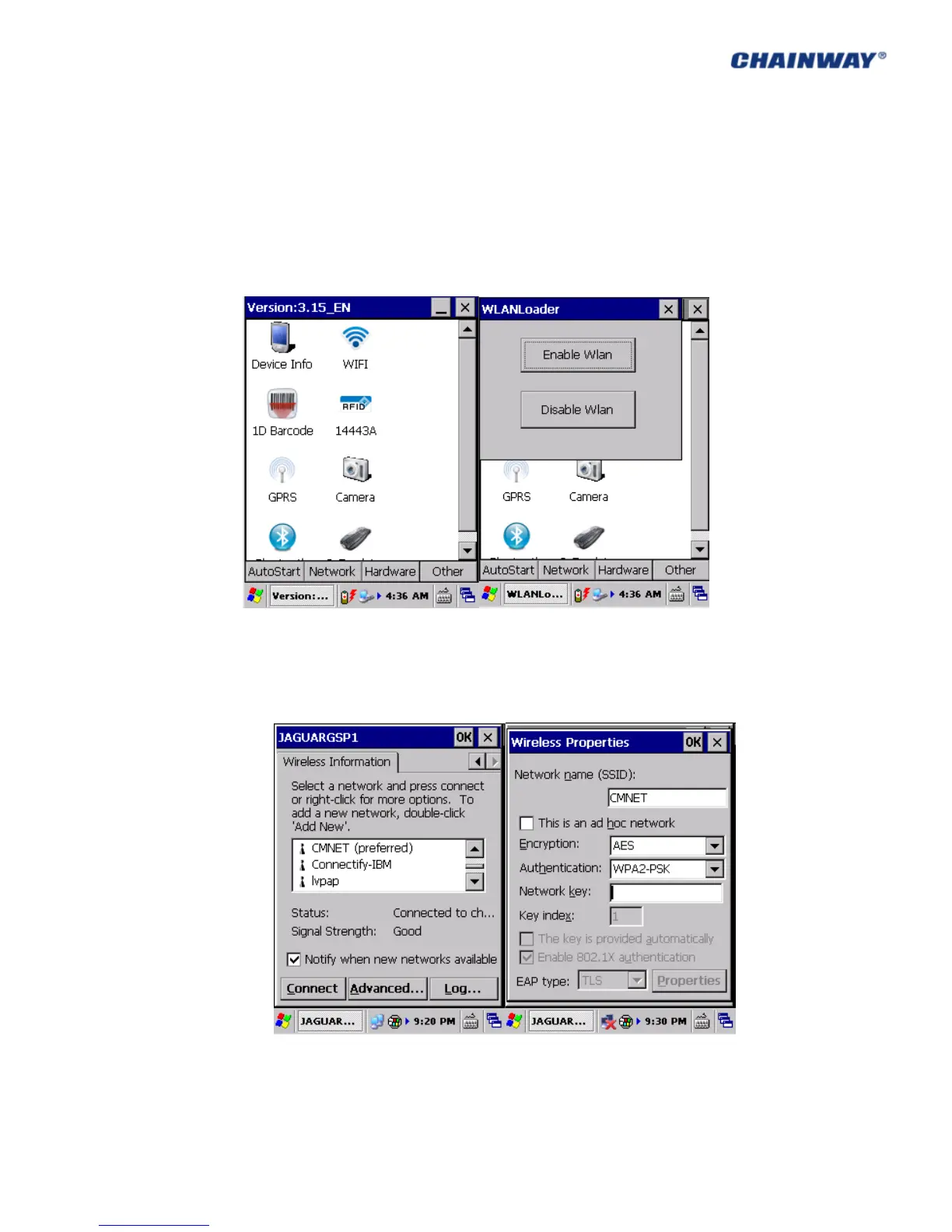
1) Open ‘AppCenter’ on desktop , then run the application ‘WIFI’ in ‘AppCenter’; Pic
5.1-1
2) Click ‘Load’ on ‘WLAN Loader’ , then network icon will display on toolbar; Pic 5.1-2
Pic 5-1-1 Pic 5-1-2
3) Double click the network icon, choose the router from ‘Wireless Information’, and
then click ‘Connect’; choose proper ‘Encryption’ and ‘Authentication’, and type
password in ‘Network Key’, and then click ‘OK’; Pic 5.1-3, Pic 5.1-4, Pic 5.1-5 and Pic
5.1-6
Pic 5-1-3 Pic 5-1-4



 To Next Page