Before updating, please backup the data: copy the data to PC or other disk like SD card. All data
and applications will be erased after updating.
6.3.1 Copy System Files to SD Card
1) Format the SD card;
Note: Format the card. Do not choose fast format. Choose the File System as FAT32.
Tip: For the TF card installed in the device by default when being purchased from us, the step
has been done before
2) Copy the update files into the SD card;
3) Install SD card to the device.
6.3.2 Update OS for Windows CE
After finishing steps above, restart the device, and then press the left button as soon as
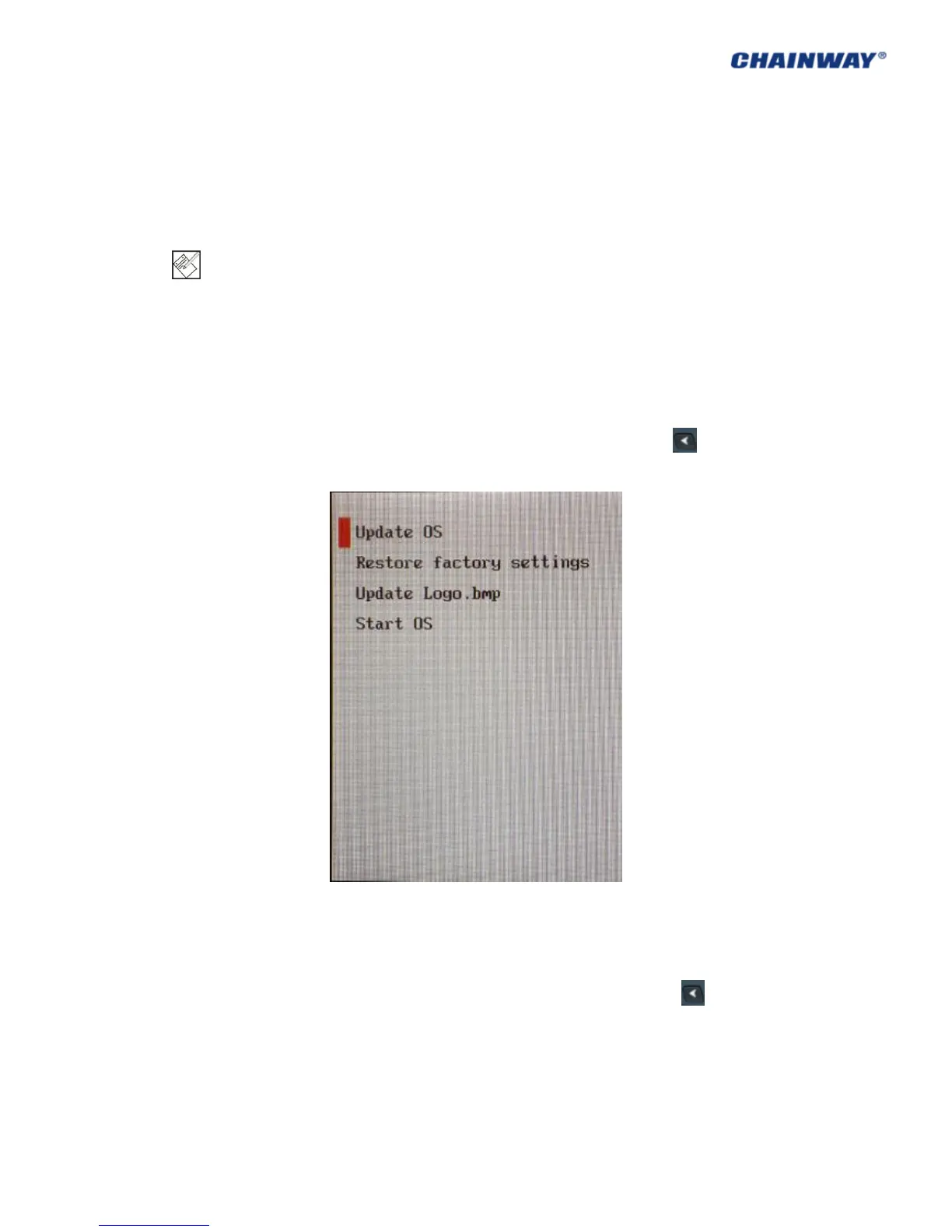
possible; then you will see it as Figure6-3-1; choose Update OS, then press the yellow button
on keyboard; then please wait the system update and start.
Pic 6.3-1
6.4 Restore Factory Settings
Before updating, please backup the data: copy the data to PC or other disk like SD card. All data
and applications will be erased after updating.
After finishing steps above, restart the device, and then press the left button as soon as
possible; then you will see it as Pic 6-3-1; choose Restore factory settings, then press the
yellow button on keyboard; then please wait the system restore and start.
If you choose Start OS, the system will start normally.
6.5 Update Logo.bmp
Before customization, please the image with the format of bmp to TF card, and the maximum



 To Next Page