Install the Protector System
®
1 Install the Safety Reversing Sensors
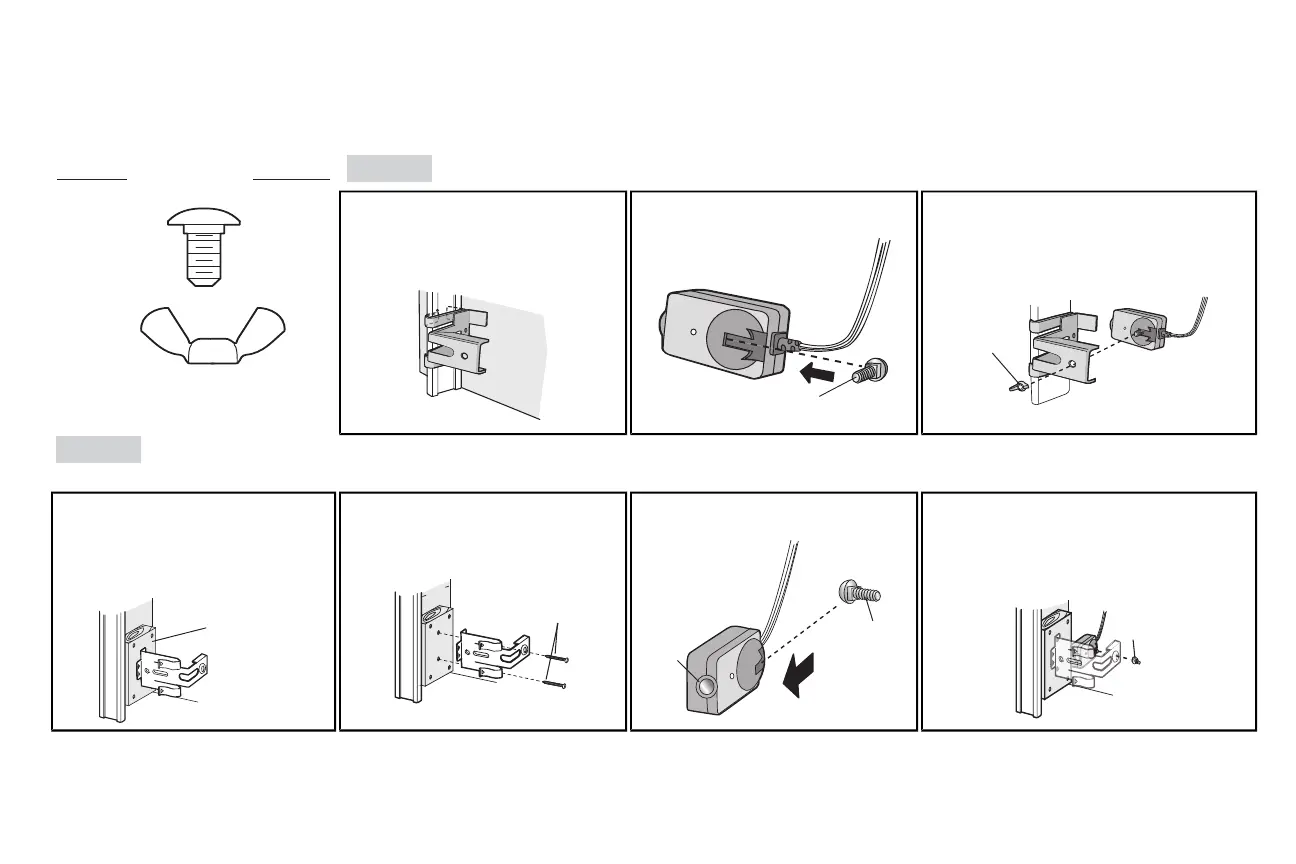
The safetyreversing sensors can be attached to the door track,the wall, or the floor. Ifthe door track will not support the sensor bracketa wall installation is recommended. Choose one of the following installations.
HARDWARE
Carriage Bolt
1/4"-20x1/2"
Wing Nut
1/4"-20
OPTION A
DOOR TRACK INSTALLATION
1.1A Slide the curved arms of the sensor
bracketaround the edge of the door
track.Snap into place so that the
sensor bracketisflush against the
track.
1.2A Slide the carriage bolt into the sloton
each sensor.
Carriage Bolt
1/4" - 20 x 1/2"
1.3A Insert the bolt through the hole in the sensor
bracketand attach with the wing nut. The lenses
on both sensors should pointtoward each other.
Make sure the lens is not obstructed bythe
sensor bracket.
OPTION B WALLINSTALLATION
If additional clearance isneeded an extension bracket(notprovided) or wood blockscan be used. Make sure each bracket has the same amount of clearance so they will align correctly.
1.1B Position the sensor bracketagainst the
wall with the curved arms facing the
door.Make sure there is enough
clearance for the beam to be
unobstructed. Mark holes.
1.2B Drill 3/16 inch pilot holes for each sensor
bracketand attach the sensor brackets
to the wall using lag screws(not
provided).
In
side
G
a
rage
Wal
l
(not provided)
1.3B Slide the carriage bolt into the sloton
each sensor.
Lens
Carriage Bolt
1/4" - 20 x 1/2"
1.4B
Insert the boltthrough the hole in the sensor
bracketand attach with the wing nut. The lenses
on both sensors should pointtoward each
other. Make sure the lensisnot obstructed by
the sensor bracket.
18







 To Next Page