16
All control wiring used to connect external devices to Class 2 circuits of the operator must be (QPTZ) Power-Limited Circuit Cables, Type CL2, CL2P,
CL2R, or CL2X or other cable with equivalent or better electrical, mechanical, and flammability ratings.
Power wiring
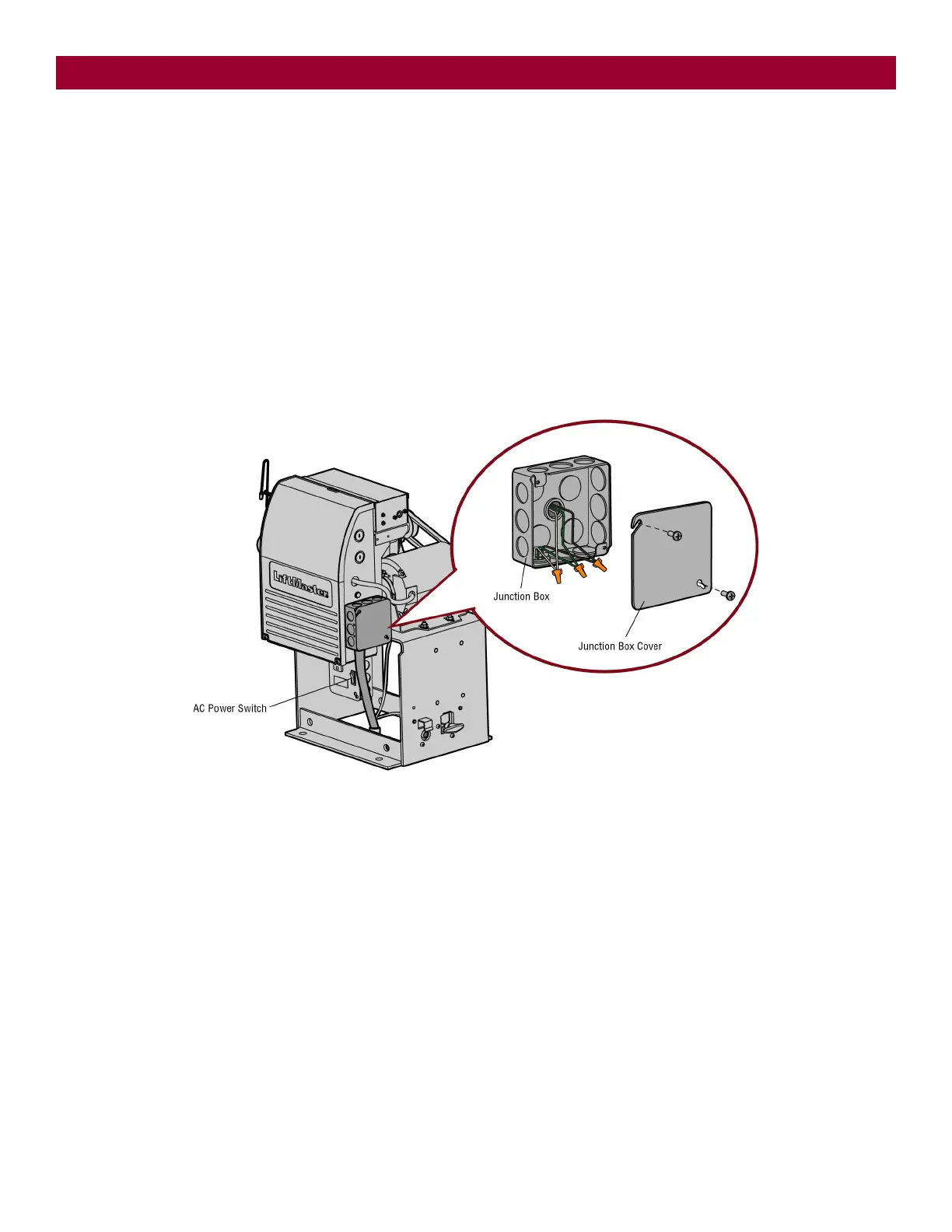
1. Make sure the AC power switch on the operator is OFF (the AC power switch will turn the incoming 120 Vac power ON or OFF).
2. Turn off the AC power from the main power source circuit breaker.
3. Run the AC power wires to the junction box on the operator.
4. Remove the junction box cover.
5.
Connect the green wire to the earth ground rod and AC ground using a wire nut. NOTE: The earth ground rod can be grounded to the chassis.
6. Connect the white wire to NEUTRAL using a wire nut.
7. Connect the black wire to HOT using a wire nut.
8. Replace the junction box cover. Ensure the wires are not pinched.
9. Turn on the AC power from the main power source circuit breaker.
10. Turn on the AC power switch.
INSTALLATION






 To Next Page