40
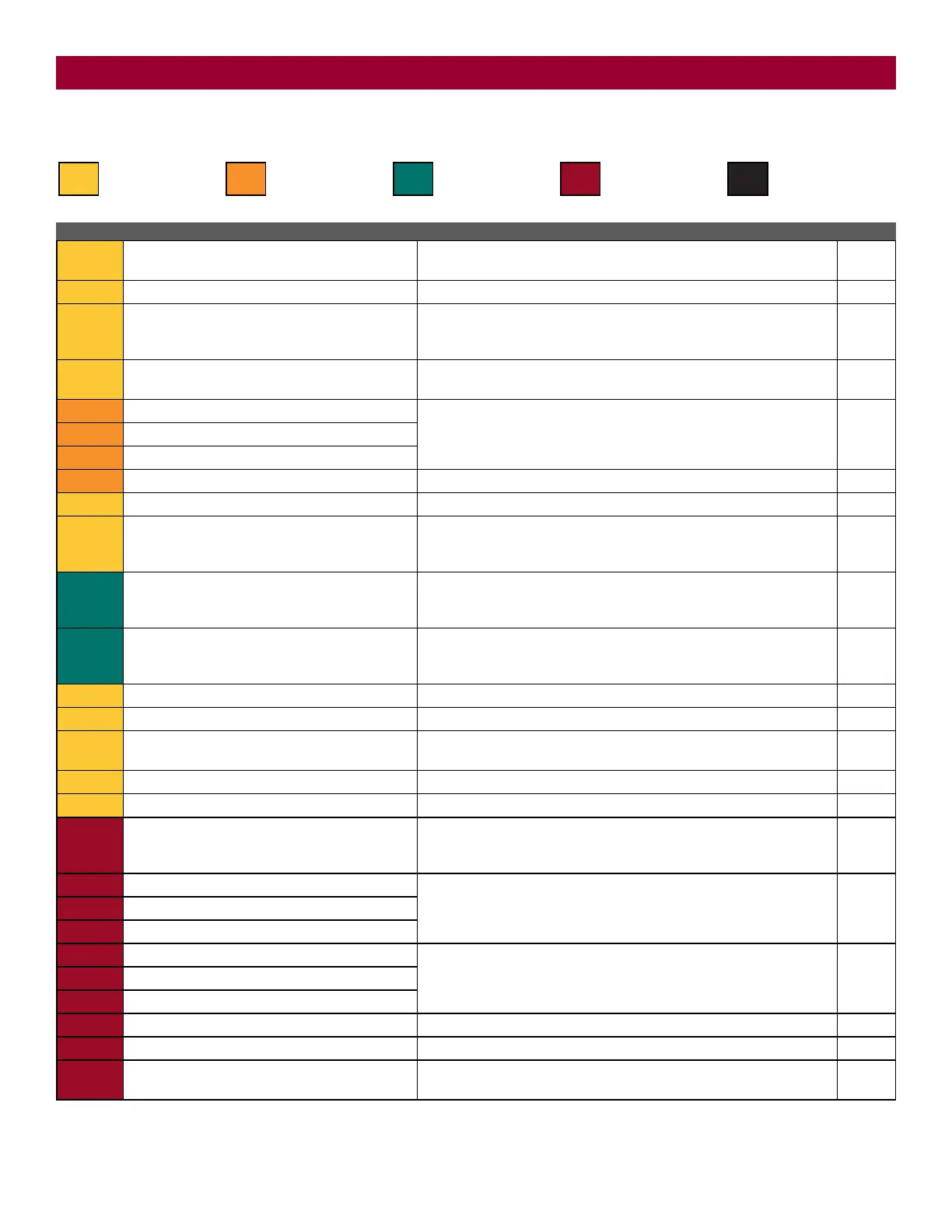
Diagnostic Codes Table
Some codes are saved in the code history and some are not. If a code is not saved it will briefly appear on the display as it occurs, then disappear.
LiftMaster System Installed System Informational
External Entrapment
Protection
Inherent Entrapment
Protection
Code Meaning Solution Saved
31
Main control board has experienced an internal
failure.
Disconnect all power, wait 15 seconds, then reconnect power (reboot). If
issue continues, replace main control board.
NO
35
Max-Run-Time Exceeded Error Check for an obstruction, then reprogram the limits. YES
36
Product ID Error Was the control board just replaced? If so, erase limits, enter limit setup
mode and set limits. If not, disconnect all power, wait 15 seconds, then
reconnect power before changing product ID harness.
YES
37
Product ID Failure Unplug product ID harness then plug back in. Disconnect all power, wait
15 seconds, then reconnect power before replacing product ID harness.
YES
43
Exit Loop Error Failure or missing loop (SHORT or OPEN - LiftMaster Plug-in Loop
Detector only) Check loop wiring throughout connection. May be a short
in the loop, or an open connection in the loop.
YES
44
Shadow Loop Error
45
Interrupt Loop Error
46
Wireless edge battery low Replace batteries in wireless edge. YES
47
Power board fault Relay fault detected in the power board. Replace the power board. YES
50
Run-Distance Error The limits are less than the minimum requirement or longer than what
was learned. Check limit positions and proper switch function. Run-
distance can be re-learned by setting the handing again.
YES
53
Brownout occurred
AC/DC board supply dipped below allowable level. Review power supply
and wiring. If rebooting, ensure enough time for discharge of power to
force a fresh boot.
YES
54
Wireless Second Operator Communication Error
Check the second operator for power. If OFF, restore power and try to run
the system. If powered, deactivate the wireless feature and then re-learn
the second operator.
YES
55
System AC Overvoltage Call utility. YES
56
System AC Undervoltage Check wiring and wire gauge to operator. YES
57
Limit Error - Stuck Switch
Check switch for proper operation. Check harness for shorts. Replace if
defective.
YES
58
Limit Error - Wrong Switch Check motor wiring. YES
59
Missing Power Board Check harness for shorts. Check for presence of power board. YES
60
Minimum number of monitored entrapment
protection devices not installed.
Review monitored entrapment protection device connections. Slide gate
operators require a minimum of two external safety devices; one in the
close and one in the open direction.
NO
61
CLOSE EYE/INTERRUPT held more than 3 minutes
Check wired input on main control board; check for alignment or
obstruction.
YES
62
CLOSE EDGE held more than 3 minutes
63
OPEN EYE/EDGE held more than 3 minutes
64
CLOSE EYE/INTERRUPT held more than 3 minutes
Check wired input on expansion board; check for alignment or
obstruction. The photoelectric sensors may be installed too far apart.
YES
65
CLOSE EYE/EDGE held more than 3 minutes
66
OPEN EYE/EDGE held more than 3 minutes
67
Wireless edge triggered more than 3 minutes Check wired input for wiring issue or obstruction. YES
68
Wireless edge loss of monitoring Check wireless edge inputs. YES
69
Wireless edge triggered
IF an obstruction occurred, no action required. If an obstruction did NOT
occur, check inputs and wiring.
NO
TROUBLESHOOTING





 To Next Page