Rev C Doc 6001242 (01-20273) 13 of 53
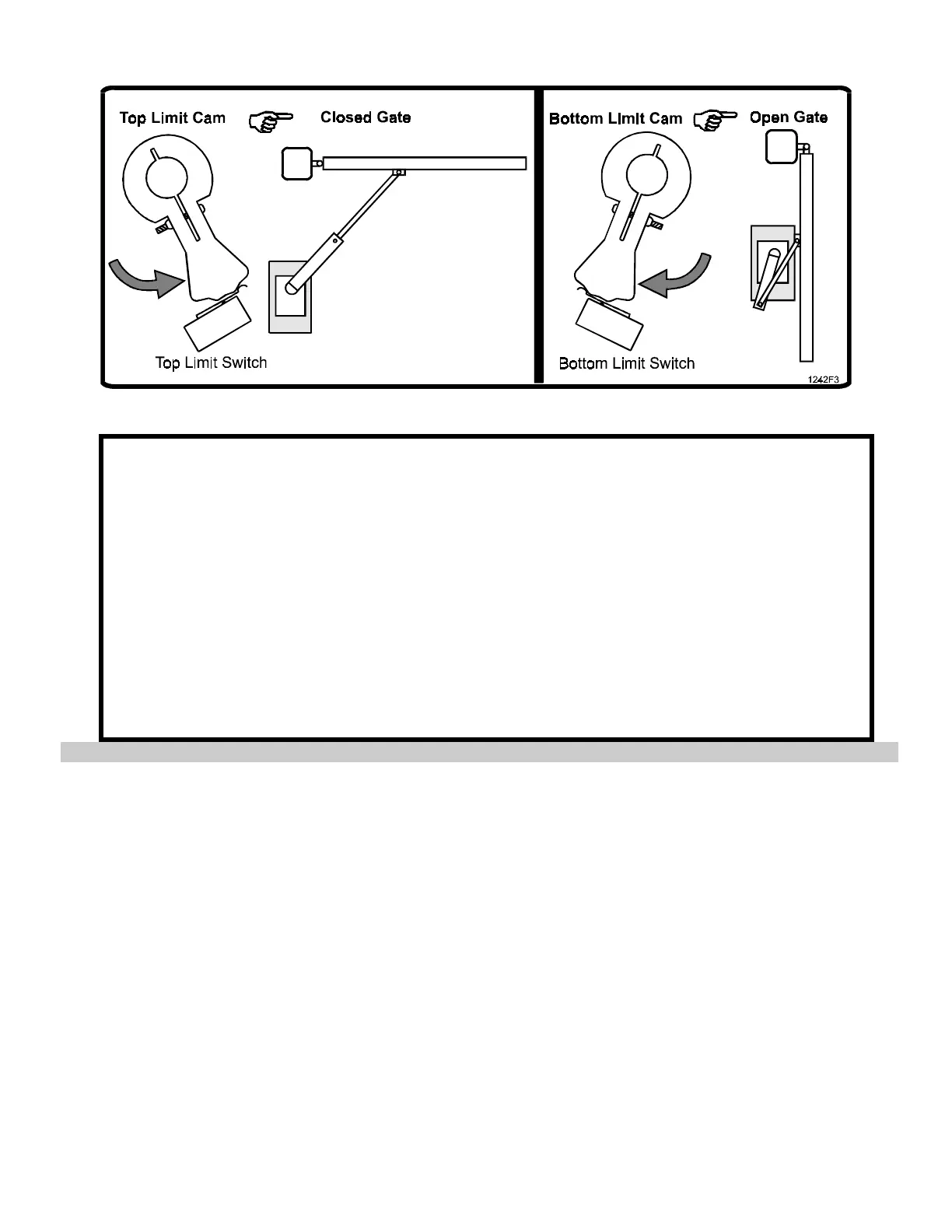
2. SETTING LEFT GATE LIMIT CAMS
Figure 8. Setting Left Gate Limit Cam.
1. Make sure that switch S2 is set to the "Right" position.
2. Turn on gate operator power switch.
3. Using manual OPEN and STOP, move the gate to its proper open limit position.
4. Loosen the locking screw on the bottom limit cam and turn the cam clockwise until it just barely
closes the limit switch.
5. Retighten the limit cam locking screw.
6. Using manual CLOSE and STOP, move the gate to its proper closed limit position.
7. Loosen the locking screw on the top limit cam and turn the cam counterclockwise until it just
barely closes the limit switch.
8. Retighten the limit cam locking screw.
9. Open and close the gate to check the limit cam settings. If required, readjust the limit cams
until they are set properly.






 To Next Page