10
Operation
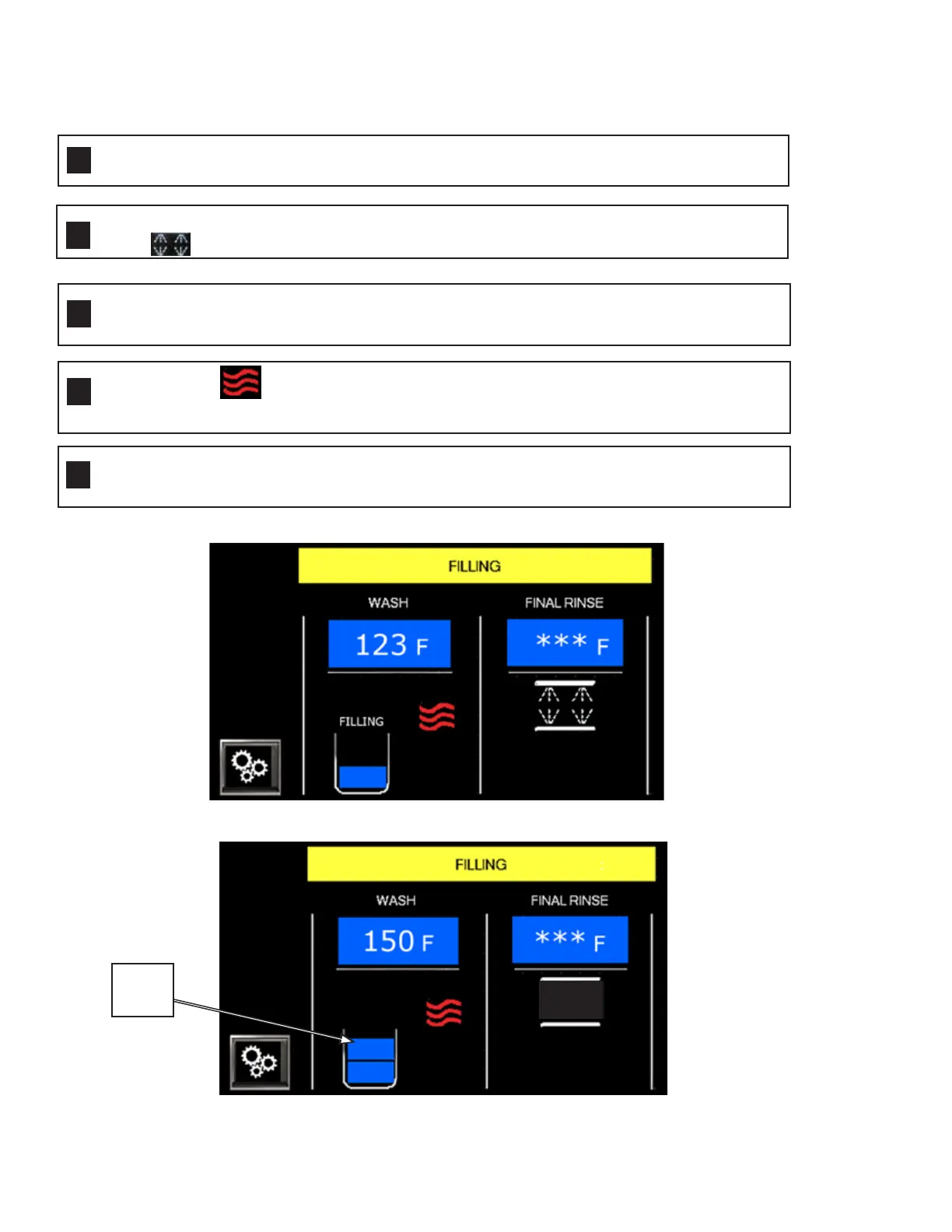
Fig. 15 - Filling
Push the Green Power button. The display illuminates and "Filling" appears in the status
bar.
The wash temperature displays. Final rinse temperature displays, *** and a spray
icon, appears while machine fills. The icon disappears when tank is full.
INITIAL FILL— With doors closed, the machine automatically fills when powered up
Rising water level in the wash tank is indicated by flashing blue blocks. The word, "Filling"
appears above the wash tank, Fig.15.
Filling is complete when two blue blocks appear in tank. The word "Filling" and the final
rinse spray icon disappear, Fig.16.
The tank heat icon appears when the water level reaches the lower float.
The icon disappears when the temperature setting is satisfied.
1
2
3
5
4
Fig. 16 - Tank full when two blue blocks appear
Tank
Full




 To Next Page