22
Cleaning
CLEANING
DELIME
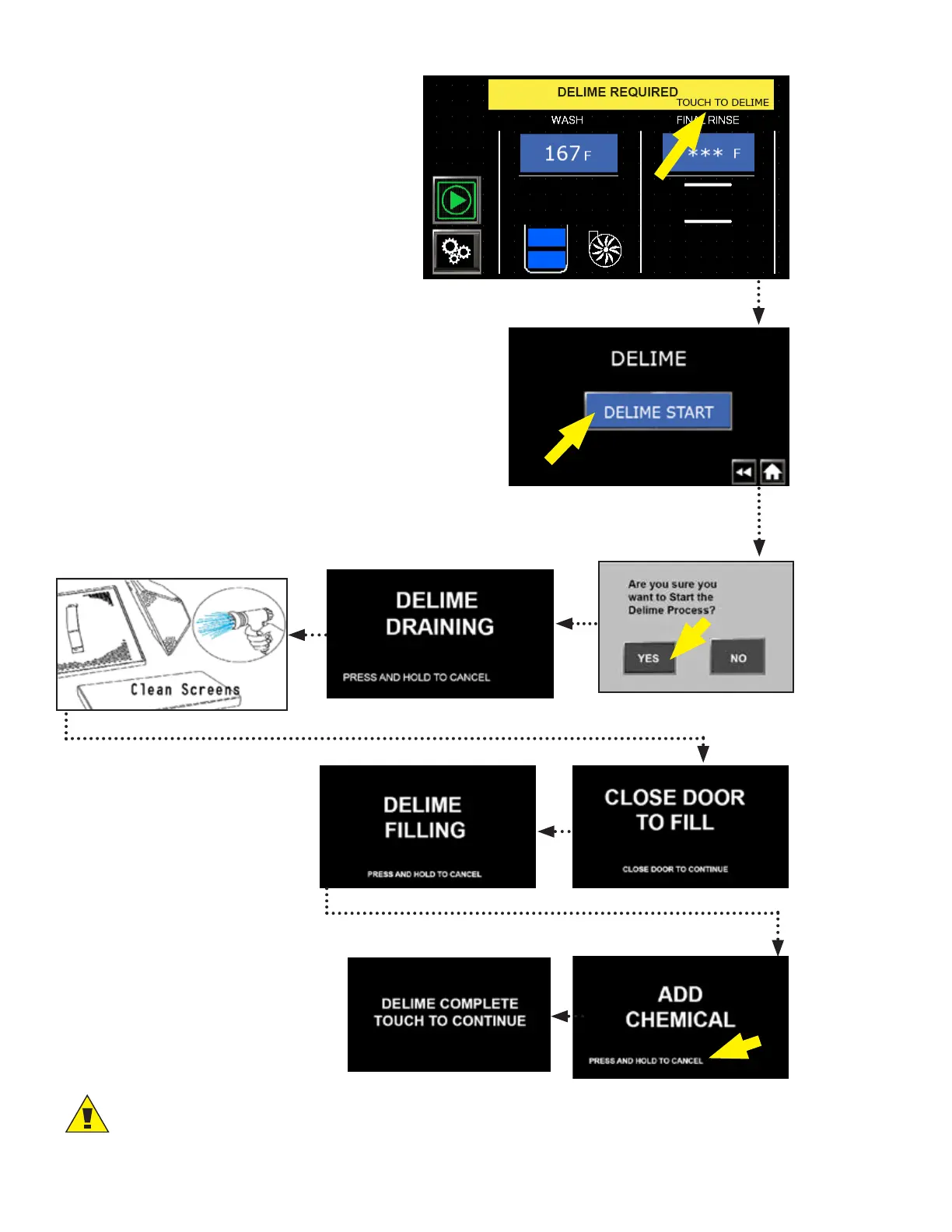
Fig. 47 - Delime required alarm
1. Status bar displays "DELIME REQUIRED"
when machine reaches the programmed
time interval, Fig. 47.
2. Press "TOUCH TO DELIME" to start a
delime operation.
3. Press "DELIME START", Fig. 48.
4. A confirmation box appears, Fig. 49. If NO is pressed,
the machine will return to normal operation.
The delime alarm will continue to appear until the
delime process is performed.
5. Press YES to begin the delime process, Fig. 49.
6. "DELIME DRAINING" appears and machine drains.
Delime process will stop and the machine will return
to normal operation if "PRESS AND HOLD TO CANCEL"
is pressed.
7. Open doors, remove and clean screens, Fig.51.
8. Close door to fill, Fig. 52.
9. First delime fill, Fig. 53.
10. Open doors and add delime
chemical according to chem-
ical supplier's instructions,
Fig. 54.
11. The delime process may be
canceled before the chemical
is added. Press and hold to
cancel. "DELIME COMPLETE
TOUCH TO CONTINUE" appears.
Touch the screen and the display
returns to the main screen.
Fig. 48 - Press DELIME START
Fig. 49 - Confirmation box
Fig. 50 - Machine drains
Fig. 51 - Remove/Clean screens
Fig. 52 - Close door to fill
Fig. 53 - First delime fill.
Fig. 54 - Add chemical
CAUTION:
Doors must not be opened after chemical is added.
Fig. 55 - Cancel before adding
chemical




 To Next Page