21
Supervisor Mode
SUPERVISOR MODE
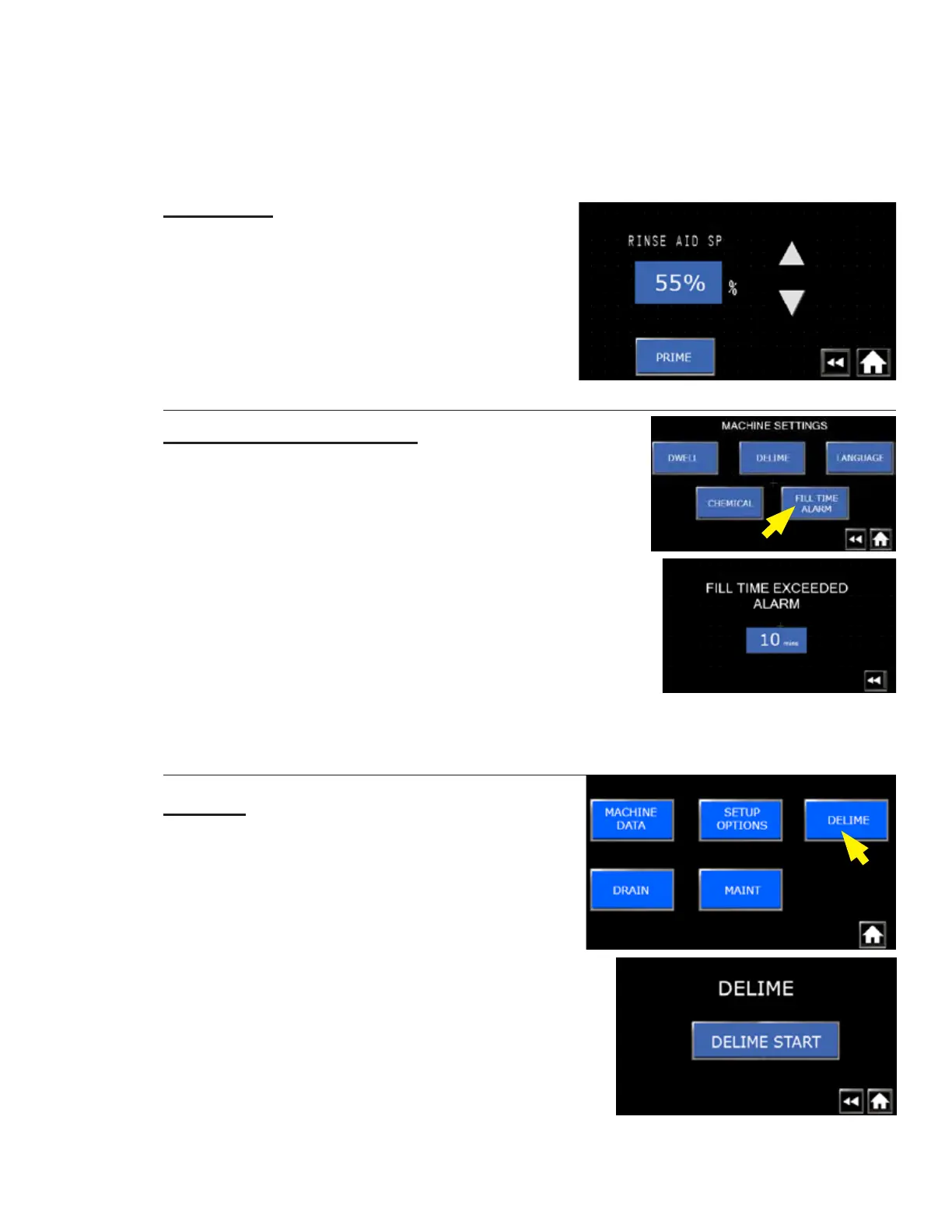
RINSE AID
Fig. 44 - Rinse aid settings
• Press Rinse Aid, Fig. 42, button to display settings.
• Factory default setting for pump speed is 55%.
• Press PRIME to manually run the rinse aid pump.
Fill Time Alarm Settings:
Fig. 45 - Fill time alarm setting
• The alarm setting works in conjunction with the FLOAT
FAULT conditions explained on pages 24-25.
• The FILL TIME EXCEEDED ALARM setting determines
the length of time the machine will try to fill before a fault.
• Press FILL TIME ALARM on the machine settings screen.
• The factory default setting is 10 minutes.
• Press the blue box to change the time and press ENT.
(THIS CONCLUDES THE SUPERVISOR SETUP OPTIONS SECTION)
DELIME
• A delime operation can be started from the
supervisor mode.
• Press the DELIME button to start the delime.
• Press DELIME START.
• Refer to pages 22-24 for the operator delime
operation.
Chemical Settings: (continued)
Fig. 46 - Supervisor delime option




 To Next Page