15
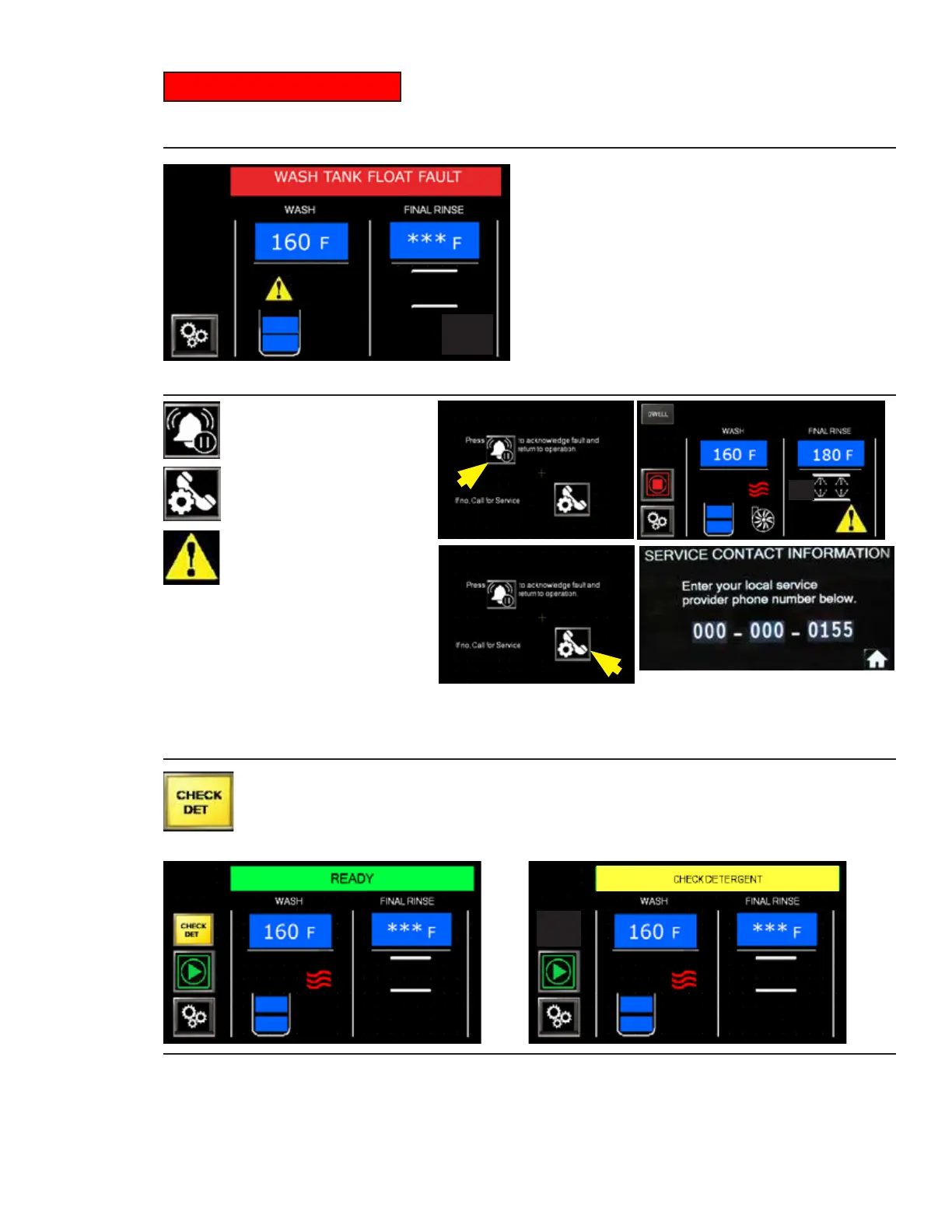
WASH TANK FLOAT FAULT TOUCH TO RESET
Some faults can be acknowledged
by pressing a "BELL" icon. A yellow
triangle appears on the display
reminding the operator the machine
is running with a fault.
Other faults require immediate action. Pressing the "PHONE" icon displays a contact screen.
The operator must immediately call for service to fix the problem.
WASH TANK FLOAT FAULT
Problem with wash tank float. Yellow triangle appears. Press
the triangle for instructions. Clean and check the movement of the float. Remove racks for
rewashing, and press the green start button to resume operation. Triangle disappears, Fig. 26.
Fig. 26 -Wash Tank Float Fault
Faults
Dishwashers with a Champion built-in detergent system will get a "CHECK DET"
button on the display. Press the button to recharge the system. If this does not
fix the issue then "CHECK DETERGENT" appears in the status bar. Inspect
the detergent system to ensure the chemical container is full. Machine continues to run.
Fig. 28 -Check Detergent
FAULT
ACKNOWLEDGE
FAULT BYPASS
CALL FOR SERVICE
Fig. 27 -Fault Actions




 To Next Page