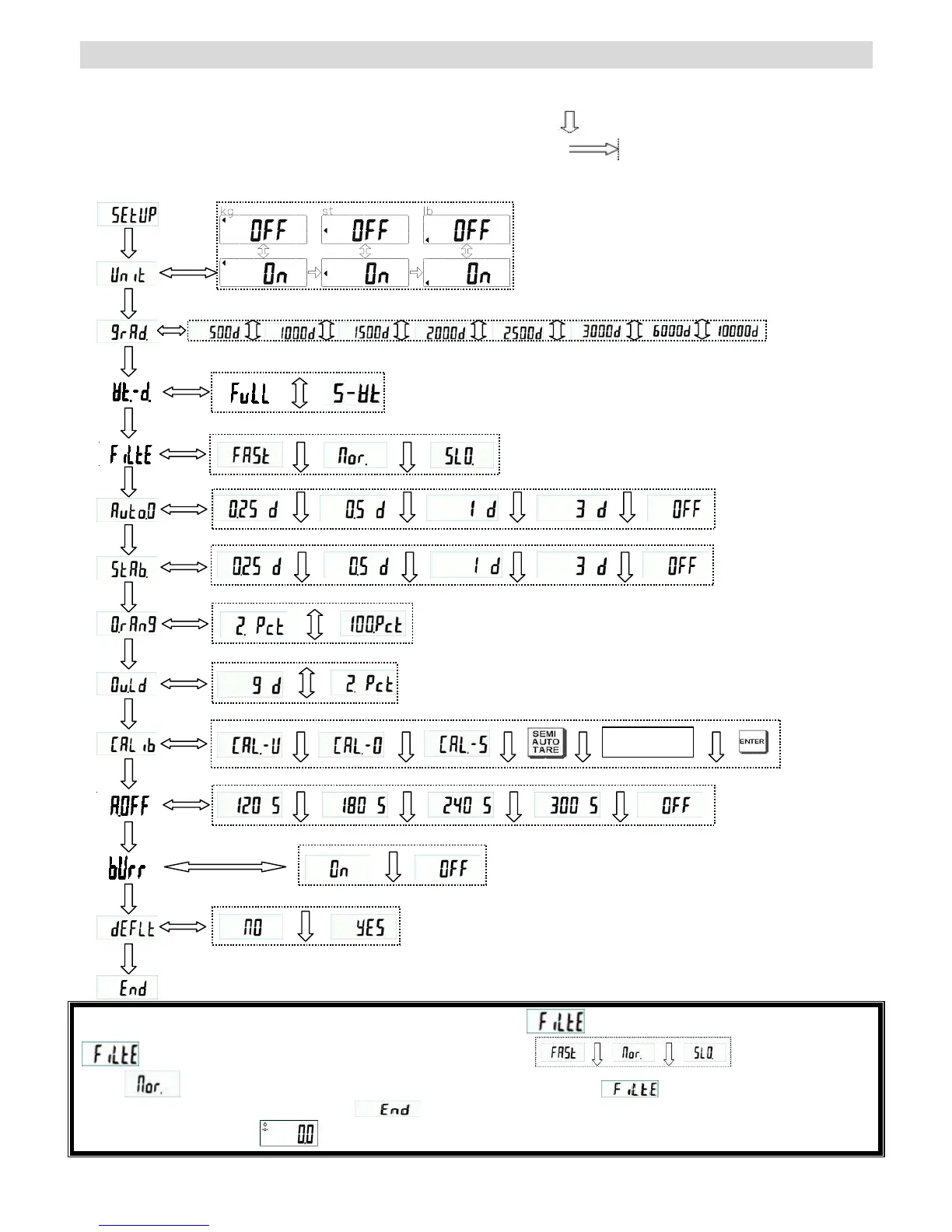
MS2500 SERVICE MENU CONFIGURATION
Press [UNIT 4key display] for 3 seconds without release to enter program setting mode.
First SETUP will appear, and then it will change to “UNIT” automatically.
Press [TARE 4key display] to switch to next function. Program flow is like
Press [HOLD/BMI 4key display] to enter function flow. Program flow is like
To confirm desired setting press [TARE 4key display] to go back to main menu.
To save all changed setting, please switch to END and press [HOLD/BMI 4key display] to save and then scale will restart.
Example- Press SEMI AUTO TARE key 3 times when display shows press HOLD key to enter into the
feature settings, and then press HOLD key to move between and if you want to
select , Press SEMI AUTO TARE key again, after the selection is made will display back automatically.
*Please press SEMI AUTO TARE key until displays on the screen, and then press HOLD key, to apply the
changes. Display will show ; means changes has been applied successfully.
enter



 To Next Page