EasyManua.ls Logo

Charder MS-2500 - Wiring

Charder MS-2500
35 pages
Print Icon
To Next Page IconTo Next Page
To Previous Page IconTo Previous Page
Loading...
6
WIRING
ACTION:
1. Remove battery from the scale.
2. Un-screw the lower housing.
3. Remove upper housing.
4. Make sure that all wire connectors are well and that no insulation material is
touching the soldering contacts.
5. Make sure that all wires are connected to the correct points.
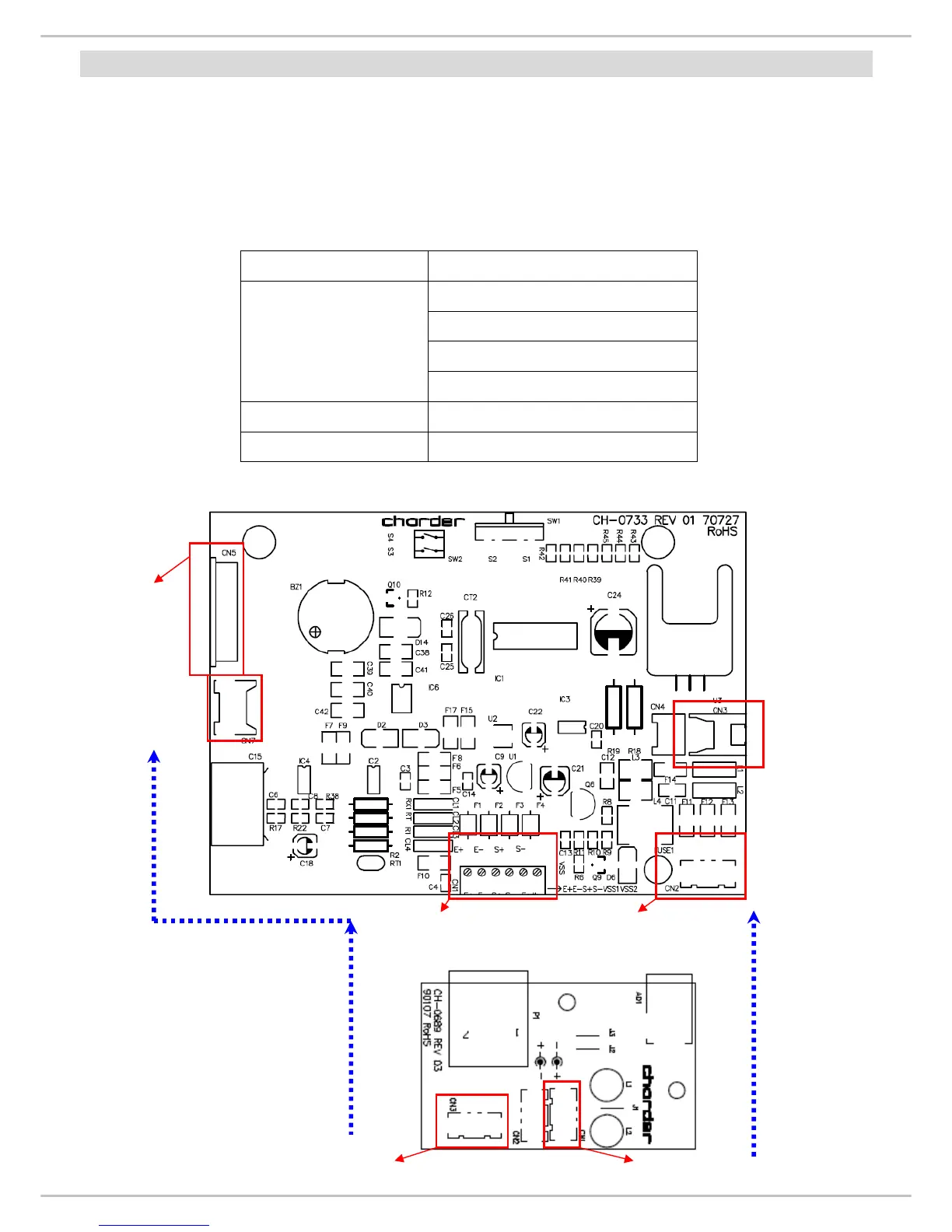
Wiring Connector
RED (solder pad “E+”)
WHITE (solder pad “S+“)
YELLOW (solder pad “S-”)
Load cell wiring
(from junction board to
main board)
BLACK (solder pad “E-“)
Battery Wiring CN 3
Power Wiring CN 2
Main Board (CH-0733)
Power Board (CH-0689)
RS 232
connector
Control panel
connector
Load cell
connector
Power board
connector
Battery
connector
AC Jack connector (CN 1)
RS 232
connector

Other manuals for Charder MS-2500

Related product manuals