15
CALIBRATION PROCEDURE
To calibrate the scale, please turn off the scale and move Calibration pin to center
(refer P.14).
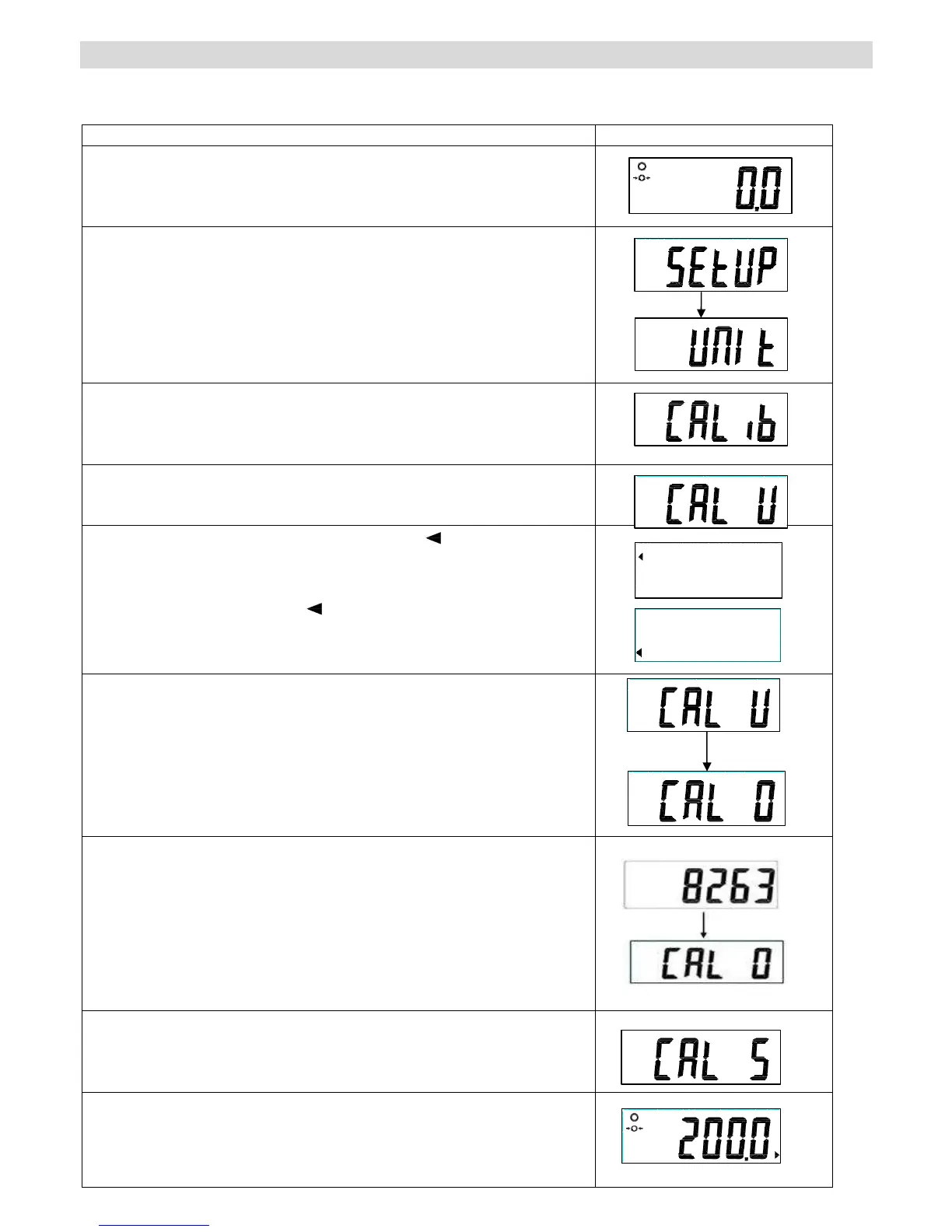
Operation Display
Turn the scale on using the ON/OFF key.
Press UNIT key for 3 seconds and SETUP will show
shortly. UNIT will appear on the display.
Press the TARE key repeatedly until the “CAL ib”
symbol is displayed.
Press the HOLD/BMI key.
Press the TARE key. The triangle [ ] will display in
the upper left corner (for “kg” calibration weight).
(If the calibration weight is “lb”, please press TARE key
again and the triangle [ ] will display in the lower left
corner.)
Press the HOLD/BMI key repeatedly until the “CAL 0”
symbol is displayed.
Press the TARE key, the display will show the present
ZERO Count value (6000~12000).
Then press the UNIT key.
Press the HOLD/BMI key.
Press the TARE key.
Enter the calibration weight (ex: 200kg). Press TARE
key and HOLD/BMI key to set your weight.


 To Next Page