32
GRAVITY COMPENSATION
If the scale has been moved (transported to another city/state/country) from the place where it has been
calibrated, the user need to carry out Gravity Compensation Procedure to compensate the Gravity difference
between the place of calibration and place of use (refer P.32 for example). Please follow the procedure below:
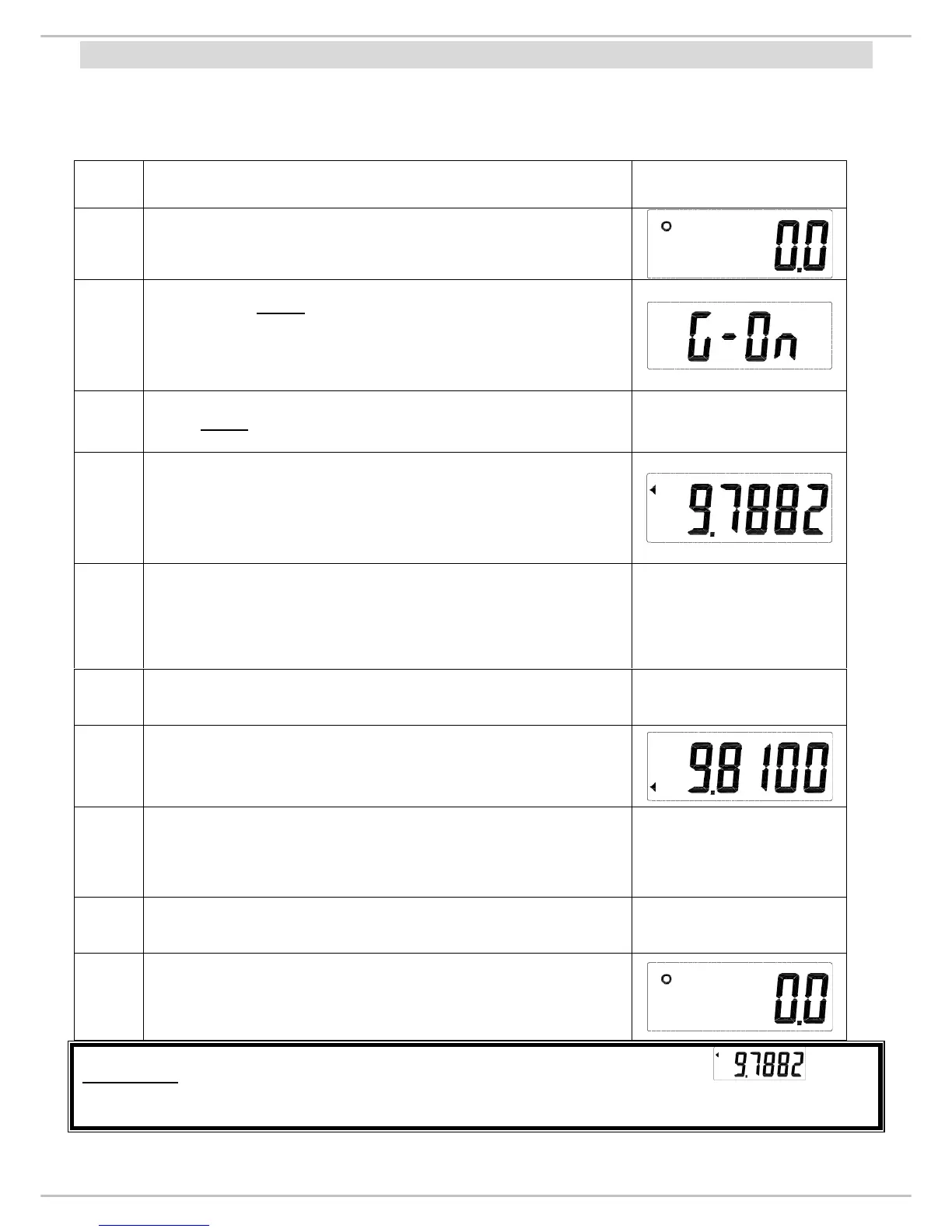
For Example- The scale has been calibrated in France therefore origin gravity (step.4) is . Later
the scale has been transported to England, as the gravity of England is not same as of France, thus we need to
compensate the gravity and key in the gravity of England (step.7) using (0~9) key.
Steps
(See P.16)
Power on the scale.
2
Long press ZERO key for 3 seconds to enter “Gravity
Compensation Mode”. Initially display will show G-on.
Note: If display shows G-OFF, press HOLD/BMI button to
change it to G-On and press TARE key (step.3).
3 Press TARE key to start setting the original gravity.
4
The display will show the last origin gravity value. The top
arrow will appear. (see right picture)
5 Input the gravity value by using HOLD/BMI and TARE key
6
After setting the original gravity value, press TARE key and
start setting the gravity value of the place for use.
7
The display shows the gravity value of using place. The
bottom arrow will appear. (see right picture)
8 Input the gravity value by using HOLD/BMI and TARE key
9
After setting the gravity value, press TARE key and return to
zero count mode.
10
Power off the indicator and


 To Next Page