Setting Up Your Passwords
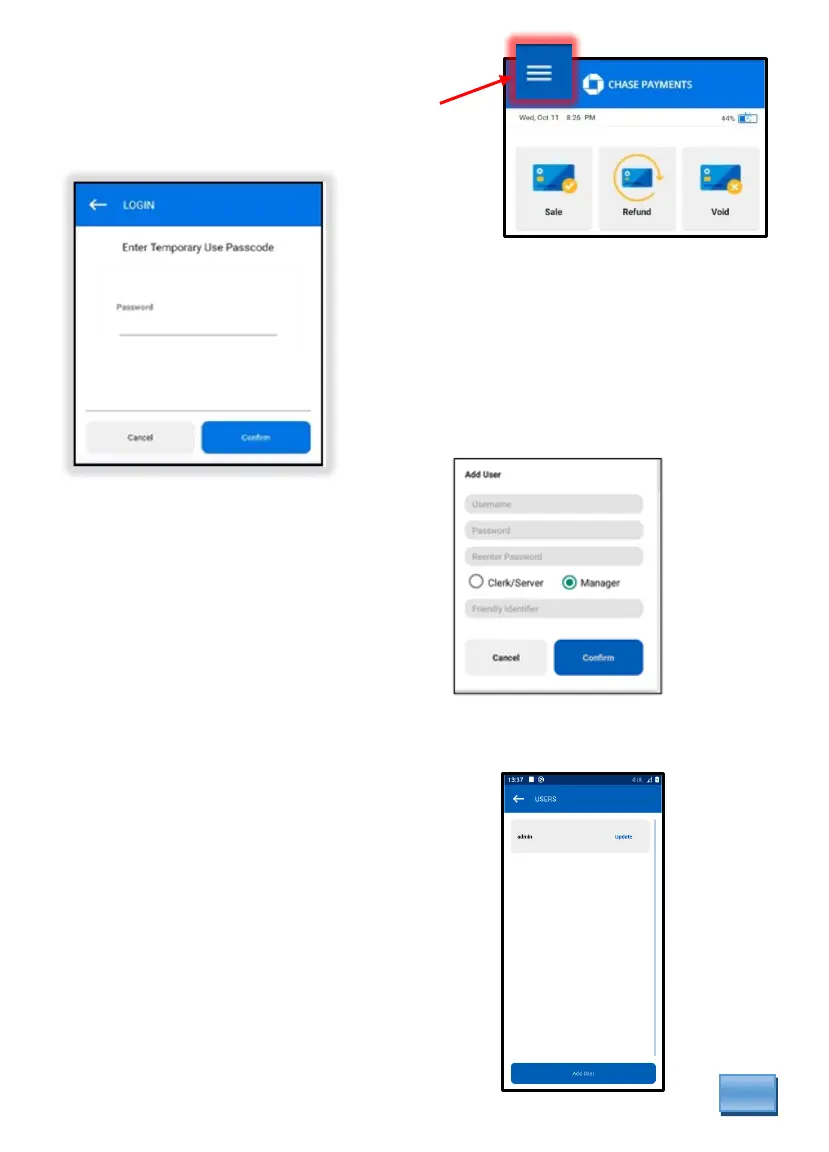
From main screen, choose the menu icon in the
upper left corner and select [User].
Add Manager(s)
Press [Add User] located at the bottom of
the screen to create user account.
1. Enter a Username
[Ex: Jane Smith]
2. Enter a password.
▪ Must be 8-characters
▪ 1 Upper
▪ 1 Lower
▪ 1 Special Character
3. Press Confirm to save changes.
4. Repeat Steps to add additional
Managers/Users.
Press/Tap [Admin]. You will be prompted to
“Enter dynamic password’.
Please use password provided by your
dedicated payment advisor.
Press/Tap [Add User] located at the bottom of
the screen to create user account.



 To Next Page