More Information and Support
Below is some helpful information about transactions and functions on
your terminal.
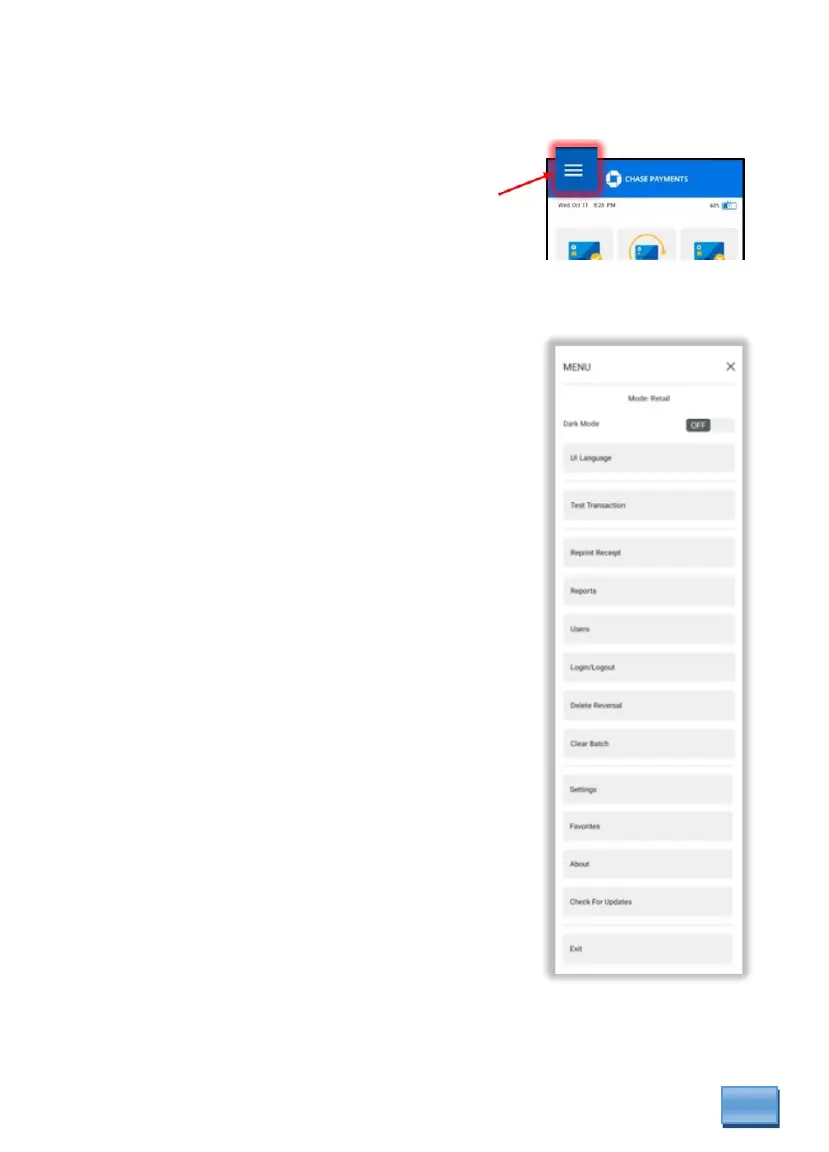
From main screen, choose the menu icon in the upper
left corner and select applicable options.
Access Reports/ Reprint a Receipt
Scroll through the menu to select desire operation.
Press the screen to start the transaction or function.
Settling the Batch
Your terminal batch contains all the daily
transactions to be settled. Settlement is the process
of managing your transactions, so they are funded
to your banking account.
For the DX4000 terminal, there are three (3)
settlement options:
• Manual Settlement
• Host Auto Settlement [default]
• Terminal Auto Settlement
Manual Settlement
If your terminal is set to Manual Close, press to access
the [Settlement] button on the main screen of the
payment application. (Where you would see your Sale
button).
Host or Terminal Auto Settlement
If your terminal is set to either Host or Timed Auto Settle,
it will automatically settle transactions in the current batch
at a specific, predetermined time, within a 24-hour period.
Note: If the terminal is unplugged or turned off before the set time, the auto settlement will
occur when the terminal is turned on again.



 To Next Page