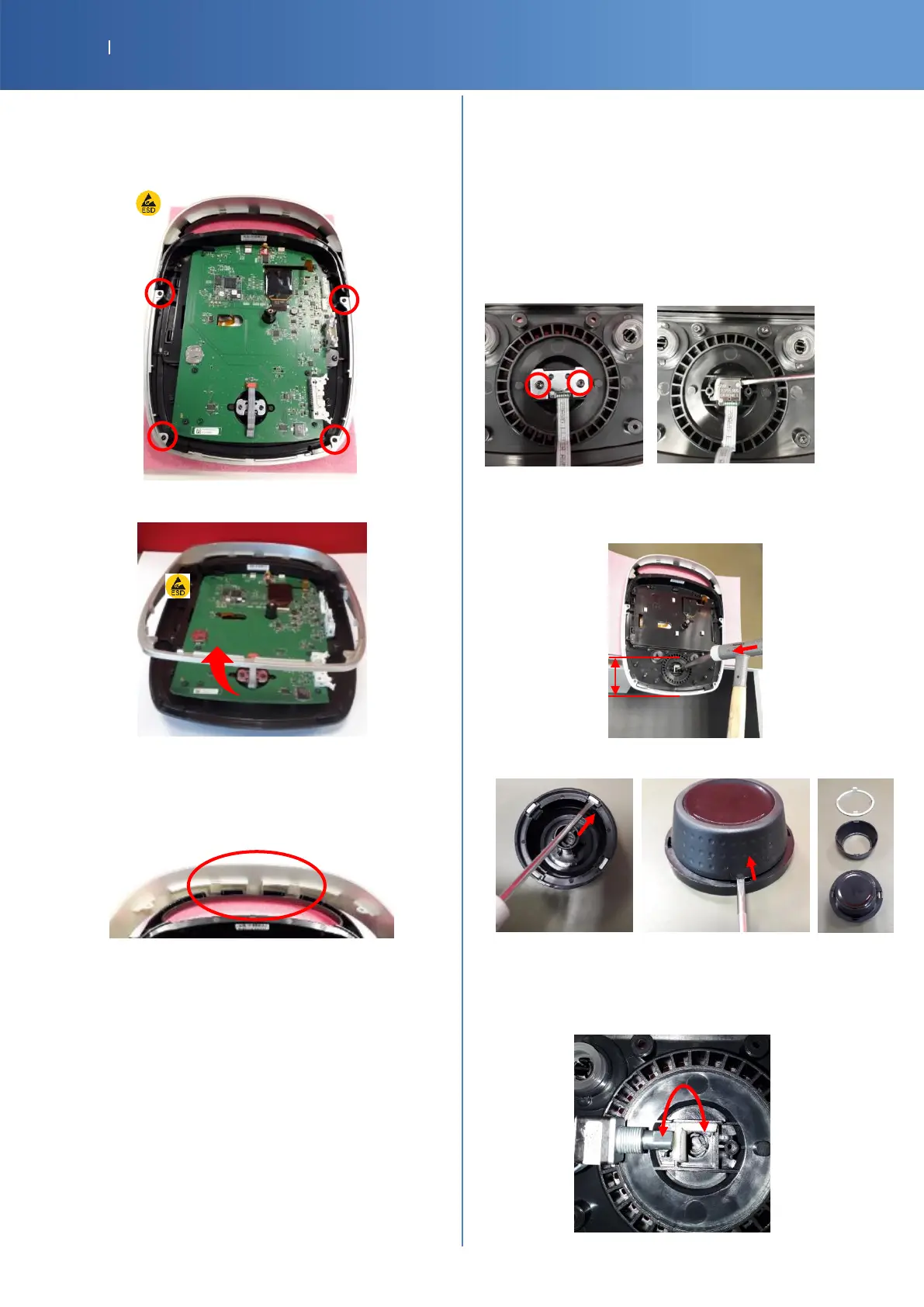
DEVICE EXTERNAL SILVER
G16-4011-SP MOB2 DEVICE EXTERNAL SILVER
Unscrew these 4 screws (Torx T10)
Unclip the up of the silver part
KNOB / ENCODER
G16-4041-SP MOB2 KNOB EXTERNAL RING SILVER
G16-4311-SP MOB2 KNOB RUBBER BLACK
14-1031-SP ENCODER GRAYHILL 62AG11-L0-020C
Return the front cover to remove the encoder
Unscrew and remove the metal support
The encoder is just inserted in the knob
To remove the encoder: use a tool to make it come out
Don’t pull on the ribbon cable
Place the top assembly on a foam and the knob area just
out the table
Put a pin punch (5mm max) inside the hole of the knob and
knock gently with a hammer
Unclip the silver and the rubber part with a little flat
screwdriver
To put back in place:
Clip the rubber and the silver ring
Insert the knob in the bearing and check the good rotation
Insert encoder: the foam must stay in place and respect the
position of the flat form














 To Next Page