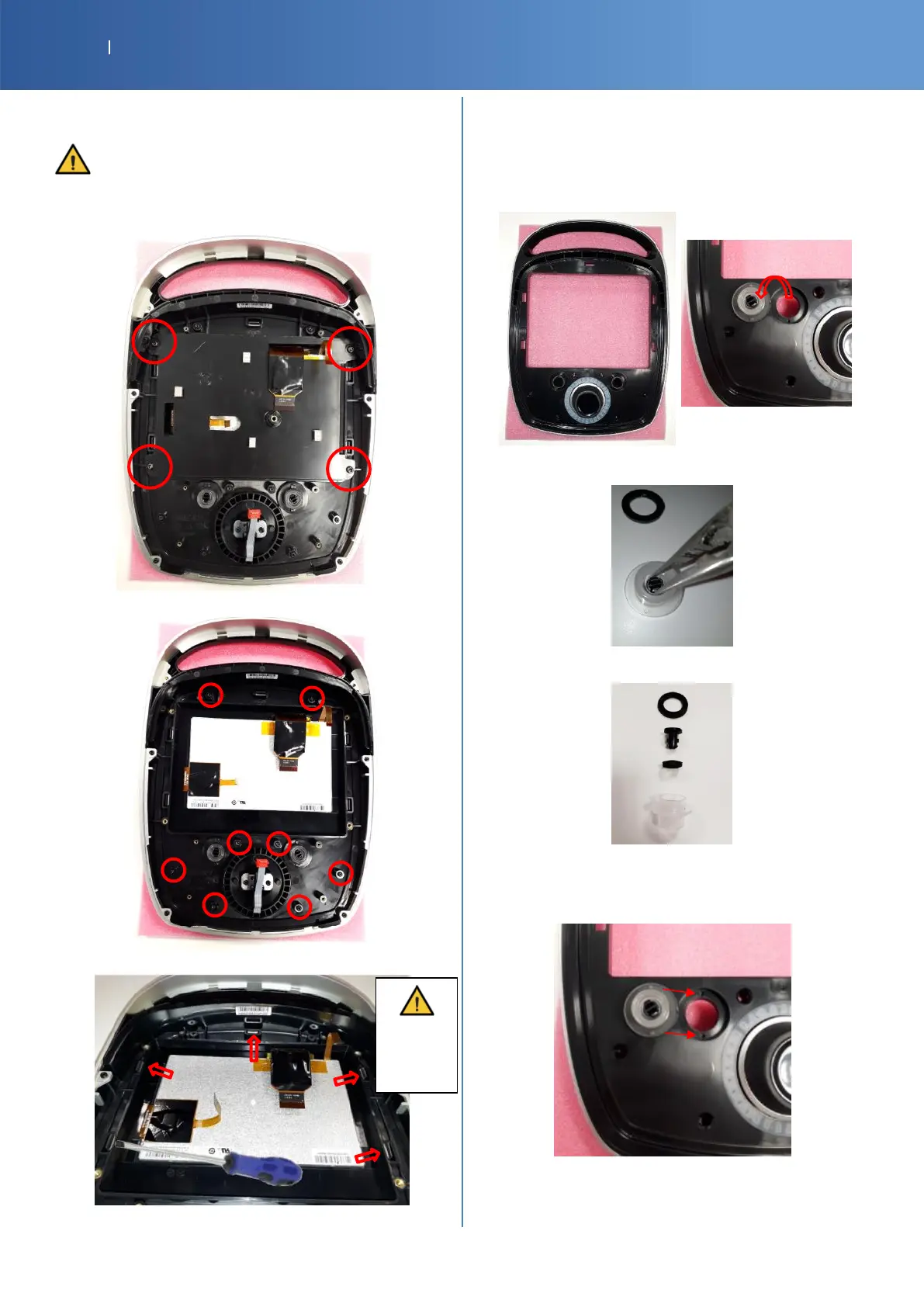
DISASSEMBLY TOP/ LENS + LCD
Disassembling the top/ lens with the LCD can be
risky for the LCD. Do that only if buttons don’t
work (needed to be clean or replace)
Unscrew these 4 screws (Torx T20)
Unscrew these 8 screws (Torx T10)
Push and unclip these 5 points with a flat screwdriver
CONTROL BUTTONS: PLAY and ON/OFF
G16-4061-SPMOB2 CTRL BUTTON
G16-4321-SP MOB2 CTRL BUTTON RUBBER
G16-4481-SP MOB2 CTRL BUTTON EXT SEAL
G16-4071-SP MOB2 CTRL BUTTON LIGHT PIPE
Clamp the 2 clips of the button part and then push
Disassemble completely the button to clean it
Check the right position of the seals and put the pins in
the holes then clip the lens with the display














 To Next Page