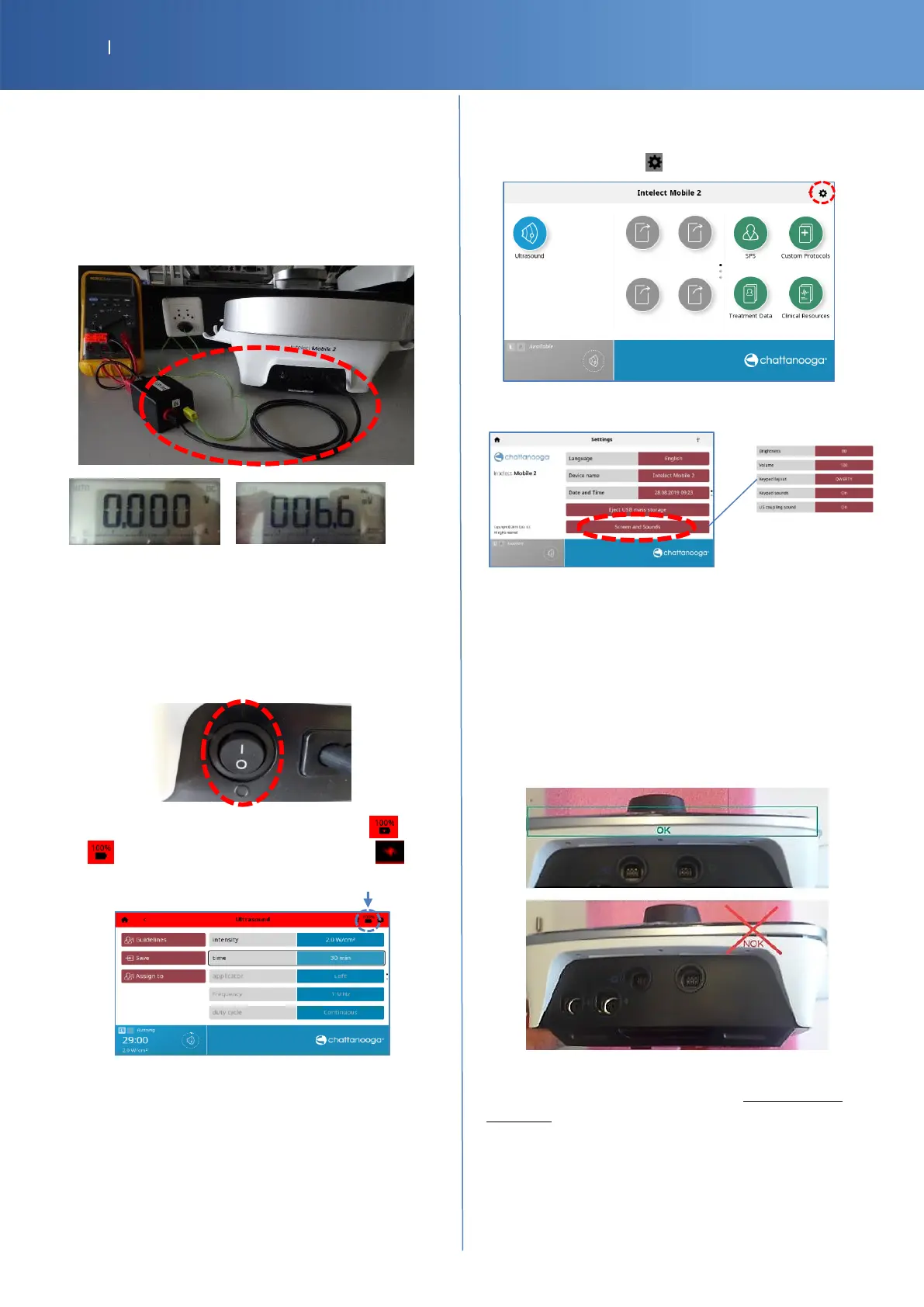
Enclosure Leakage
• Use the “USB-Banana” cable to connect the USB of the
device and the red connector IN (MD box).
Note : Sometimes, when you plug the USB to the device a
warning with a sound appears, this is normal behavior.
• Set the multimeter to V DC and V AC, then read the
values after stabilization.
Value of V DC Value of V AC
• Check Pass/Fail the tracker sheet §7 , if the values are
less than the reference
Battery detection (test optional)
• Switch OFF the power line.
• Verify that the battery logo change, before , after
(there is no more the symbol of charge )
• Check Pass/Fail the tracker sheet §8 if the battery is
detected.
To check the autonomy of the battery: “Battery Test” P32
Visual inspection
Screen and Sounds
• Press the “sys “icon. .
• Press to « Screen and Sounds »
Modify “Brightness” to test the back light
Modify “Volume” to test the sound
Casing
Verify if:
-
The casing is correctly closed
-
The holders are not broken
All tests performed are passed and the battery is
removed.
Check Pass/Fail the tracker sheet §9














 To Next Page