| Intelect
®
Mobile 2 - Service Manual 67
8.4. ULTRASOUND APPLICATOR
•
Print the tracker sheet (page 67)
•
Note on this tracker sheet the Serial number and
the size §1 & 2
Power On the device
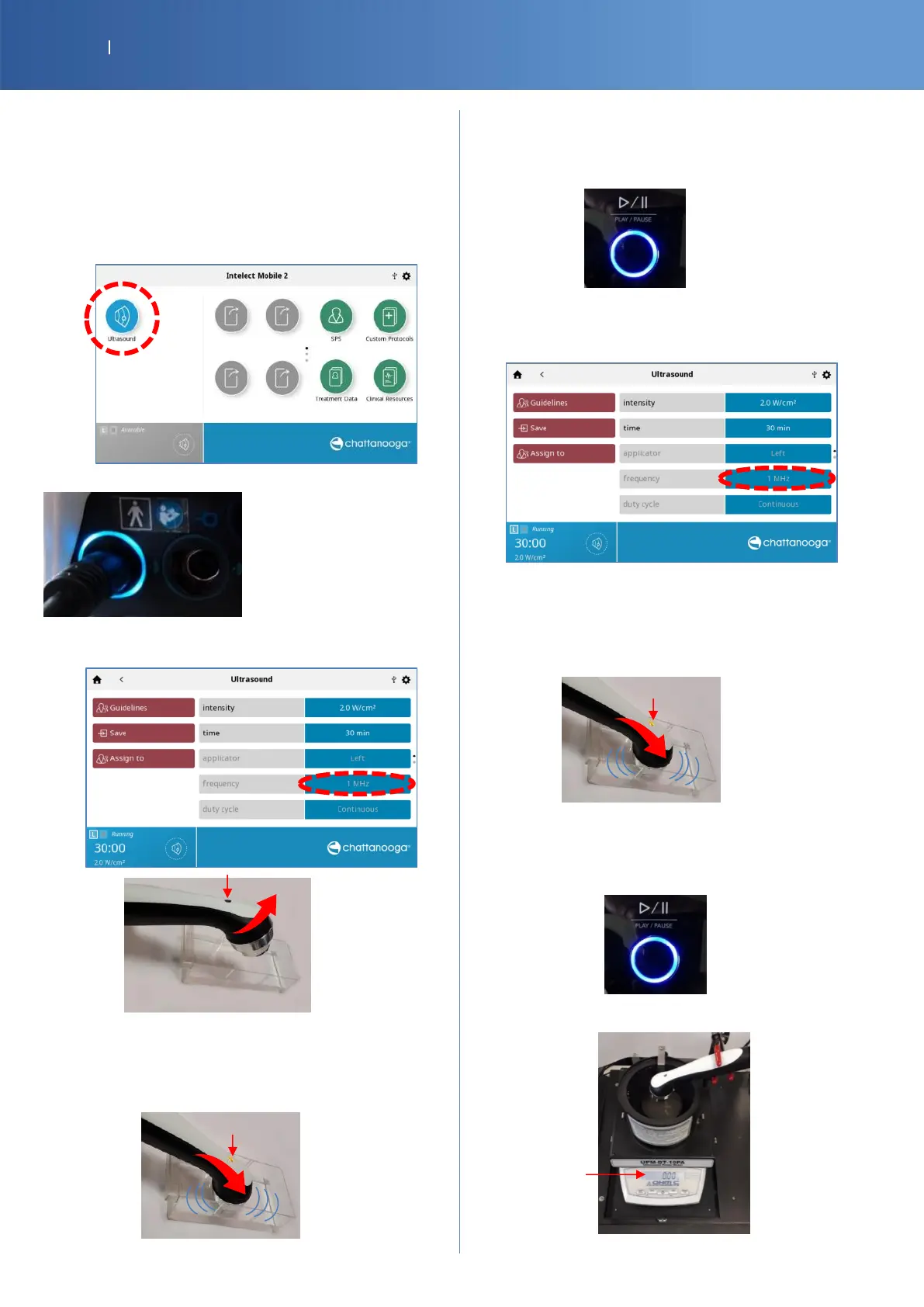
Select US therapy menu
Plug the applicator to be tested on left port
Select 1MHZ frequency and start treatment
The applicator must be in air or in the holder
Verify the LED is blinking in BLUE,
Check Pass/Fail the tracker sheet §3
Put the end of the transducer in water
Verify the LED is light continuously in BLUE,
Check Pass/Fail the tracker sheet §4
Pause the treatment
Select 3MHZ frequency and start treatment
The applicator must be in air or in the holder
Verify the LED is blinking in BLUE,
Check Pass/Fail the tracker sheet §5
Put the end of the transducer in water
Verify the LED is light continuously in BLUE,
Check Pass/Fail the tracker sheet §6
Pause the treatment
Place the applicator on the wattmeter














 To Next Page