CORE™ 3x3 User Manual Rev. 1 Page 11 of 23
4. OPERATION
To access the control panel functions, use the four buttons located underneath the
display.
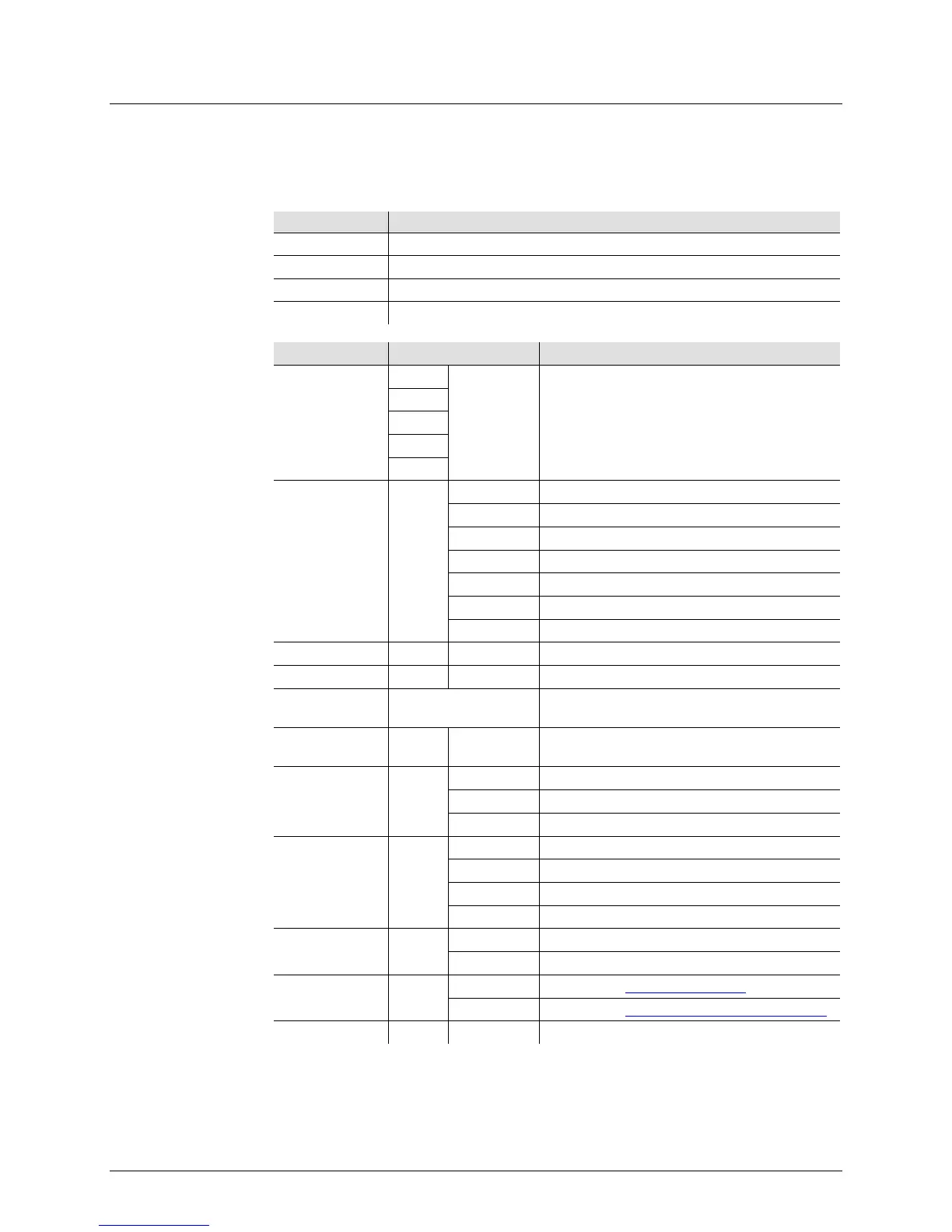
Button Function
<MENU> Selects an operation mode or to backs out of the current menu option
<UP> Scrolls up the list of options or selects a higher value
Scrolls down the list of options or selects a lower value
<ENTER> Activates a menu option or a selected value
DMX
Personalities
and Starting
Address
3-CH
d 1–d512
Selects DMX personality and
starting address
5-CH
9-CH
27CH
31CH
Static Colors C--
Red
b Blue
gb Cyan
r b Magenta
Yellow
rgb White
Auto Program P-- P 1–P 6 Auto programs
Program Speed S-- S 1–S100 Selects auto program speed (slow to fast)
Sound-Active
Mode
Snd Sound-Active mode
SEnS u 0–u100 Sound sensitivity control
Custom Color
Mixing
U--
Red (0–100%)
b 0–b255 Blue (0–100%)
Dimmer dIM
OFF Dimmer speed off
dIM1 Dimmer, fast speed
Dimmer, medium speed
dIM3 Dimmer, slow speed
Fan Settings FAN
Fan automatically turns on
Master Modes SEnd
SEd1 Mode 1 (see Master/Slave Mode
)
SEd4 Mode 4 (see Two-by-Two Master/Slave Mode)
Slave Modes SLA SLA1–SLA4 Slave modes 1–4



 To Next Page