Equipment Setup and Operation
CHCNAV i83 GNSS USER GUIDE
| 2022-01
5.5
IO Settings Menu
Use the IO Settings menu to set up all receiver outputs and inputs. The receiver can output
CMR, RTCM, Raw data, Ephemeris data, GPGGA, GPGSV, on TCP/IP, UDP, serial port, or
Bluetooth ports.
5.5.1 IO Settings Submenu
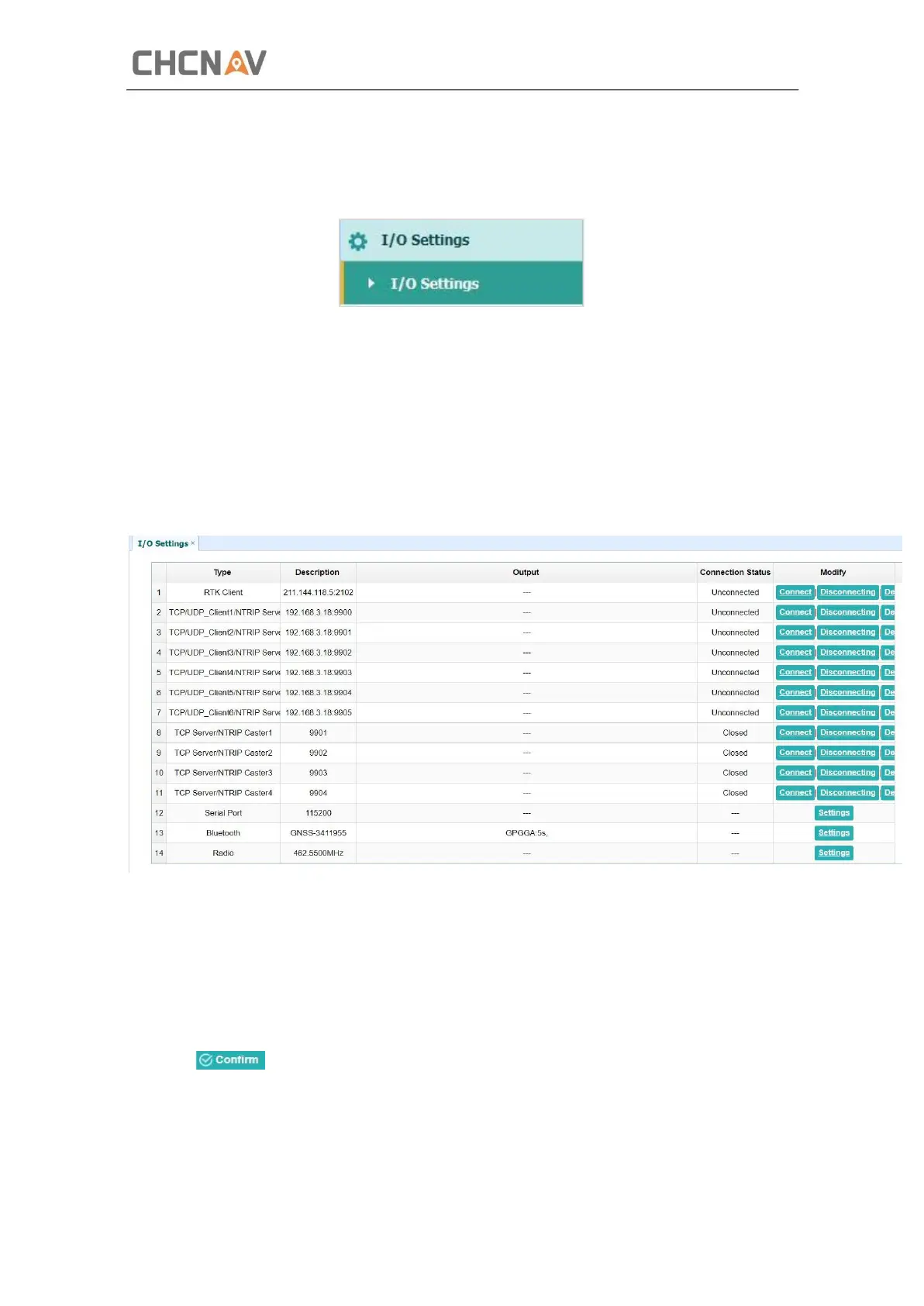
The following figure shows an example of the screen that appears when you select this
submenu.
In this submenu, users can configure 6 types of input and outputsettings.
1. RTK Client
After configuring the settings of RTK client, users can log on CORS or APIS. Tap the Connect
button to the right → the IO Settings screen will appear → choose one of the connection
protocols among the NTRIP, APIS_BASE and APIS_ROVER → configure the related parameters
→ click to log on CORS or APIS.



 To Next Page