7
4- PRODUCT OPERATION
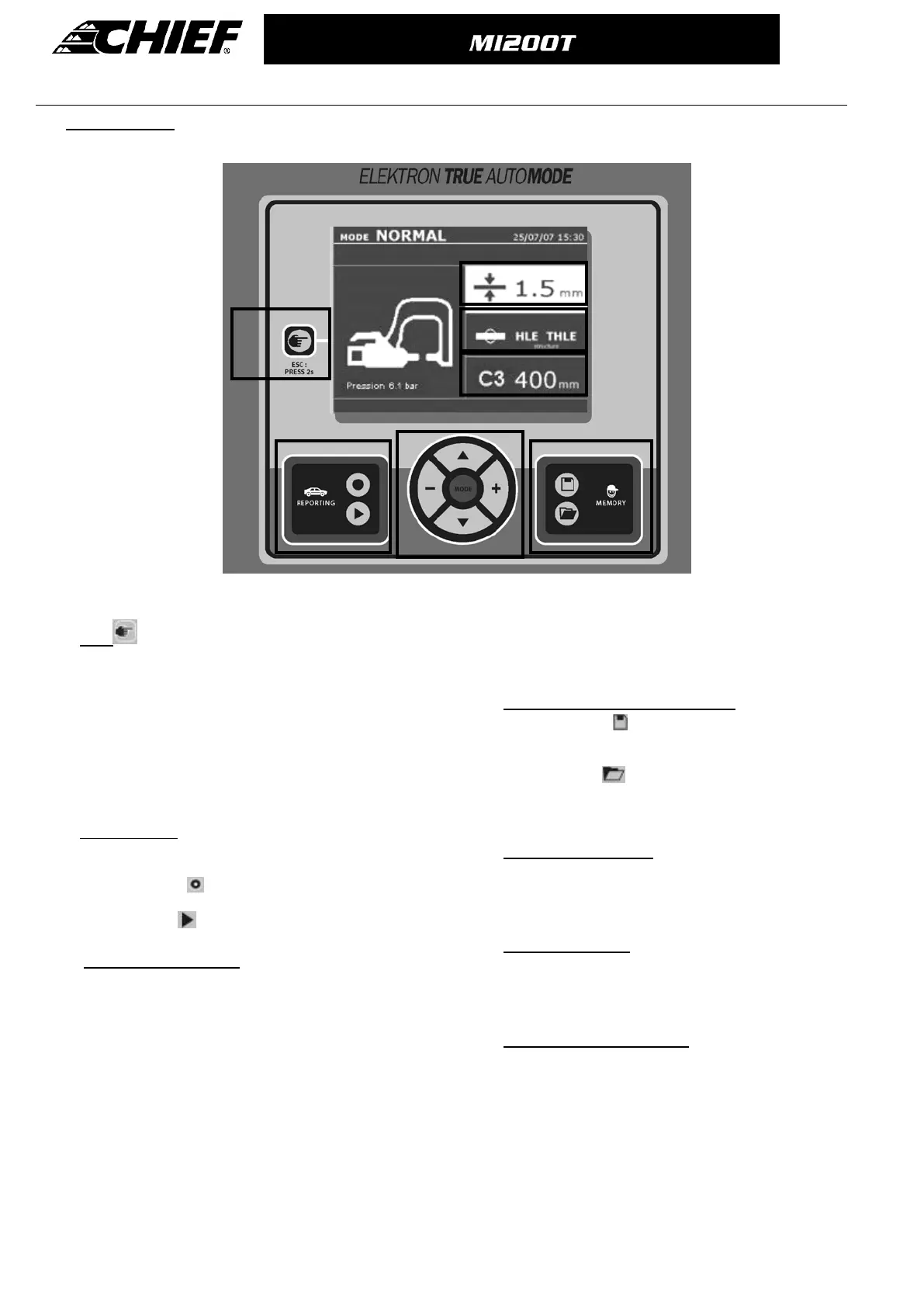
Key definition
① key
_ This key is used to select the tool required: Clamp,
single-sided gun or “clamp adjustment”
- Press for 2 seconds: to return to normal mode from
any other mode.
- To re-set the spot-counter to 0 (when displayed): Press
for 2 seconds.
- In visualisation mode: Press twice to erase the report
that is displayed on the screen.
- In Program Saving mode: Press the button briefly to
erase the selected program.
② Save a report
More details can be found on this function in the
corresponding chapter.
The « record » key enables or disables the saving of
a report.
The « View » key
allows the user to read the
sequence of spots performed.
③
Using advanced modes
The MODE button navigates through 4 different modes:
STANDARD MODE, MULTISHEET MODE, MANUAL MODE,
and AUTO MODE. A prolonged press on the MODE key
enters the configuration mode, where the language and
date can be edited and the warning sound activated for
“current too low” or “low pressure” messages. The up and
down keys go through the parameters to modify (sheet
thickness, type of steel, arm used). The + and – keys
allow modification of each parameter. sich die Werte
ändern oder auswählen; die + und – Tasten erhöhen bzw.
verringern den ausgewählten Wert.
④ Saving of user welding parameters
The « save » button allows the user to save
selected welding parameters (mode, sheet thickness,
welding current, welding time or electrode force)
The “open” button
will restore previously saved
welding settings. The machine automatically goes to
manual mode, recalling the saved parameters (current,
welding time, force) and the tool used (clamp or gun).
⑤ Select sheet thickness
The sheet thickness can be adjusted using the + and –
keys. The thickness can be selected from the following
preset values: 0.6, 0.8, 1.0, 1.2, 1.5, 1.8, 2.0, 2.5, 3.0
mm.
⑥ Select type of steel
This allows the selection of the type of metal to weld from
4 different options: coated steel, HTS steel, UHTS steel,
BORON steel. This setting can be adjusted using the +
and – keys.
⑦ Adjustment of the arm used
When a clamp is used (either C or X), the user should
specify the length of the arms fitted to the clamp, so that
the machine will automatically adjust the air pressure to
reach the required electrode force.



 To Next Page