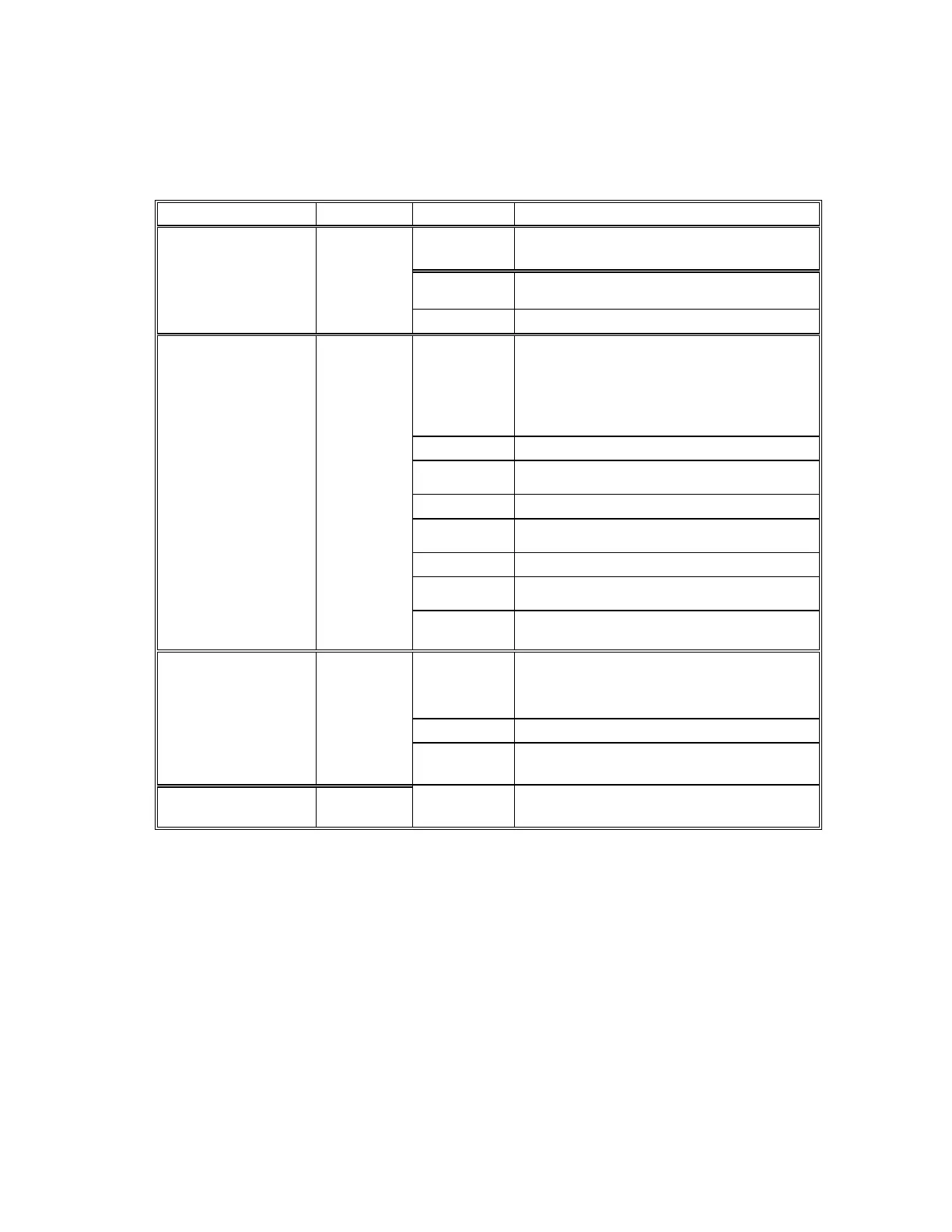
2.2 LED status
LED Color(s) Activity Desc.
Off Power OFF
Red
Blinking
Booting/System Self-Test
Power Red
Red On Device Ready
Off No Ethernet Link
Link Green
Green On Ethernet Link established
Off 10 Mbps
SPD Green
Green 100 Mbps
Off No collision
Collision
Red
Red Collision
Off No data activity
Ethernet
(on the RJ-45
connector)
ACT Green
Green
Blinking
Transmitting/Receiving
Off No TCP/IP session link
Green On TCP/IP session link established
Transaction
Link
Green
Green
Blinking
Data Sending/Receiving between Serial
and Ethernet
COM Port No.1-8 Green On The COM port is connected
2.3 Initial Setup
Use this section to set up your computer to assign it a static IP address in the 192.168.168.1 to
192.168.168.254 range with a subnet mask of 255.255.255.0. This is necessary to ensure that
your computer can communicate with your BF-480.
Your computer must have an Ethernet card and TCP/IP installed. TCP/IP should already be
installed on computer using Windows 98/2000/XP and later operating systems.
Note: Connect a computer to BF-480 Ethernet port directly should be with crossover
Ethernet cable, if both connect to hub/switch should be with straight-through Ethernet
cable.


 To Next Page