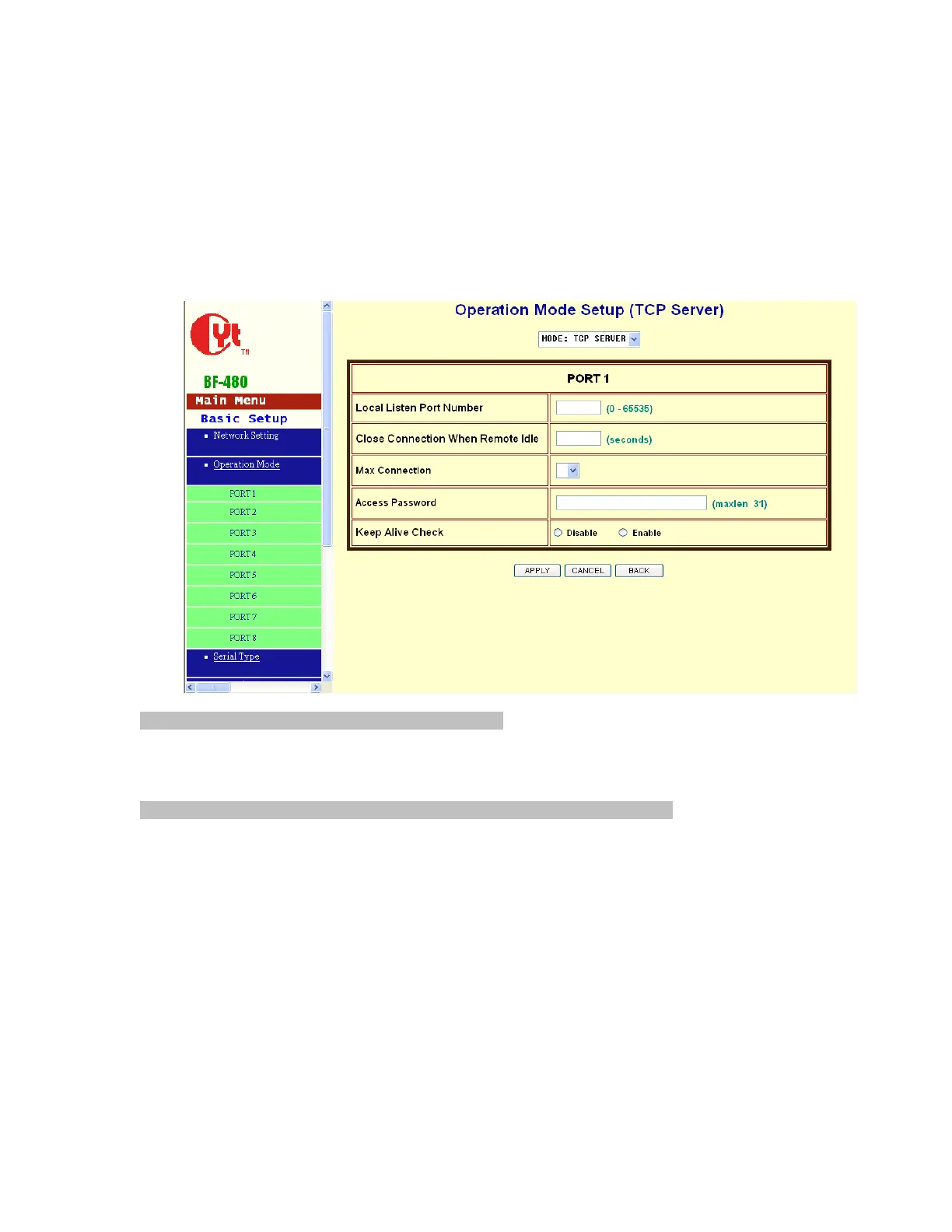
3.2 Operation mode
The BF-480 support four operation mode: TCP Server, TCP Client, UDP Server and UDP Client.
These modes are listed in the drop-down menu for the Operation Mode setting. Each setup
screen and available features will differ depending on what kind of operation mode you select.
Default is TCP Server.
TCP Server
Listen Port Number: default 50000, range 0 to 65535
If your device is acted as passive to accept commands from remote and the data be guaranteed
to be received by peer is your concern, then you can set BF-480 as TCP Server. Be sure the
value of item Listen Port Number is same as your remote control application using.
Close Connection When Remote Idle (second): default 300, range 0 to 32768
If you want to keep the connection between BF-480 and your remote control application always
on, then set the value of item Close Connection When Remote Idle to 0, otherwise, when the
idle time of no any traffic on line reach the setting value, BF-480 will terminate this connection.
For security concern, you can input Access Password to protect your device,
BF-450(M)/BF-430/431 will authenticate whether this TCP connection is valid by this password.
Keep Alive Check: default Disable
Disable: Disable the check of TCP connection is still alive or not.
Enable: BF-450(M)/430/431 automatically send a Ping request to peer per each 30 seconds, the
TCP connection will be terminated if no response of Ping reply from peer.
Max TCP Connection: default 1, range from 1 to 4
The allowed TCP connections accept by BF-450(M)/430/431 simultaneously. It is usually used
when user needs to receive data from different hosts simultaneously. When multiple hosts
establish TCP connection to BF-450(M)/430/431 at the same time, it will duplicate serial data and
transmit to all hosts. When data comes from Ethernet port, it is sent on first-in-first-out basis to


 To Next Page