Need help?
Do you have a question about the Chuango H4 and is the answer not in the manual?
Describes stable transmission frequencies for the system.
Outlines key features like dual network support and accessory capacity.
Highlights security features like tamper switch and RF codes.
Covers ease of use regarding accessory management and app control.
Explains different zone types like Normal, Home, Delay, and 24-Hour.
Details the meaning of various indicator lights on the panel.
Step-by-step guide on how to power on the H4 panel.
Instructions on placing the panel on a table for optimal use.
Explains the buttons and functions of the remote control.
Details the indicator light behavior on the remote control.
Explains the testing and power-saving modes of the PIR motion detector.
Details the power-saving mechanism based on human body movement detection.
Steps to pair wireless accessories with the H4 panel.
Procedure for removing paired wireless accessories.
Step-by-step guide for installing the door/window contact sensor.
Instructions for mounting and setting up the PIR motion detector.
Guide on downloading the 'H4 Smarthome' mobile application.
Instructions for connecting the panel to a WiFi network via the app.
Steps to register the panel and user account in the app.
Managing system arming/disarming and accessory configuration via the app.
Controlling smart switches and setting schedules through the app.
Configuring automated actions (rules) based on system status or scenarios.
Managing user accounts, including adding subusers and changing passwords.
Setting up phone numbers for alarm notifications via GSM.
Configuring siren tones, volume levels, and ringing times.
Setting delay times for arming and disarming the system.
Guide on resetting the system to its original factory settings.
Covers usage, liquid/foreign object warnings, repair, and accessory use.
Lists conditions to avoid like extreme temperatures and humidity for safe operation.
 General
| Wi-Fi | Yes |
|---|---|
| Alarm decibels | 105 dB |
| Wi-Fi standards | 802.11b, 802.11g, Wi-Fi 4 (802.11n) |
| Operating frequency | 433 MHz |
| Operating temperature (T-T) | 0 - 55 °C |
| Operating relative humidity (H-H) | 0 - 80 % |
| Number of supported remote controls | 10 |
| Number of simultaneously connected devices (max) | 70 |
| Product color | White |
| Housing material | Acrylonitrile butadiene styrene (ABS) |
| Motion sensor technology | Passive infrared (PIR) sensor |
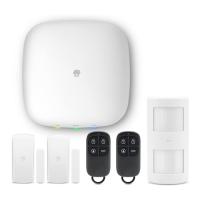
| Number of remote controls | 2 pc(s) |
| Number of door/window sensors | 1 pc(s) |
| Alarm current | 300 mA |
| Static current | 100 mA |
| Battery voltage | 3.7 V |
| Battery capacity | 800 mAh |
| Battery technology | Lithium |

 To Next Page