The Cimetrics B3075 is a BACnet/IP to BACnet/IP router designed for building automation systems (BAS) that require communication between multiple BACnet/IP networks. It facilitates the selective forwarding of BACnet messages, enabling the creation of a comprehensive BACnet internetwork. The device employs the UDP protocol (IETF RFC 768) for interoperable communication over IP networks, typically using twisted-pair Ethernet.
Function Description:
The primary function of the B3075 is to route BACnet/IP messages between two distinct Ethernet ports, referred to as the "Customer port" and the "Private port." This setup is particularly useful in scenarios where a BAS integrator wants to place BACnet/IP devices on one or more private IP networks while using an IT-managed IP network for inter-network communication or communication between buildings. The B3075 is not an IP router in the traditional sense; it performs Network Address Translation (NAT) for BACnet/IP packets. This means that BACnet/IP packets originating from devices on the private network will contain the B3075's backbone network IP address when forwarded to the backbone network, and vice-versa. The original IP address of the originating BACnet/IP device is preserved by being encoded within the BACnet NPDU, adhering to the BACnet Standard.
In addition to its core routing functionality, the B3075 offers several supplementary features:
- BACnet Device: The B3075 acts as a BACnet Device itself, with configurable Device Object instance number (Device ID) and Device Object name (Device Name).
- BBMD Support: It can be configured as a BACnet Broadcast Management Device (BBMD) on the Customer port, with optional support for Foreign Devices. This allows it to forward BACnet broadcast messages across IP subnets, which are typically blocked by IP routers.
- Packet Capture: The device supports BACnet packet capture on both BACnet/IP interfaces. Captured files can be imported into tools like Wireshark for analysis. This feature is disabled by default but can be enabled by an administrator.
- VPN Functionality: The B3075 can be configured to allow non-BACnet communication (e.g., HTTPS) between client devices on the Customer network and devices on the Private network using OpenVPN Community Edition client software. It supports two VPN modes: "Insecure OpenVPN" (construction mode with a time limit) and "OpenVPN" (no time limit, client configuration file downloadable only by admin).
- Web Server Private Key and Certificates: The built-in web server uses HTTPS, and the factory default private key and operational certificate can be replaced with user-generated ones.
Important Technical Specifications:
- Hardware: Small-form-factor computer with three Ethernet ports: two for BACnet communication (Customer and Private ports) and one dedicated for local B3075 configuration (Configuration port).
- Power: AC-to-DC power adapter (12 VDC).
- Mounting: Hardware for mounting on a flat surface or a DIN rail.
- BACnet Network Numbers: Configurable for each BACnet router port, chosen from the range 1 to 65,534.
- BACnet UDP Port: Typically 47808, but configurable for each port.
- BBMD Broadcast Distribution Table (BDT): Configurable list of BBMDs (IP addresses and UDP ports) to receive forwarded BACnet/IP broadcasts.
- Packet Capture Storage: Can store captured packets in internal RAM (ring buffer, up to 4 files x 40MB = 160MB total) or on an attached USB memory stick.
- OpenVPN: Supports one or two OpenVPN virtual NICs at IP addresses in the IP subnet connected to the Private port.
Usage Features:
- Web-based Configuration Interface: The B3075 is configured via a web browser, accessible through its dedicated Configuration port. Access can also be enabled through the Customer and Private ports.
- User Accounts: An "admin" account is always enabled, and the password must be changed upon first use, adhering to complexity requirements.
- Configuration Activation: Changes to configuration parameters are saved and applied only after activation from the "Activate Configuration" page, which initiates a device reboot. Unactivated changes are discarded upon power loss or logout.
- DHCP Client: The Customer port can be configured to use DHCP to obtain network settings, though a DHCP Reservation is recommended for stability.
- Syslog Client: An internal syslog client can forward logged events to an external syslog server for monitoring.
- NTP Client: An internal NTP client can retrieve the current date and time from an external NTP server, ensuring accurate packet timestamps during capture.
- Internal Diagnostics: A "Status and Statistics" page provides a detailed view of the device's health and operation, including router info, network statistics, and top processes. Diagnostic information can be saved to a file for technical support.
- Configuration Management: The current configuration can be saved to a file and later loaded onto the same or a compatible B3075. Sensitive data like passwords and VPN client files are not included in the configuration file for security reasons.
- Factory Default Reset: The device can be reset to factory default settings through the web interface if the admin password is known. If the admin password is unknown, a physical procedure involving a USB mouse and power cycling allows for a factory reset and recovery of the default admin password.
Maintenance Features:
- Firmware Updates: While not explicitly detailed in the provided text, the ability to load configuration files implies a mechanism for maintaining device software.
- Troubleshooting: The "Status and Statistics" page and the ability to save internal diagnostic information are crucial for troubleshooting potential malfunctions or misconfigurations.
- Security: Features like password complexity requirements, optional disabling of Write-BDT requests, and the ability to replace web server certificates contribute to the device's security posture. The VPN functionality also offers secure remote access to the private network.
- Warranty: Cimetrics provides a two-year limited warranty against defects in materials and workmanship, provided the B3075 is used and maintained according to instructions. This warranty is voided by improper handling, unauthorized modification, or failure to adhere to safety codes.

 Need help?
 General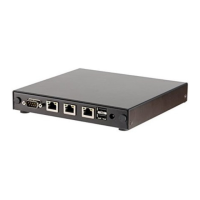

 To Next Page
