18
Configuring and Using the VPN Functionality
By default, the B3075 will only forward BACnet/IP messages. However, there are situations in which it is
desirable to permit client devices connected to the Customer network to communicate with devices
connected to the Private network using a different network protocol, such as HTTPS. When this is
functionality is needed, the B3075 may be configured to allow the use of OpenVPN community edition
client software on a PC that is connected to the Customer network. TAP mode is used, allowing the use of
both IP-based and non-IP protocols.
Note: Consult with your customer’s IT department before enabling the B3075’s VPN functionality.
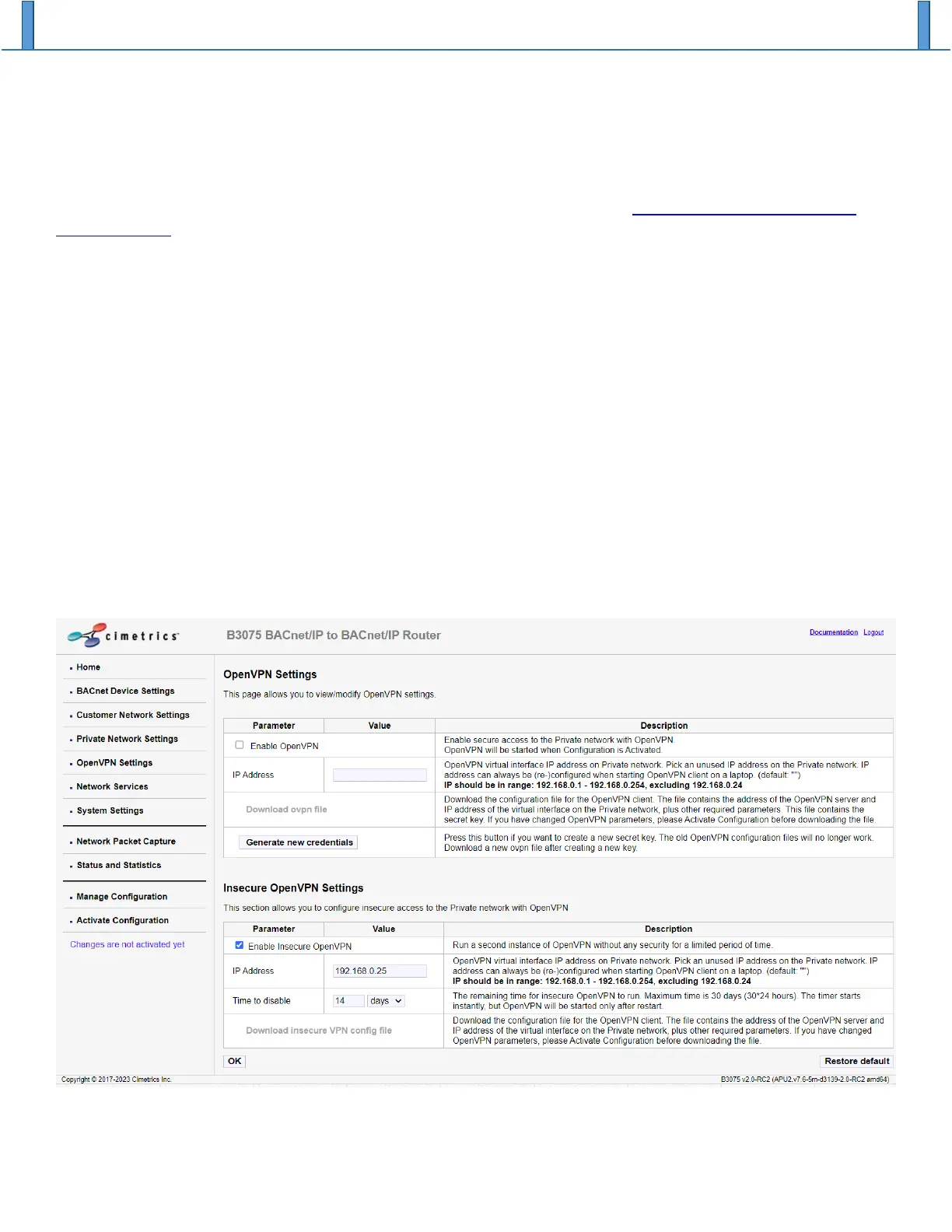
To configure the B3075’s VPN server functionality, login as admin then navigate to the OpenVPN Settings
web page. You can choose from two modes of VPN operation:
1. “Insecure OpenVPN” mode: The VPN client configuration file can be freely downloaded from the
B3075’s login web page. The VPN will be automatically disabled after a certain period
(configurable by the admin user). We sometimes refer to this as “construction mode” because it is
particularly useful while the automation system is being configured and commissioned.
2. “OpenVPN” mode: The VPN client configuration file can only be downloaded by the admin user.
There is no time limit in this mode.
Both modes may be used simultaneously, with a limit of one active client per mode. In both modes, the
B3075’s built-in VPN server is present on the Customer port. For each mode, select an unused IP address
on the Private network for use by the VPN’s virtual interface.


 To Next Page