4
B3075 Functionality Overview
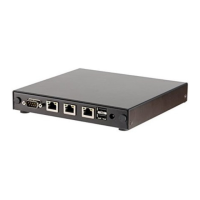
The B3075 is a BACnet/IP to BACnet/IP router with two distinct Ethernet ports for BACnet/IP
communication. In this document we refer to those two ports as the “Customer port” and the “Private
port”. Also, the B3075 has a third physical Ethernet port that is dedicated to local B3075 configuration,
and that port is referred to as the “Configuration port” in this document.
The B3075 also has several features that supplement the core BACnet routing functionality. These
features are summarized below, and there is additional information later in this document.
Additional BACnet Functionality
The B3075 is a BACnet Device, as defined in the BACnet Standard. The Device Object instance number
(a.k.a. “Device ID”) and the Device Object name (a.k.a. “Device Name”) are configurable.
The B3075 can be configured to be a BBMD on the Customer port, with optional support for Foreign
Devices.
BACnet packet capture is also supported on both BACnet/IP interfaces, and the packet capture files
created by the B3075 can be imported into software tools such as Wireshark. This feature is disabled by
default, but it can be enabled by the administrator.
Non-BACnet Functionality
The B3075 includes functionality that is designed to make it easier to manage, monitor, and secure the
B3075, including the following:
1. An internal syslog client can forward logged events to an external syslog server.
2. An internal NTP client can retrieve the current date and time from an external NTP server.
3. An internal DHCP client can configure the IP address, network mask, default gateway address, and
the DNS server’s IP address used by the Customer port.
4. One or two OpenVPN virtual NICs can be enabled at IP addresses in the IP subnet connected to the
Private port, permitting non-BACnet communication through the B3075 to devices connected to the
Private network. OpenVPN Community Edition client software is required.
5. The factory default private key and operational certificate used by the built-in web server can be
replaced.
Note that this additional functionality is optional. It can be enabled by the administrator using the
B3075’s web-based configuration interface.


 To Next Page