How To Find IP Address
Quick Steps
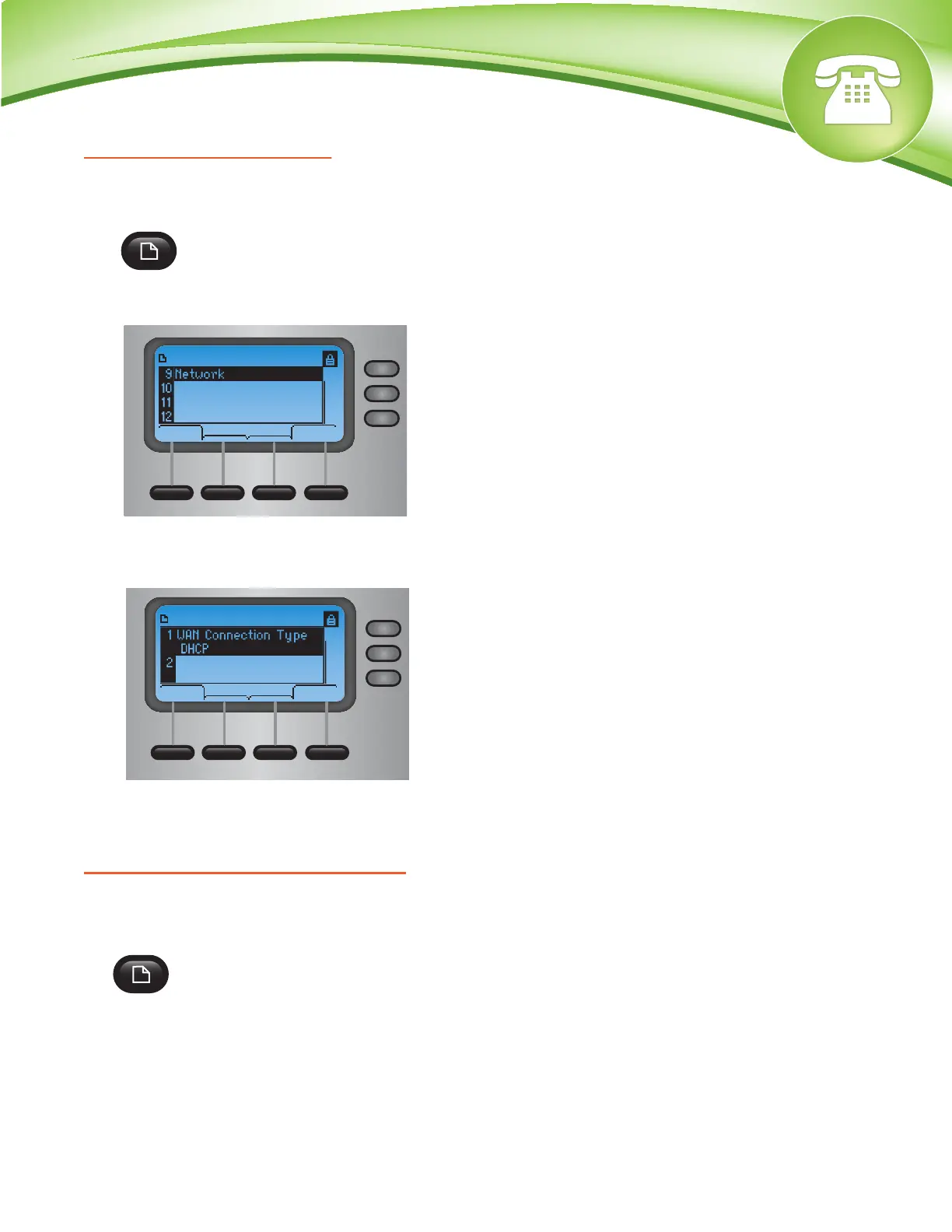
1. On the phone select the Configuration button.
2. Scroll to option number 9, Network and press Select.
3. Scroll down and you will see the IP Address
How To Find The MAC Address
Quick Steps
1. On the phone select the Configuration button.
© Copyright Schmooze Com, 2012
2. Scroll to option number 9, Network and press Select.
3. Scroll down and you will see the MAC Address
How To Set The Configuration Server
Quick Steps
1. Find the IP Address of the Phone and open a web browser to the IP address of the phone.
2. Login with the phone user password.
3. Click on the Admin option at the top and login with the admin user
4. Click on the Advanced option at the top right corner.
5. Click on Provisioning tab at the top
6. Define the Profile Rule to your PBX. Generally this would be tftp://IPADDRESS/spa$MA.xml
such as tftp://10.10.0.1/spa$MA.xml in our example and press the Save button at the bottom.
select
cancel
Product Info
Setup
Status
Reboot
select
cancel
Network
Current IP
10.XX.X.XX
How To Factory Default
Quick Steps
1. On the phone select the Configuration button.
2. Next scroll to option 14 Factory Reset and click Select. The phone will now ask you to confirm
your selection and then it will reboot.


 To Next Page