3-5
Cisco 7206 Installation and Configuration Guide
OL-5102-02
Chapter 3 Installing the Cisco 7206
Rack-Mounting the Cisco 7206
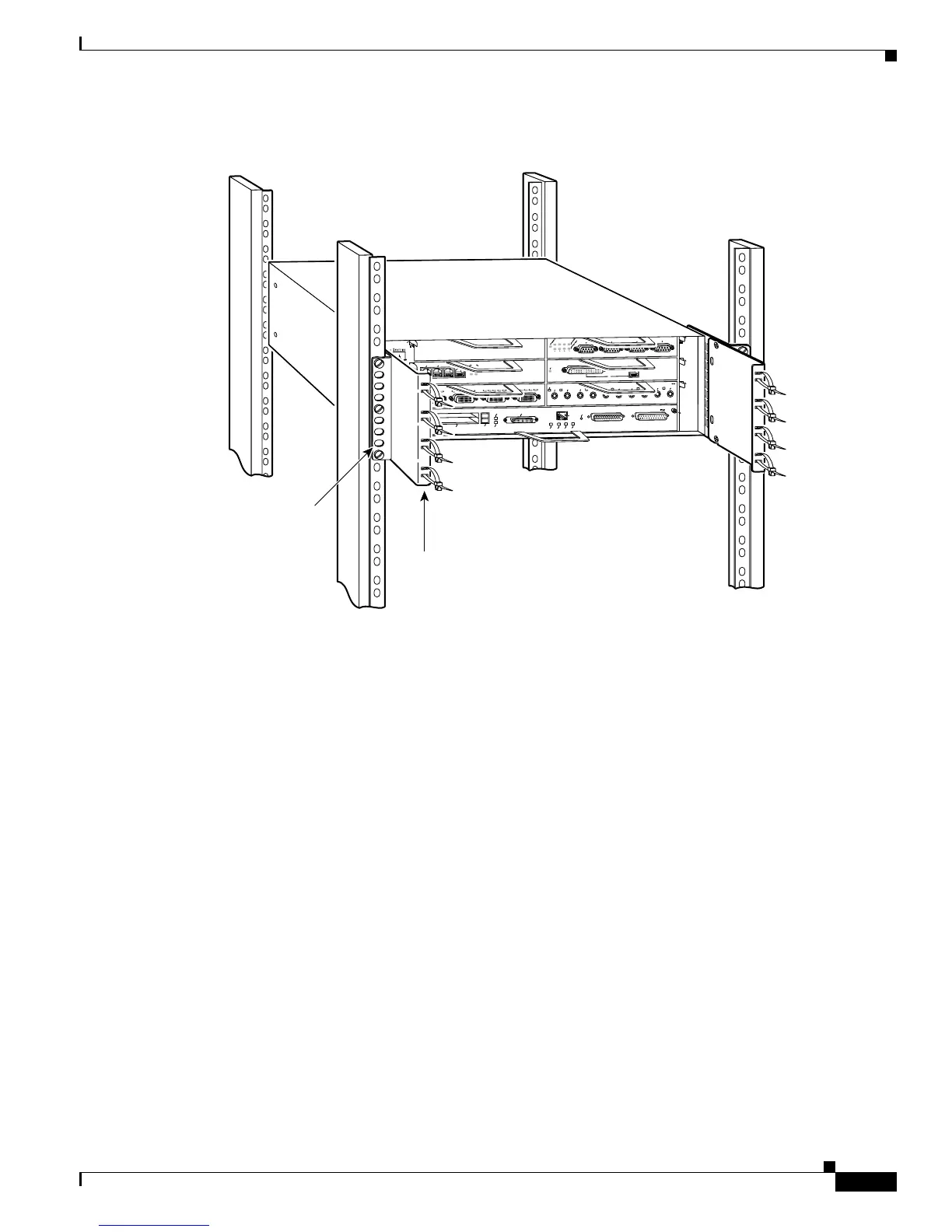
Figure 3-5 Rack-Mounting the Chassis in a Four-Post Rack with Installed Cable-Management
Brackets—Front Installation Shown
If you are rack-mounting a Cisco 7206 router from the rear, the rack-mount brackets are installed at the
rear of the chassis, and the cable-management brackets are installed at the front of the chassis. You must
install both sets of brackets before you install the chassis in the rack.
Attaching the Chassis Rack-Mount and Cable-Management Brackets
This section explains how to install the rack-mount and cable-management brackets at the front and the
rear of the Cisco 7206. Before installing the chassis in the rack, you must install a rack-mount bracket
on each side of the front or rear of the chassis. If you are rack-mounting the chassis from the front and
you plan to use the cable-management brackets, you must install the cable-management brackets when
you install the rack-mount brackets on the chassis.
If you are rack-mounting the chassis from the rear, you may install the rack-mount and
cable-management brackets separately; however, both sets of brackets must be installed on the chassis
before the chassis is installed in the rack.
The parts and tools required for installing the rack-mount and cable-management brackets are listed in
Chapter 2, “Preparing for Installation,” the “Tools for Installation” section on page 2-8.
4
6
F
A
S
T
S
E
R
I
A
L
E
N
T
D
T
C
R
D
R
C
L
B
C
D
T
D
T
C
R
D
R
C
L
B
C
D
T
D
T
C
R
D
R
C
L
B
C
D
T
D
T
C
R
D
R
C
L
B
C
D
E
T
H
E
R
N
E
T
-1
0
B
F
L
E
N
R
X
0
1
2
3
4
T
X
R
X
T
X
R
X
T
X
R
X
T
X
R
X
T
X
T
O
K
E
N
R
I
N
G
0
1
2
3
E
T
H
E
R
N
E
T
1
0
B
T
E
N
A
B
L
E
D
0
2
1
3
L
I
N
K
0
1
2
3
ENABLED
MII
LINK
RJ45
F
A
S
T
E
T
H
E
R
N
E
T
0
3
5
1
2
0
Cisco 7200
Series
H9452
M
I
I
E
N
R
J
4
5
E
N
R
J
4
5
L
I
N
K
1
O
P
W
R
O
K
RJ-45
CPU
RESET
FAST ETHERNET INPUT/OUTPUT CONTROLLER
ENABLED
PCMCIA
EJECT
SLOT 0
SLOT 1
FE MII
Rack-mount
bracket
Cable-management bracket



 To Next Page
 Loading...