Do one of the following actions:
• If the server software and firmware are already at the required minimum version as shown in the preceding
table, replace the CPUs by using the procedure in the following section.
• If the server software or firmware is not at the required minimum version, follow the instructions in the
Cisco UCS B200 M4 Server Upgrade Guide for E5-2600 v4 Series CPUs to upgrade it. Then replace
the CPUs by using the procedure in the following section.
Removing a Heat Sink and CPU
Procedure
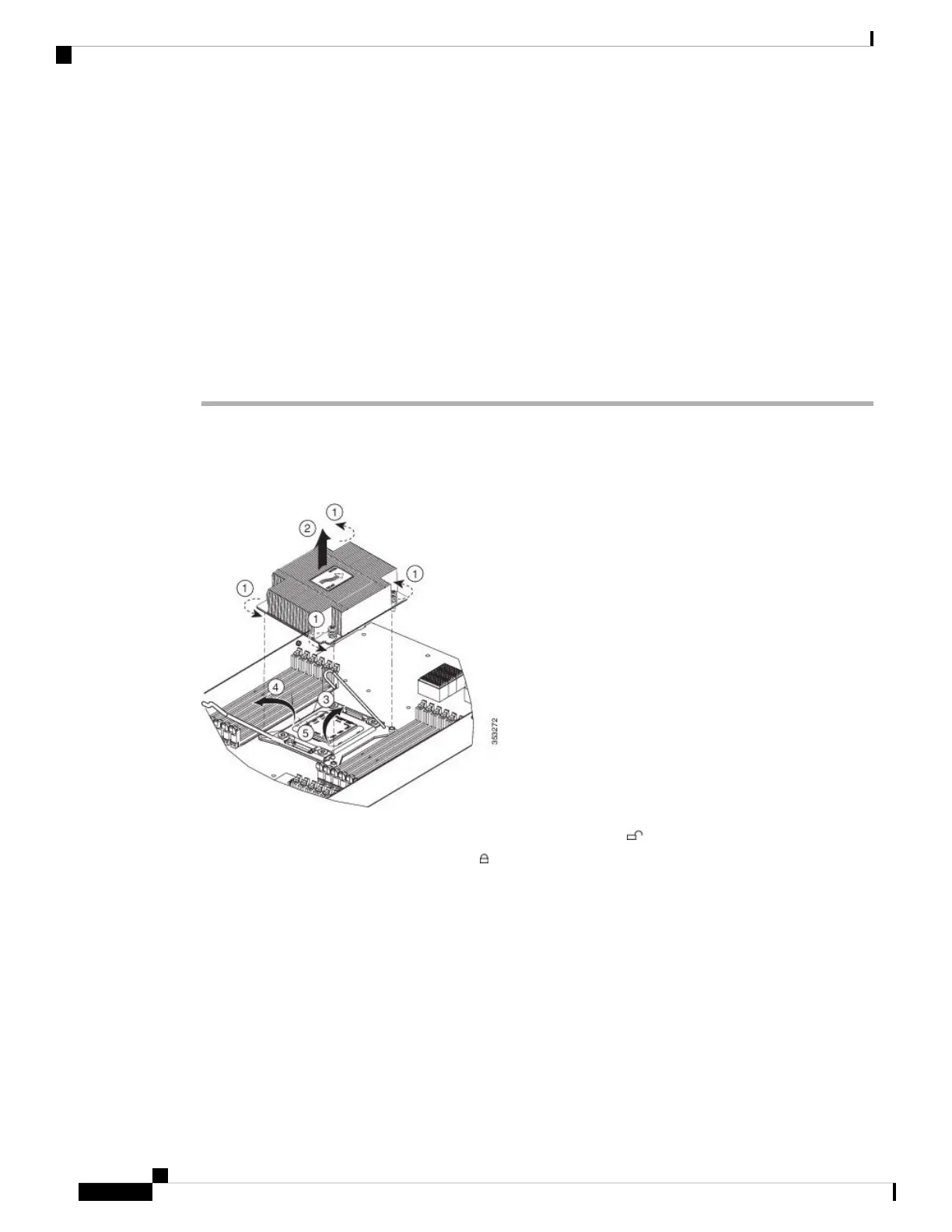
Step 1 Unscrew the four captive screws.
Step 2 Remove the heat sink.
Figure 7: Removing the Heat Sink and CPU
Step 3 Unhook the self-loading socket (SLS) lever that has the unlock icon .
Step 4 Unhook the SLS lever that has the lock icon .
Step 5 Grasp the sides of the CPU carrier (indicated by the arrows in the illustration) and swing it into a standing
position in the SLS plug seat.
Servicing a Blade Server
10
Servicing a Blade Server
Removing a Heat Sink and CPU


 To Next Page
 Loading...