41
Section 3. Know Your Lift Truck
Data Plate
Data Plate
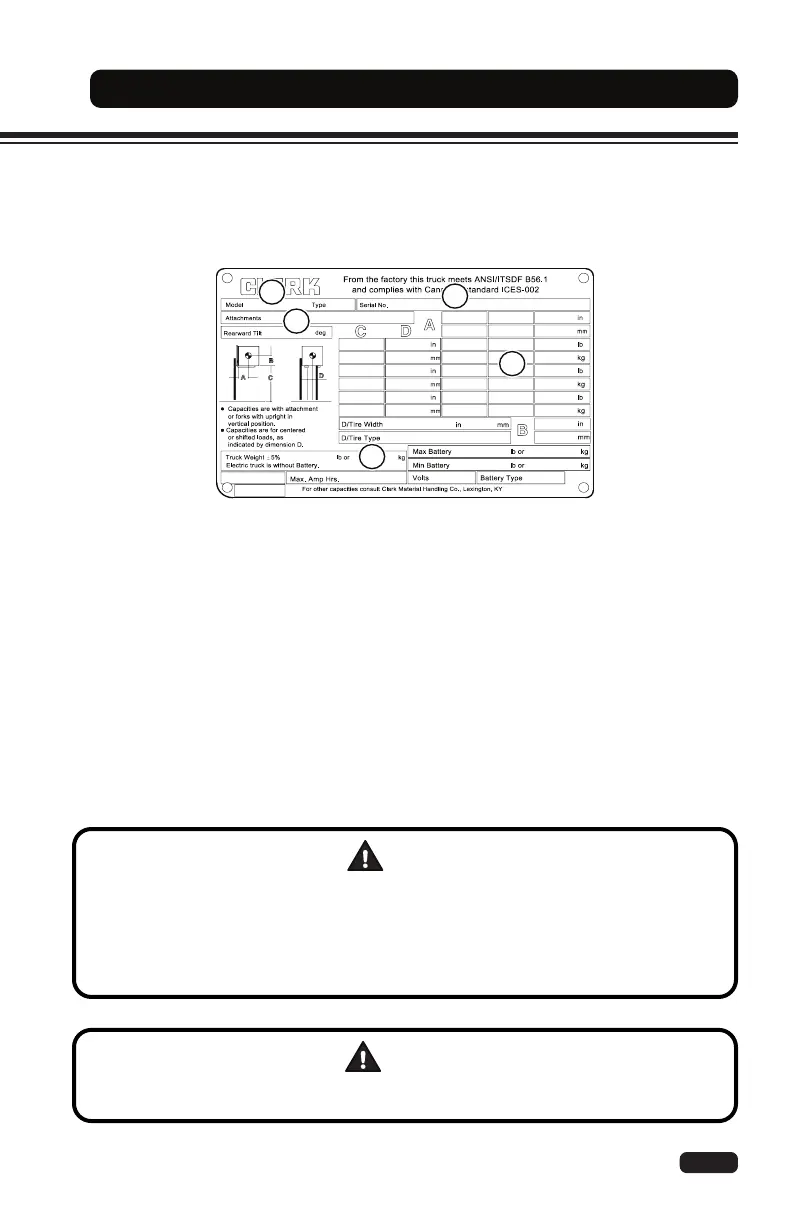
The data plate contains important information about the specications and lifting capacity of
your lift truck. If it is missing or damaged, remove the lift truck from service and contact your
authorized CLARK dealer for a replacement.
Data Plate
CAUTION
By law, all modications aecting capacity or safety must be approved by the
manufacturer before changes to the lift truck can be made.
A new data plate is required whenever modications are made to the lift truck that may
aect capacity, such as adding an attachment. Contact your authorized CLARK dealer for
an updated data and capacity plate showing the correct capacity.
WARNING
Lift truck capacity DOES NOT increase if the load center is less than what is shown on
your data plate. DO NOT exceed the maximum capacity!
(1) Model and Type: Identies the model and type of lift truck. Certain types of lift trucks are
not permitted in areas that contain re hazards - watch for marked areas.
(2) Serial Number: A unique identication number assigned to your lift truck. It is also
stamped on the frame of your lift truck. Use this number when requesting service information
or ordering replacement parts to ensure accuracy.
(3) Attachments: Lists the current attachment(s) installed on the lift truck. The operator must
make sure this matches with what is actually installed on the lift truck.
(4) Capacity: Shows the maximum lifting capacity of the lift truck with respect to the load
center and the fork height.
(5) Weight: The unloaded weight of the lift truck. It does not include the weight of the battery.
Always use the total (loaded) weight of the lift truck when operating on elevators, dock boards,
or oors with a limited capacity.


 To Next Page