EasyManua.ls Logo

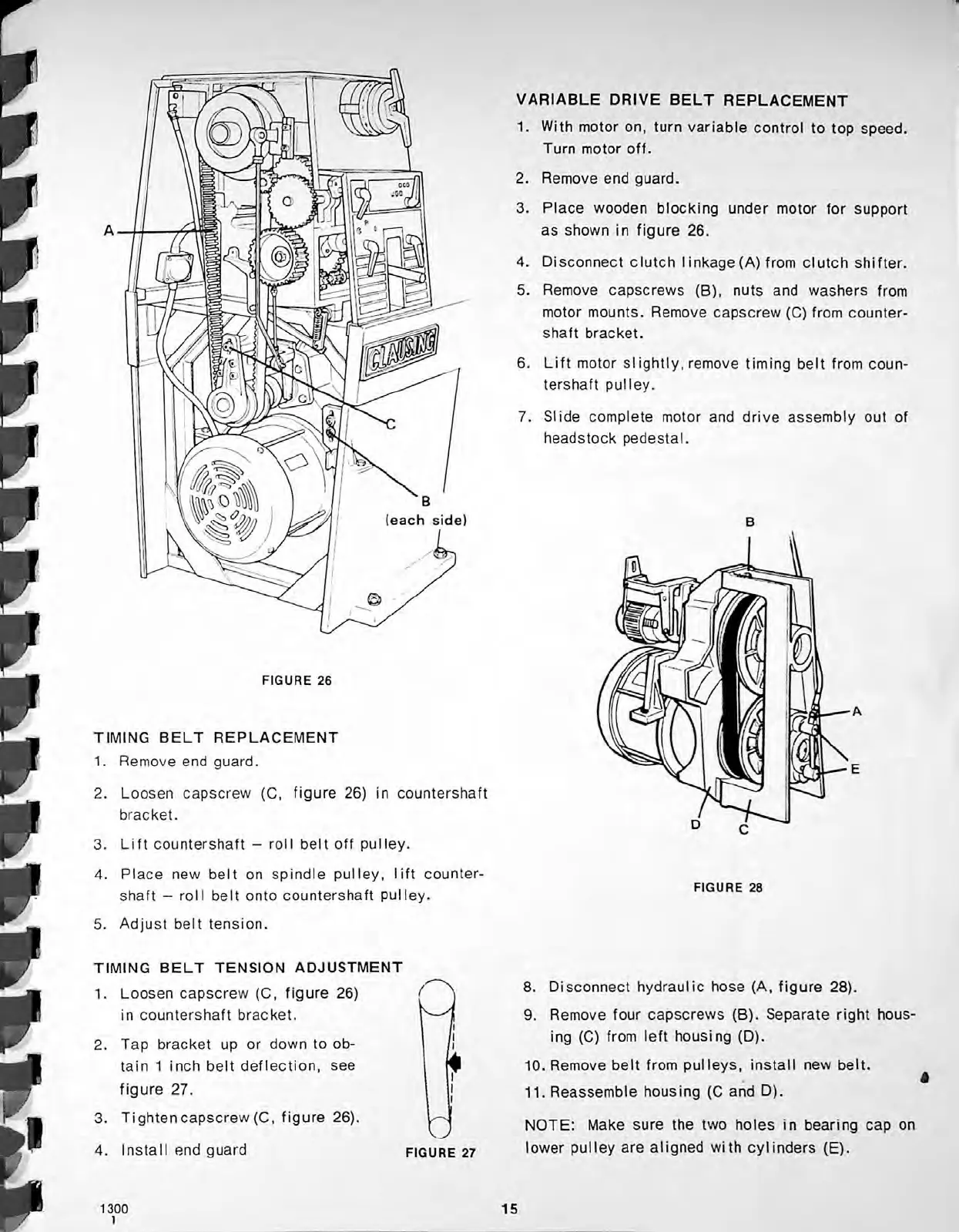
CLAUSING 1300 Series - Timing Belt Replacement; Timing Belt Tension Adjustment; Variable Drive Belt Replacement

Default Icon
36 pages
Print Icon
To Next Page IconTo Next Page
To Previous Page IconTo Previous Page
Loading...
VARIABLE
DRIVE
BELT
REPLACEMENT
1.
With
motor
on,
turn
variable
control
to
top
speed.
Turn
motor
off.
2.
Remove
end
guard.
3.
Place
wooden
blocking
under
motor
for
support
as
shown
in
figure
26.
4.
Disconnect
clutch
I
inkage
(A)
from
clutch
shifter.
5.
Remove
capscrews
(B),
nuts
and
washers
from
motor
mounts.
Remove
capscrew
(C)
from
counter
shaft
bracket.
A
6.
Lift
motor
siightly,
remove
timing
belt
from
coun
tershaft
pulley.
7.
Slide
complete
motor
and
drive
assembly
out
of
headstock
pedestal.
(each
side)
FIGURE
26
TIMING
BELT
REPLACEMENT
1.
Remove
end
guard.
2.
Loosen
capscrew
(C,
figure
26)
in
countershaft
bracket.
3.
Lift
countershaft
-
roll
belt
off
pulley.
4.
Place
new
belt
on
spindle
pulley,
lift
counter
shaft
-
roll
belt
onto
countershaft
pulley.
5.
Adjust
belt
tension.
FIGURE
28
TIMING
BELT
TENSION
ADJUSTMENT
1.
Loosen
capscrew
(C,
figure
26)
in
countershaft
bracket.
8.
Disconnect
hydraulic
hose
(A,
figure
28).
9.
Remove
four
capscrews
(B).
Separate
right
hous
ing
(C)
from
left
housing
(D).
10.
Remove
belt
from
pulleys,
install
new
belt.
11.
Reassemble
housing
(C
and
D).
(
!i
i
2.
Tap
bracket
up
or
down
to
ob
tain
1
inch
belt
deflection,
see
figure
27.
3.
Tightencapscrew(C,
figure
26).
4.
Install
end
guard
*
i
i
a
NOTE:
Make
sure
the
two
holes
in
bearing
cap
on
lower
pulley
are
aligned
with
cylinders
(E).
FIGURE
27
15
1300
1

Related product manuals